web
You’re offline. This is a read only version of the page.
close
Skip to main content
Community site session details

Community site session details

Session Id :

Setup SQL Server Backups for Business Central On-Premise

Olister Rumao Profile Picture Olister Rumao 3,967

Introduction:

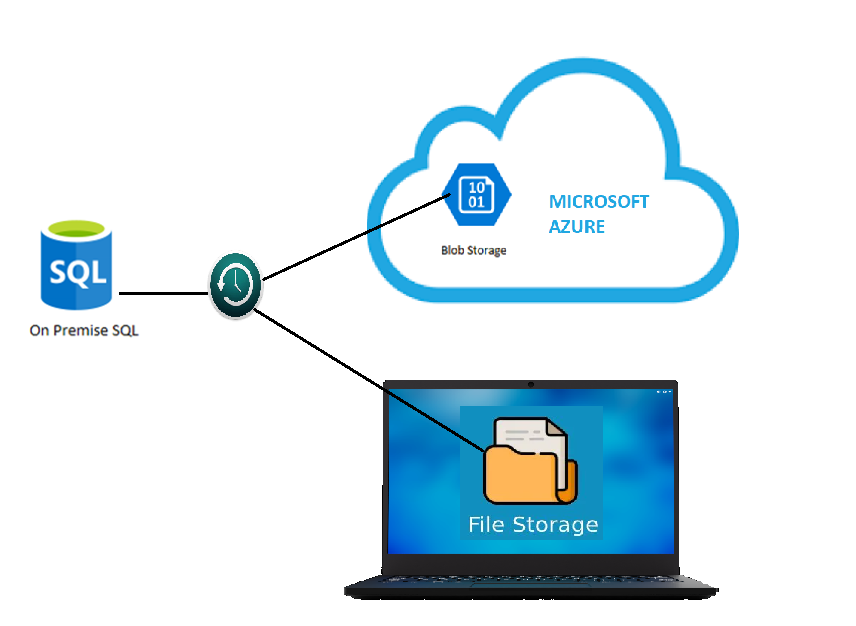
After having a successful implementation of Business Central On-Premise for the client's environment, it is necessary to automate administrative tasks such as Database Backups and restoration policies to Ensure Business Continuity and Disaster Recovery.
Pre-requisites:

  • Understanding of SQL Backups
    -Full Backups: https://www.mssqltips.com/sqlservertutorial/7/sql-server-full-backups/
    - Differential Backups:https://www.mssqltips.com/sqlservertutorial/9/sql-server-differential-backups/
    - Transactional Backups: https://www.mssqltips.com/sqlservertutorial/8/sql-server-transaction-log-backups/
  • Understanding of PowerShell

Demonstration:
In this blog, it is necessary that you understand the different backup types. Just to give a hint below is a one-line explanation.
i. Full Backups:
Takes a full backup of DB
ii. Differential Backups: After the full backup takes the change in data is added to the differential backup
iii. Transactional Backup: After the last backup, the transactional difference is being backed up. Ideally used for point-in-time backup.

1. Setting Up SQL Backup using Azure Blob Storage:
Once I log in to my SQL Server using SSMS, Goto System Databases > master > Programmability > Stored Procedures, right-click on Stored Procedure and create Stored Procedure and copy the source code below and save it with name.

Code to Backup SQL to Azure Blob storage:

 1
2
3
4
5
6
7
8
9
10
11
12
13
14
15
16
17
18
19
20
21
22
23
24
25
26
27
28
29
30
31
32
33
34
35
36
37
38
39
40
41
42
43
44
45
46
47
48
49
50
51
52
53
54
55
56
57
58
59
60
61
62
63
64
65
66
67
68
69
70
71
72
73
74
75
76
77
78
79
80
81
82
83
84
85
86
87
88
89
90
91
92
93
94
USE [master] 
GO /****** Object: StoredProcedure [dbo].[sp_Backup_Db_AzureBlob] Script Date: 03-05-21 1:37:23 PM ******/
SET
ANSI_NULLS
ON
GO
SET
QUOTED_IDENTIFIER
ON
GO --EXEC sp_Backup_Db_AzureBlob 'LS','F'
ALTER PROCEDURE [dbo].[sp_Backup_Db_AzureBlob] ( @databaseName sysname = null, @backupType CHAR(1) ) AS
BEGIN
SET
NOCOUNT
ON;
DECLARE @DBs TABLE ( ID int IDENTITY PRIMARY KEY, DBNAME nvarchar(500) ) -- Pick out only databases which are online in case ALL databases are chosen to be backed up
-- If specific database is chosen to be backed up only pick that out from @DBs
INSERT INTO
@DBs (DBNAME)
SELECT
Name
FROM
master.sys.databases
where
state = 0
AND name = ISNULL(@DatabaseName , name)
ORDER BY
Name -- Declare variables
DECLARE @BlobURL varchar(1000) = 'YOUR AZURE STORAGE'
DECLARE @BackupName varchar(100)
DECLARE @BackupFile varchar(100)
DECLARE @DBNAME varchar(300)
DECLARE @sqlCommand NVARCHAR(1000)
DECLARE @dateTime NVARCHAR(20)
DECLARE @Loop int -- Loop through the databases one by one
SELECT
@Loop = min(ID)
FROM
@DBs WHILE @Loop IS NOT NULL
BEGIN
-- Database Names have to be in [dbname] format since some have - or _ in their name
SET
@DBNAME = '[' + (
SELECT
DBNAME
FROM
@DBs
WHERE
ID = @Loop) + ']' -- Set the current date and time n yyyyhhmmss format
SET
@dateTime = REPLACE(CONVERT(VARCHAR, GETDATE(), 101), '/', '') + '_' + REPLACE(CONVERT(VARCHAR, GETDATE(), 108), ':', '') -- Create backup filename in path\filename.extension format for full,diff and log backups
IF @backupType = 'F'
SET
@BackupFile = REPLACE(REPLACE(@DBNAME, '[', ''), ']', '') + '_FULL_' + @dateTime + '.BAK'
ELSE
IF @backupType = 'D'
SET
@BackupFile = REPLACE(REPLACE(@DBNAME, '[', ''), ']', '') + '_DIFF_' + @dateTime + '.BAK'
ELSE
IF @backupType = 'L'
SET
@BackupFile = REPLACE(REPLACE(@DBNAME, '[', ''), ']', '') + '_LOG_' + @dateTime + '.TRN' -- Provide the backup a name for storing in the media
IF @backupType = 'F'
SET
@BackupName = REPLACE(REPLACE(@DBNAME, '[', ''), ']', '') + ' full backup for ' + @dateTime IF @backupType = 'D'
SET
@BackupName = REPLACE(REPLACE(@DBNAME, '[', ''), ']', '') + ' differential backup for ' + @dateTime IF @backupType = 'L'
SET
@BackupName = REPLACE(REPLACE(@DBNAME, '[', ''), ']', '') + ' log backup for ' + @dateTime -- Generate the dynamic SQL command to be executed
IF @backupType = 'F'
BEGIN
SET
@sqlCommand = 'BACKUP DATABASE ' + @DBNAME + ' TO URL = ''' + @BlobURL + '' + @BackupFile + ''' WITH NOINIT,NAME= ''' + @BackupName + ''', NOSKIP, NOREWIND, NOUNLOAD, STATS = 10'
END
IF @backupType = 'D'
BEGIN
SET
@sqlCommand = 'BACKUP DATABASE ' + @DBNAME + ' TO URL = ''' + @BlobURL + '' + @BackupFile + ''' WITH DIFFERENTIAL,NAME= ''' + @BackupName + ''', NOSKIP, NOFORMAT'
END
IF @backupType = 'L'
BEGIN
SET
@sqlCommand = 'BACKUP LOG ' + @DBNAME + ' TO URL = ''' + @BlobURL + '' + @BackupFile + ''' WITH INIT,NAME= ''' + @BackupName + ''', NOSKIP, NOFORMAT'
END
-- Execute the generated SQL command
EXEC(@sqlCommand) PRINT @sqlCommand PRINT @DBNAME -- Goto the next database
SELECT
@Loop = min(ID)
FROM
@DBs
where
ID > @Loop
END
END

Note: For Azure Blob storage, you also need to link your Azure Account in SSMS.

2. Setting Up SQL Backup using Local Storage:
Once I log in to my SQL Server using SSMS, Goto System Databases > master > Programmability > Stored Procedures, right-click on Stored Procedure and create Stored Procedure and copy the source code below and save it with name.

Code to Backup SQL DB to Disk File: 

 1
2
3
4
5
6
7
8
9
10
11
12
13
14
15
16
17
18
19
20
21
22
23
24
25
26
27
28
29
30
31
32
33
34
35
36
37
38
39
40
41
42
43
44
45
46
47
48
49
50
51
52
53
54
55
56
57
58
59
60
61
62
63
64
65
66
67
68
69
70
71
72
73
74
75
76
77
78
USE [master]
GO
/****** Object: StoredProcedure [dbo].[sp_BackupDatabases_ToDisk] Script Date: 03-05-21 1:32:08 PM ******/
SET ANSI_NULLS ON
GO
SET QUOTED_IDENTIFIER ON
GO
ALTER procedure [dbo].[sp_BackupDatabases_ToDisk]
(
@databaseName sysname = null,
@backupType CHAR(1),
@backupLocation nvarchar(200)
)
AS
BEGIN
SET NOCOUNT ON;
DECLARE @DBs TABLE
(
ID int IDENTITY PRIMARY KEY,
DBNAME nvarchar(500)
)
-- Pick out only databases which are online in case ALL databases are chosen to be backed up
-- If specific database is chosen to be backed up only pick that out from @DBs
INSERT INTO @DBs (DBNAME)
SELECT Name FROM master.sys.databases
where state=0
AND name= ISNULL(@DatabaseName ,name)
ORDER BY Name
-- Declare variables
DECLARE @BackupName varchar(100)
DECLARE @BackupFile varchar(100)
DECLARE @DBNAME varchar(300)
DECLARE @sqlCommand NVARCHAR(1000)
DECLARE @dateTime NVARCHAR(20)
DECLARE @Loop int
-- Loop through the databases one by one
SELECT @Loop = min(ID) FROM @DBs
WHILE @Loop IS NOT NULL
BEGIN
-- Database Names have to be in [dbname] format since some have - or _ in their name
SET @DBNAME = '['+(SELECT DBNAME FROM @DBs WHERE ID = @Loop)+']'
-- Set the current date and time n yyyyhhmmss format
SET @dateTime = REPLACE(CONVERT(VARCHAR, GETDATE(),101),'/','') + '_' + REPLACE(CONVERT(VARCHAR, GETDATE(),108),':','')
-- Create backup filename in path\filename.extension format for full,diff and log backups
IF @backupType = 'F'
SET @BackupFile = @backupLocation+REPLACE(REPLACE(@DBNAME, '[',''),']','')+ '_FULL_'+ @dateTime+ '.BAK'
ELSE IF @backupType = 'D'
SET @BackupFile = @backupLocation+REPLACE(REPLACE(@DBNAME, '[',''),']','')+ '_DIFF_'+ @dateTime+ '.BAK'
ELSE IF @backupType = 'L'
SET @BackupFile = @backupLocation+REPLACE(REPLACE(@DBNAME, '[',''),']','')+ '_LOG_'+ @dateTime+ '.TRN'
-- Provide the backup a name for storing in the media
IF @backupType = 'F'
SET @BackupName = REPLACE(REPLACE(@DBNAME,'[',''),']','') +' full backup for '+ @dateTime
IF @backupType = 'D'
SET @BackupName = REPLACE(REPLACE(@DBNAME,'[',''),']','') +' differential backup for '+ @dateTime
IF @backupType = 'L'
SET @BackupName = REPLACE(REPLACE(@DBNAME,'[',''),']','') +' log backup for '+ @dateTime
-- Generate the dynamic SQL command to be executed
IF @backupType = 'F'
BEGIN
SET @sqlCommand = 'BACKUP DATABASE ' +@DBNAME+ ' TO DISK = '''+@BackupFile+ ''' WITH INIT, NAME= ''' +@BackupName+''', NOSKIP, NOFORMAT, STATS = 10'
END
IF @backupType = 'D'
BEGIN
SET @sqlCommand = 'BACKUP DATABASE ' +@DBNAME+ ' TO DISK = '''+@BackupFile+ ''' WITH DIFFERENTIAL, INIT, NAME= ''' +@BackupName+''', NOSKIP, NOFORMAT'
END
IF @backupType = 'L'
BEGIN
SET @sqlCommand = 'BACKUP LOG ' +@DBNAME+ ' TO DISK = '''+@BackupFile+ ''' WITH INIT, NAME= ''' +@BackupName+''', NOSKIP, NOFORMAT'
END
-- Execute the generated SQL command
EXEC(@sqlCommand)
PRINT @BackupFile
PRINT @DBNAME
-- Goto the next database
SELECT @Loop = min(ID) FROM @DBs where ID>@Loop
END
END


3. Creating CMD Script to call SQL Stored Procedure:
There are six different CMD scripts for Azure Blob storage, Disk storage, and types of Backup.
Each of these scripts will be stored in a .bat(BATCH) files

Azure Storage Backup:
  • Full backup:
    sqlcmd -S BC\BCDEMO -E -Q "EXEC sp_Backup_Db_AzureBlob @databaseName='LS', @backupType='F'"

  • Differential backup:
    sqlcmd -S BC\BCDEMO -E -Q "EXEC sp_Backup_Db_AzureBlob @databaseName='LS', @backupType='D'"

  • Transactional backup:
    sqlcmd -S BC\BCDEMO -E -Q "EXEC sp_Backup_Db_AzureBlob @databaseName='LS', @backupType='L'"
Disk Backup:
  • Full backup:
    sqlcmd -S BC\BCDEMO -E -Q "EXEC sp_BackupDatabases_ToDisk @databaseName='LS', @backupType='F', @backupLocation='C:\DB BACKUP\'"

  • Differential backup:
    sqlcmd -S BC\BCDEMO -E -Q "EXEC sp_BackupDatabases_ToDisk @databaseName='LS', @backupType='D', @backupLocation='C:\DB BACKUP\'"

  • Transactional backup:
    sqlcmd -S BC\BCDEMO -E -Q "EXEC sp_BackupDatabases_ToDisk @databaseName='LS', @backupType='L', @backupLocation='C:\DB BACKUP\'"

4. Scheduling the CMD batch file to run backups recurringly:
In this case, Full Backup is scheduled once every day, Differential Backup runs every 2 hours and Transactional Backup runs every 10mins.
Below is the task scheduler created to trigger each of the scripts that we created in Step 3.
Task created in Task Scheduler


Action call for the .bat files

Conclusion:

I hope this blog helps you set up the SQL Backup policies. It is recommended that either Step 1 or Step 2 is performed to save resources. Although for additional security you can opt for both.
Also storing these backups can take up a lot of disk space, hence it is advisable to setup disk cleanup policies.
Feel free to comment if there are any doubts. Cheers


This was originally posted here.

Comments

*This post is locked for comments
