




 393
393 Like
Like Share
Share
 Report
Hello folks, While working a few days back with the business the event in one of the virtual machine of dynamics 365 connection operations I had encountered an Issue and I'm sure most of you have had this kind of issue before with your business event system.
My business event was simple and straight – Using OOB business event when someone posts the customer payment, I need to get the email trigger. That’s all!!
But when I activated the specific business event, supplying power automate artifacts(GUID), and upon posting the AR payment – I received an error – “The underlying connection was closed: An unexpected error occurred on a send.”

We all know it must be something to do with .Net version or sometimes few protocols/certificate issues. And we write the below piece of code to get rid of the error:
| ServicePointManager.SecurityProtocol = SecurityProtocolType.Tls12 | SecurityProtocolType.Tls11; |
However, we CAN’T write this line in our situation here. So, what NEXT!
Below is what I did to Resolvein my VM (*I know it's not great to use the Regedit – and you may loose your application if you mistype/incorrect entries.)
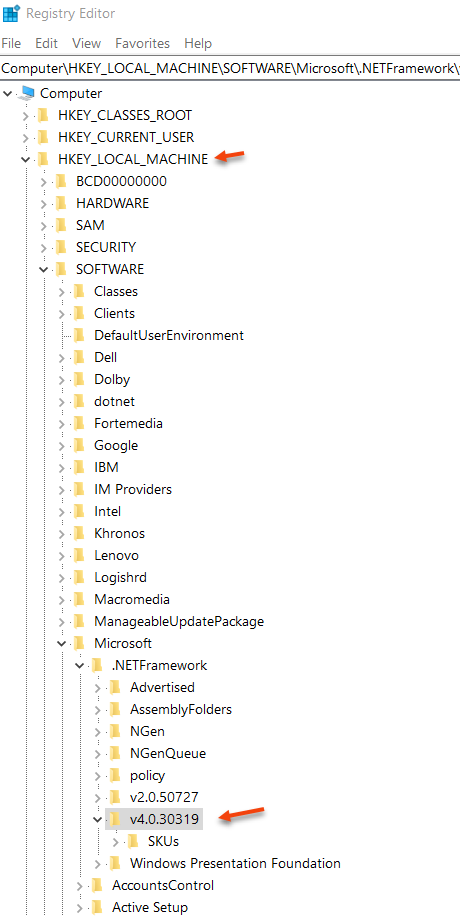
Set the SchUseStrongCrypto registry key as follows, save below code to forceTLS1.2.reg and run it:
| Windows Registry Editor Version 5.00 (WIN+R – RegEdit) |
| [HKEY_LOCAL_MACHINE\SOFTWARE\Microsoft\.NETFramework\v4.0.30319] "SchUseStrongCrypto"=dword:00000001 [HKEY_LOCAL_MACHINE\SOFTWARE\Wow6432Node\Microsoft\.NETFramework\v4.0.30319] "SchUseStrongCrypto"=dword:00000001 |
Good Day!
*This post is locked for comments