web
You’re offline. This is a read only version of the page.
close
Skip to main content

Announcements

News and Announcements icon
Community site session details

Community site session details

Session Id :
Microsoft Dynamics CRM (Archived)

"Search Inactive Contacts (or Accounts)" - Broken?

(0) ShareShare
ReportReport
Posted on by 519

 Hey Everyone,

 In a bit of a quandary here and fight with Microsoft Tech Support over this particular item.

 Setup – CRM 2011 hosted via Microsoft

 When using the default “Inactive Contacts” thru CRM via the Outlook Add In and attempting to utilize the “Search Inactive Contacts” feature, I get results from the Active Contacts!!

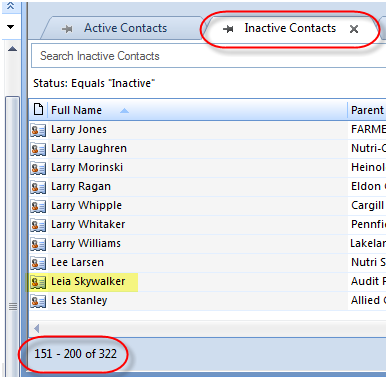
 For testing purposes, I created, then made Inactive a contact, Leia Skywalker and she does appear in the default “Inactive Contacts” tab, as 1 of 322 total Inactive Contacts -
0815.P3.png

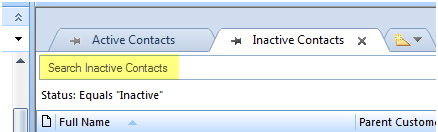
However…  When I use the “Search Inactive Contacts” feature –
3644.P4.png

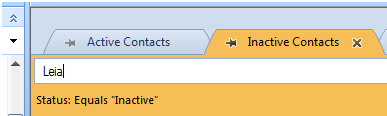
And insert her first name –

2620.p5.png

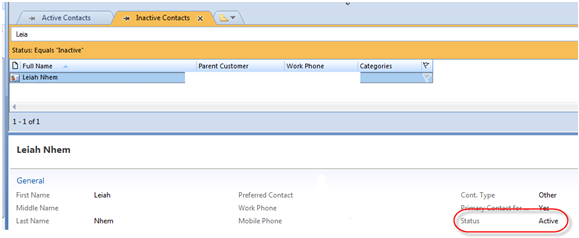
Then proceed with the lookup, I get a contact who is an Active contact!! –
0624.p6.png

And the Inactive Contact of Leia Skywalker doesn’t show at all!!

 The only way that I can get Leia Skywalker to appear when on the Inactive Contacts tab is to filter on “Full Name” begins with “Leia” and then she appears.
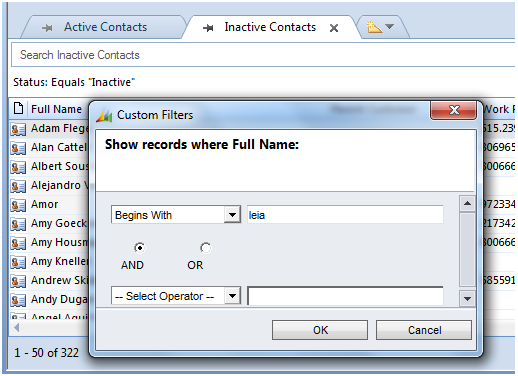
And subsequent result –
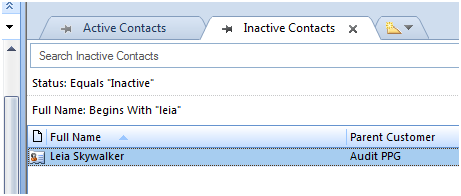
So seriously, what’s the purpose of “Search Inactive Contacts” if it doesn’t work as it should??  Or am I asking too much of the system to do as it’s supposed to do??

 Thoughts/advice on this topic would be appreciated.

 Regards,

 Joe

*This post is locked for comments

I have the same question (0)
  • Feridun Kadir Profile Picture
    1,705 Most Valuable Professional on at

    The way searching in Outlook behaved changed in UR7 (I see you are hosted so you definitely have the new behaviour). Have a read of my post http://fkbase.info/node/152 and see if that helps answer your question.

  • PS Profile Picture
    23,577 on at

    Hi joe,

    The behavior for search in CRM is like this only, you can search only active contacts.

    If you try to search an inactive contact with name somehow matching (first 3 or last 3 characters etc) to active contacts, the search result will display only active contacts. They have provided a search box for inactive records but it doesn't work, actually there is no provision for it.

    You are not demanding too much; you might get a solution in upcoming roll-ups.

  • Joe Sznaza Profile Picture
    519 on at

    Hey Guys,

    Thanks for the follow ups and advice.  However, still not believing it.  As a matter of fact, it gets even MORE interesting now!!

    I'm also a CRM Admin on another Microsoft Hosted instance and the "Search Inactive Contacts" works as expected!!

    Like before, I viewed "all" of my Inactive contacts (in this case only 2 as I was testing) -

    6278.p2.png

    And also like prior, I only searched on part of the name I was looking for -

    5432.p3.png

    And wouldn't you know it - BAM!  There it shows as expected!! -

    The only thing I can think of is that in my current system with the Search not working, it is a laptop running W7 with Office 2007.  In the version where it is working, it's a system running W7, but with Office 2010.  I'm know wondering if MS released some kind of update that inadvertanly is causing an issue when a machine has Office 2007 on it?

    Curious and curious...

    Joe

  • Al Ericson Profile Picture
    240 on at

    Hi Joe,

    Thanks for posting your question.

    It certainly seems like a design issue with the searching of inactive contacts in the Outlook client. There is an investigation in progress with the development team to change the design of the search in Outlook.

    Currently when conducting a search while in a different view such as inactive contacts, the search line displays "Search Inactive Contacts". This is misleading, as you have witnessed, it doesn't search inactive contacts. Rather the search is being conducted as a quick find search no matter what view is present.

    The proposed change to the development team is to remove the label of search inactive contacts, and produce a different view when the search is completed. This way the confusion of the search criteria will be averted.

    This above explanation does not detail why the search produces the correct results when adding in the filter of the fullname. Let me explain what is occurring when you add the fullname filter and receive the results of the inactive contacts.

    The filters being applied are not for the search, but are being applied on the view. When you add in the fullname filter, it is adjusting the inactive contact view, to retrieve inactive contacts with the fullname as specified. You will notice when completing the steps of adding in the filter for the fullname of the contact, that the search icon (magnifying glass) will be present still on the search bar. If you select the icon, it will conduct the search for active contacts, and you will lose the results that were previously retrieved.

    As noted previously in a different reply that the search in Outlook has been updated to act more like the search in the web client. The search is using the criteria defined in the quick find view settings. As a test, I added the inactive status into the filter criteria of the quick find search for contacts within the customizations of CRM 2011. After reconfiguring the Outlook client, I was able to search for both active and inactive contacts using the search bar in the Outlook client.

    In short, there will be a future update that will change the labeling of the search functionality in Outlook. Currently the settings are misleading as it appears to be searching on the current view. This is not the case, rather the search is being conducted with the filter criteria of the quick find search view for that entity. Also, I noticed when adding the filters in Outlook, it appears the filters are being applied to the search. In reality the additional filters being applied are only for the view.

    The instance where the search was functioning in the manner of the context of the view on a different workstation may have been due to the update version of the Outlook client rather than the version of Office being used.

    Hope this explains the issue a little further,

    Al Ericson

  • Anne-Marie Proulx Profile Picture
    60 on at

    I must admit that I have had the same problem while testing today and we are on W7 with Office 2007.

  • Suggested answer
    PS Profile Picture
    23,577 on at

    Hi joe,

    The behavior for search in CRM is like this only, you can search only active contacts.

    If you try to search an inactive contact with name somehow matching (first 3 or last 3 characters etc) to active contacts, the search result will display only active contacts. They have provided a search box for inactive records but it doesn't work, actually there is no provision for it.

    You are not demanding too much; you might get a solution in upcoming roll-ups.

  • Chris L-T Profile Picture
    15 on at

    Hi Feridun,

    I couldn't find any of the information in your post in the release notes of UR7:

    support.microsoft.com/.../en-us

    Did I miss something or is it actually not written there?

  • Chris L-T Profile Picture
    15 on at

    Hi Prashant,

    I actually experience a different behaviour with our Outlook Client:

    We recently upgraded from UR6 to UR15.

    Now, when I search in a certain view (although, the search field actually says: "Search my active contacts"), the results no longer only include records within the current view, but all records.

    That is - as well as the use for wildcards - unintelligent, but obviously intended.

    However, when I search for a contact (in any view), the results also display inactive contacts, which is totally unacceptable.

    Any idea, why this could be the case?

  • Feridun Kadir Profile Picture
    1,705 Most Valuable Professional on at

    Hmm, you are right. There doesn't appear to any info on the change in the release note. Did you follow my link to the podcast? The change gets a very brief mention there.

  • Chris L-T Profile Picture
    15 on at

    It's obviously been part of the UR12...

    support.microsoft.com/.../de

    However, I would really like to undo this behaviour - but actually there seems to be no way, right?

Under review

Thank you for your reply! To ensure a great experience for everyone, your content is awaiting approval by our Community Managers. Please check back later.

Helpful resources

Quick Links

Season of Sharing Community Challenge Launch!

Jump in, show your community spirit, and win prizes!

Women in Power Builds Momentum

Expanding mentorship, skilling, and AI innovation

Congratulations to the April Top 10 Community Leaders

These are the community rock stars!

Leaderboard > 🔒一 Microsoft Dynamics CRM (Archived)

#1
ScottDurow Profile Picture

ScottDurow 2

#2
GJones Profile Picture

GJones 1

Last 30 days Overall leaderboard

Featured topics

Product updates

Dynamics 365 release plans