web
You’re offline. This is a read only version of the page.
close
Skip to main content

Announcements

No record found.

News and Announcements icon
Community site session details

Community site session details

Session Id :
Customer experience | Sales, Customer Insights,...
Answered

User does not have send-as privilege

(0) ShareShare
ReportReport
Posted on by 15

Hello,

I have added a process that sends an email to a user from an admin when a new case is created. The process get's stuck with the following error:

Plugin Trace:

[Microsoft.Xrm.Sdk.Workflow: Microsoft.Xrm.Sdk.Workflow.Activities.SendEmail]
[SendEmailStep1: Send an email when a case is opened. ]

Error Message:

System.ServiceModel.FaultException`1[Microsoft.Xrm.Sdk.OrganizationServiceFault]: User does not have send-as privilege. (Fault Detail is equal to Exception details:
ErrorCode: 0x8004480D
Message: User does not have send-as privilege.
TimeStamp: 2021-07-26T15:35:58.8593521Z
--
Exception details:
ErrorCode: 0x8004480D
Message: User does not have send-as privilege.
TimeStamp: 2021-07-26T15:35:58.8593521Z
--
).

Both accounts (to and from) are assigned the system administrator role so they both have all permissions.  
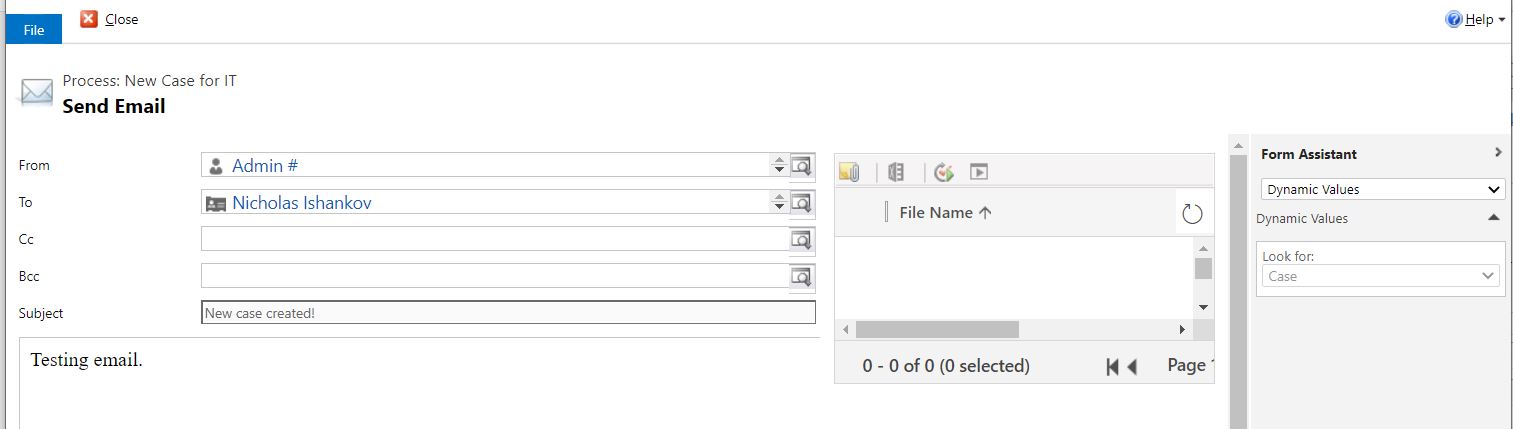
6685.case_2D00_support_2D00_1.JPG

Are there some other settings I am missing for these accounts?

Thanks,

Nicholas Ishankov

I have the same question (0)
  • Verified answer
    Tyson Bosse Profile Picture
    on at

    Hello,

    In Dynamics there are two areas to check for Send as privileges. The first one if you login to the Dynamics instance with the user that will be sending the mail > click gears icon in upper right hand side > click options > click email tab > there will be a checkbox that says "allow other Microsoft Dynamics 365 users to send email on your behalf" This must be checked:

    pastedimage1627322040104v1.png

    The second area, which I'm sure is checked as the user is a system admin. Is under settings > security > users > open up the user > click security roles > open up sys admin security role > go to business management tab and ensure "send email as another user" is checked:

    pastedimage1627322194904v2.png

    If both of these are checked, then there may be some Exchange settings on the Exchange side that isn't allowing the email to be sent as another user.

    Thanks,

    Tyson

  • bbcni Profile Picture
    15 on at

    This resolved the error and the process status us Succeeded , however the email has not been delivered. Can this be an issue with Exchange settings?

  • Verified answer
    Community Member Profile Picture
    on at

    Does the mailbox enabled, for the sender in Dynamics 365?

    Because if it is not enabled then it will show email record status as pending(other than sent/completed).

  • Suggested answer
    Amit Katariya007 Profile Picture
    10,409 Moderator on at

    Thank you.

Under review

Thank you for your reply! To ensure a great experience for everyone, your content is awaiting approval by our Community Managers. Please check back later.

Helpful resources

Quick Links

Introducing the 2026 Season 1 community Super Users

Congratulations to our 2026 Super Stars!

Meet the Microsoft Dynamics 365 Contact Center Champions

We are thrilled to have these Champions in our Community!

Congratulations to the April Top 10 Community Leaders

These are the community rock stars!

Leaderboard > Customer experience | Sales, Customer Insights, CRM

#1
ManoVerse Profile Picture

ManoVerse 73 Super User 2026 Season 1

#2
Muhammad Shahzad Shafique Profile Picture

Muhammad Shahzad Sh... 69 Most Valuable Professional

#3
11manish Profile Picture

11manish 50

Last 30 days Overall leaderboard

Product updates

Dynamics 365 release plans
