web
You’re offline. This is a read only version of the page.
close
Skip to main content

Announcements

No record found.

News and Announcements icon
Community site session details

Community site session details

Session Id :
Microsoft Dynamics AX (Archived)

Dynamics AX 7 / Rainier : How to delete two models both referencing same existing package Application Platform in AX 7?

(0) ShareShare
ReportReport
Posted on by 792

Hi,

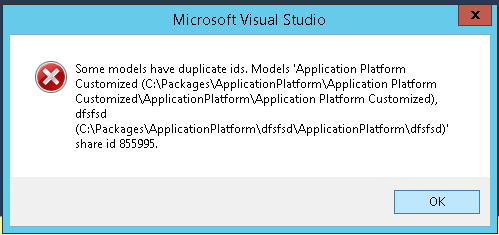
When I was working hands on the CTP8 environment of Dynamics AX 7, I mistakenly created two Models (Application Platform Customized and dfsfsd) both referencing existing package "Application Platform". Since then a blocking error popup is coming which says, "Some models have duplicate ids..."

Please see the image below:-
modelerror.png

This blocking error is coming everywhere, on every button click in the Visual Studio !!!

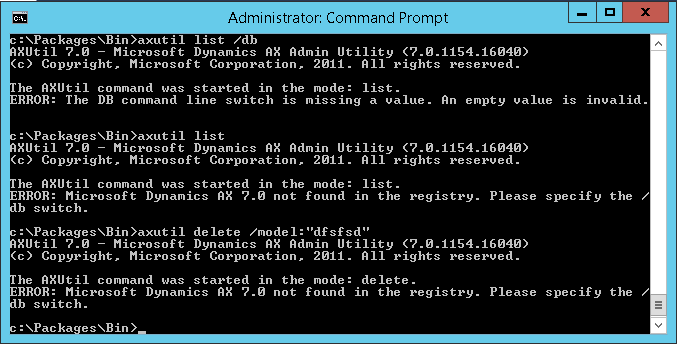
I understood I needed to delete the 2 models and that will fix the issue, but I could find any option to delete the model from Visual Studio. Then I tried using axutil from C:\Packages\Bin location. But this is what it says:-

ERROR: Microsoft Dynamics AX 7.0 not found in the registry. Please specify the /db switch.
axutil-error.png

Can you please help me what database value I need to specify here for the CTP8 environment? I saw that its of the following format:-

axutil list /db:<database>

And what is any (if any) better way to delete the erroneous models?

I am surprised the AX 7 environment is so unstable, a simple mistake by the developer can bring it down.

*This post is locked for comments

I have the same question (0)
  • Verified answer
    Sohaib Cheema Profile Picture
    49,664 Super User 2026 Season 1 on at

    each model has folder in local drive, one way to delete model can be deleting that local repository for specific model.

    when we create a model, which has a  reference model, model is created described inside that referred model. such as in your case error message is showing you

    C:\Package\ApplicationSuite\referedModelName(dfsfsd)

    Model will go way if you

    1) delete model folder

    2) delete references inside referred Model

    I do agree with you that AX7, can come down if some mistake done by a developer and mistakenly a folder is deleted from local repository

  • Verified answer
    vinitgoyal2005 Profile Picture
    6,332 on at

    I could not find any way to delete the model from Visual studio but you can directly go into the explorer and delete following things:

    • Solution created for the project(model)
    • For Extension model, Package folder created for that extension model.
    • For Customization model, folder created for the model under existing package and the descriptor xml file for the model.

    You can check here details about how model folder structure and XML files are created. I have tried creating and deleting the model several times.

  • Sagnik Majumder Profile Picture
    792 on at

    Hi Shoaib & Vinit, thanks a lot for your help. It really solved the delete model problem.

  • Verified answer
    Community Member Profile Picture
    on at

    Hi Sagnik,

    Please use modelUtil.exe in C:\Packages\Bin. axutil is pretty much deprecated

Under review

Thank you for your reply! To ensure a great experience for everyone, your content is awaiting approval by our Community Managers. Please check back later.

Helpful resources

Quick Links

Introducing the 2026 Season 1 community Super Users

Congratulations to our 2026 Super Stars!

Meet the Microsoft Dynamics 365 Contact Center Champions

We are thrilled to have these Champions in our Community!

Congratulations to the April Top 10 Community Leaders

These are the community rock stars!

Leaderboard > 🔒一 Microsoft Dynamics AX (Archived)

#1
CP04-islander Profile Picture

CP04-islander 24

#2
Michel ROY Profile Picture

Michel ROY 14

#3
Jagadabi Profile Picture

Jagadabi 6

Last 30 days Overall leaderboard

Featured topics

Product updates

Dynamics 365 release plans
