web
You’re offline. This is a read only version of the page.
close
Skip to main content

Announcements

No record found.

News and Announcements icon
Community site session details

Community site session details

Session Id :
Small and medium business | Business Central, N...
Answered

[Cloud target] The property 'IsControlAddIn' must be set on the .NET type (...)

(0) ShareShare
ReportReport
Posted on by 217

Hi,

Describe the bug

When publishing extension from vscode or with powershell cmdlet to my container, it fails with this error message:

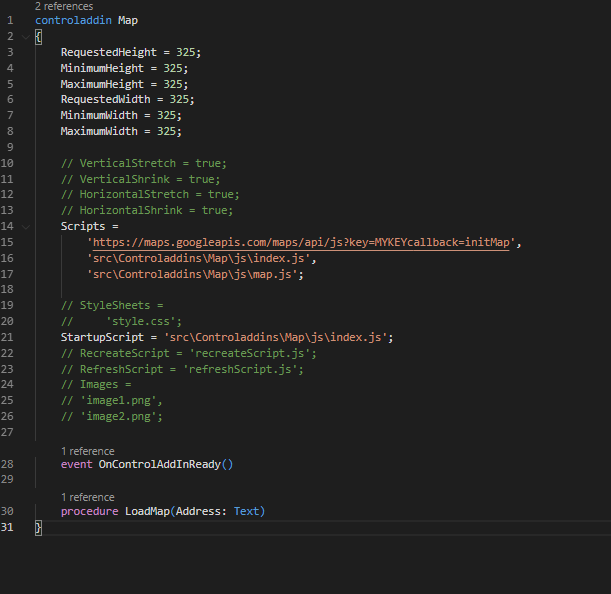
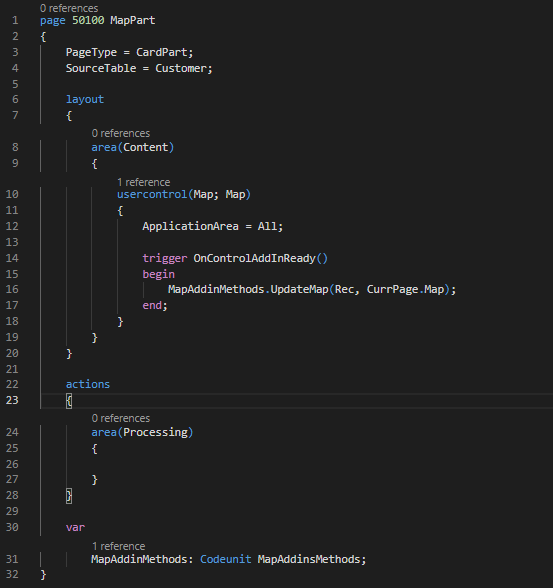
src/Pages/pages/Pag50100.MapPart.al(10,30): error AL0511: The property 'IsControlAddIn' must be set on the .NET type 'DocumentFormat.OpenXml.Spreadsheet.Map' if the type represents a .NET control add-in.
src/Pages/pages/Pag50100.MapPart.al(10,30): error AL0417: Control add-in 'Map' not found


Obviously, I can't create a dotnet reference to this assembly as I am targetting a Cloud version.

This piece of code worked in previous versionS, I just wanted to migrate it into the wave2 release.

Is there any declaration difference in this version of AL Language ?

To Reproduce

  • Create a project with a controladdin
  • Reference it in a Page
  • Publish the app.

  • AL Language: 4.0.182565

  • Business Central: Version: Platform 15.0.36510.0 + Application 15.0.36560.0

I've posted an issue on github: github.com/.../5340


  • Verified answer
    jdecottignies Profile Picture
    217 on at

    I had an answer from the github issue. The name "Map" cannot be used so I had to rename it

Under review

Thank you for your reply! To ensure a great experience for everyone, your content is awaiting approval by our Community Managers. Please check back later.

Helpful resources

Quick Links

Season of Sharing Community Challenge Winners!

Congratulations to our community stars!

Women in Power Builds Momentum

Expanding mentorship, skilling, and AI innovation

Leaderboard > Small and medium business | Business Central, NAV, RMS

#1
OussamaSabbouh Profile Picture

OussamaSabbouh 554 Super User 2026 Season 2

#2
YUN ZHU Profile Picture

YUN ZHU 344 Super User 2026 Season 2

#3
Teagen Boll Profile Picture

Teagen Boll 189 Super User 2026 Season 2

Last 30 days Overall leaderboard

Featured topics

Microsoft Training Manuals

Product updates

Dynamics 365 release plans