web
You’re offline. This is a read only version of the page.
close
Skip to main content
Community site session details

Community site session details

Session Id :
Finance | Project Operations, Human Resources, ...
Suggested answer

FormDataSource control of FormPart

(0) ShareShare
ReportReport
Posted on by 2

Hi,

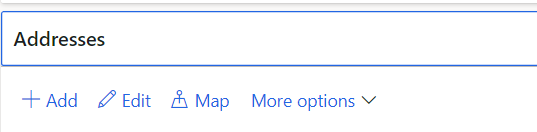
    I want to enable/Disable the Add button ,Edit Button of the Customer Address(AddressTab) in the Cust Table Form . I can able to enable /Disable the other fields in the CustTable form by getting the DataSource control .using  (Chain of Command) . 
pastedimage1672834571143v1.png

   But I am unable to get the DataSource control of DirPartyPostalAddressView Since this view doesn't not belongs to the CustTable form .

I have tried the following code


[ExtensionOf(formDataSourceStr(CustTable, CustTable))]
final class CustTable_Extension
{
    public int active()
    {
        int result = next active();

        if(result)
        {
		    FormDataSource fds= element.dataSource(formDataSourceStr(LogisticsPostalAddressGrid, DirPartyPostalAddressView));
            fds.allowEdit(false);
            fds.allowCreate(false);


		//Also tried this code to get the datasource control

		    DirPartyPostalAddressView dirPartyPostalAddressView = element.DirPartyPostalAddressView;
            FormDataSouce dirPartyPostalAddressViewfds = dirPartyPostalAddressView.datasource();
            dirPartyPostalAddressViewfds.allowEdit(false);

        }
        return result;
    }
}

But This doesnt work for the FormPart and also the view doesnt belong to the CustTable Form Datasource. May I know how can I restrict the FormPart from creating/Editing the record

I have the same question (0)
  • Suggested answer
    GirishS Profile Picture
    27,825 Moderator on at
    RE: FormDataSource control of FormPart

    Hi NoobGamer,

    Add or edit button is not related to CustTable form - As you mentioned it is a form part - Name of the form is "LogisticsPostalAddressGrid".

    You need to add the logic on the "LogisticsPostalAddressGrid" form.

    Instead of code you can go with security to restrict access to Add and edit button instead of doing via code.

    Also Add and Edit button is menu item button, so setting allow edit property for form DataSource won't work.

    Also, this form will be used in the multiple forms- So I think it will get affect in all the forms.

    Thanks,

    Girish S.

  • NoobGamer Profile Picture
    2 on at
    RE: FormDataSource control of FormPart

    Hi Girish ,

         Thanks for your Response , I need to write some condition inside the fds.allowEdit(false);

    So I need to use restrict via Code .

         I will try to write some condition in the LogisticsPostalAddressGrid ,

         Even though if the Add/Edit button is a menu item , if I make allowedit/allowcreate to false wont it disable the button ? or this is different ?

  • GirishS Profile Picture
    27,825 Moderator on at
    RE: FormDataSource control of FormPart

    For menu item button you can set the allowEdit and visibility property.

    Also check one more thing. Try to write the COC for the AddressGridFormPart on CustTable.

    [ExtensionOf(formControlStr(CustTable, AddressGridFormPart))]
    final class CustTable_Extension
    {
        next getFocus();
        //debugg the code and find whether the fRun returns LogisticsPostalAddressGrid form run.
        FormRun fRun = this.getPartFormRun();
    }
    

    Thanks,

    Girish S.

  • RadekM Profile Picture
    170 on at
    RE: FormDataSource control of FormPart

    You can go with a event or extend the Action class and remember this form part is shows on mutliple spots and just changing it in CustTable form will work only there. 

    If u go for example to the advanced setting from CustTable addresstab your logic won't work and the buttons will be enabled again.

    [FormDataSourceEventHandler(formDataSourceStr(LogisticsPostalAddressGrid, DirPartyPostalAddressView), FormDataSourceEventType::SelectionChanged)]
    public static void DirPartyPostalAddressView_OnSelectionChanged(FormDataSource sender, FormDataSourceEventArgs e)
    {
        FormRun                                     formRun = sender.formRun() as FormRun;
        Formdatasource                              DirPartyPostalAddressView_ds = sender as FormDataSource;
        DirPartyPostalAddressView                   DirPartyPostalAddressView = DirPartyPostalAddressView_ds.cursor();
    }

  • NoobGamer Profile Picture
    2 on at
    RE: FormDataSource control of FormPart

    What does the action class mean by ? and is there is any reason that I should go for Selectionchanged Event ?

    whether formpart contains multiple elements ?

    Is it recommended to write my logic is custtable formdatasource active method or in the LogisticsPostalAddressGrid ?

  • RadekM Profile Picture
    170 on at
    RE: FormDataSource control of FormPart

    I did mean the class that has the logic for the buttons. DirPartyPostalAddressFormHandler or DirPartyPostalAddressAction class.

    There is no actual reason for that exact event u can use any that suits for your logic.

    It depends on the logic itself. But I would use LogisticsPostalAddressGrid.

  • NoobGamer Profile Picture
    2 on at
    RE: FormDataSource control of FormPart

     This Logic worked for me .

    [FormEventHandler(formStr(LogisticsPostalAddressGrid), FormEventType::Activated)]
        public static void LogisticsPostalAddressGrid_OnActivated(xFormRun sender, FormEventArgs e)
        {
    
            FormRun             FormLogisticsPostalAddressGrid    =  sender;
            FormBuildDesign CustTableDesign = FormLogisticsPostalAddressGrid.form().design();
            FormControl     ActionsButtonGroupButton = FormLogisticsPostalAddressGrid.design(0).controlName('ActionsButtonGroup');
            str                 FormName;
            FormBuildDataSource formBuildDataSource = FormLogisticsPostalAddressGrid.form().dataSource(tableStr(DirPartyPostalAddressView));
            FormName = FormLogisticsPostalAddressGrid.args().caller().name();
    
    
            if(FormName == formStr(CustTable))
            {
                CustTable custTable = FormLogisticsPostalAddressGrid.args().record();
                
                ActionsButtonGroupButton.enabled(******);
               
               
            }
            if(FormName == formStr(VendTable))
            {
                VendTable vendTable = FormLogisticsPostalAddressGrid.args().record();
                
                ActionsButtonGroupButton.enabled(******);
               
               
            }
    
        }

Under review

Thank you for your reply! To ensure a great experience for everyone, your content is awaiting approval by our Community Managers. Please check back later.

Helpful resources

Quick Links

Responsible AI policies

As AI tools become more common, we’re introducing a Responsible AI Use…

Pallavi Phade – Community Spotlight

We are honored to recognize Pallavi Phade as our Community Spotlight honoree for…

Leaderboard > Finance | Project Operations, Human Resources, AX, GP, SL

#1
André Arnaud de Calavon Profile Picture

André Arnaud de Cal... 765 Super User 2025 Season 2

#2
CA Neeraj Kumar Profile Picture

CA Neeraj Kumar 743

#3
Sumit Singh Profile Picture

Sumit Singh 551

Last 30 days Overall leaderboard

Product updates

Dynamics 365 release plans


