web
You’re offline. This is a read only version of the page.
close
Skip to main content

Announcements

No record found.

News and Announcements icon
Community site session details

Community site session details

Session Id :
Microsoft Dynamics CRM (Archived)

Invalid argument error when resolving an email address to a contact

(0) ShareShare
ReportReport
Posted on by 60

When resolving an email address inside of CRM with either an existing contact or a new contact an error is produced.  See screencast attached.  This happens for all users of CRM regardless of permission levels.  The user is able to manipulate other elements of the email.
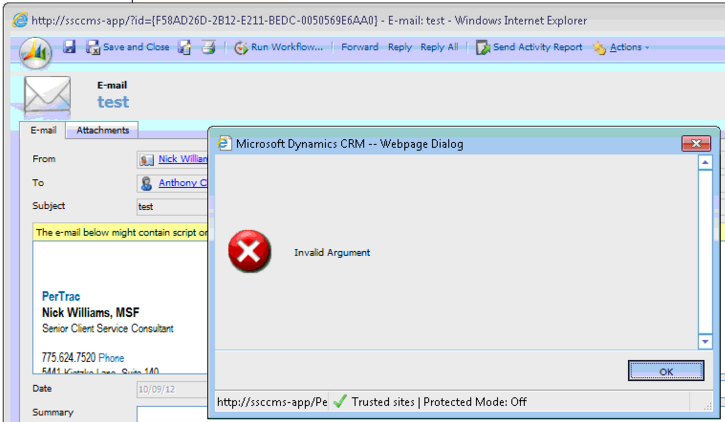
[View:https://community.dynamics.com/cfs-file.ashx/__key/CommunityServer-Components-UserFiles/00-00-07-85-68-Attached+Files/3326.Email_2D00_Tracking_2D00_Error.swf]

Log Files

*This post is locked for comments

I have the same question (0)
  • AaronRic Profile Picture
    10,035 on at

    Hi Nathan,

    I would recommend enabling Verbose Platform tracing to see what errors are being thrown besides this invalid argument. To do this:

    1. Go to HKEY_LOCAL_MACHINE\SOFTWARE\Microsoft\MSCRM

    2. Make sure you have a string value registry key called TraceCategories. The value for this should be *:Verbose

    3. Make sure you have a DWORD registry key called TraceCallStack. The value for this should be one

    4. Make sure you have a DWORD registry key called TraceEnabled and TraceRefresh

    5. Change TraceEnabled to 1 and change TraceRefresh to a value different from its current value. (IE. If its 1, change to 2 or 3)

    6. Then, recreate the issue

    7. Then, change TraceEnabled to 0 and change TraceRefresh to a value different from its current value. (IE. If its 1, change to 2 or 3)

    8. Go to C:\Program Files\Microsoft Dynamics CRM\Trace

    9. Compress all of the files created during this time frame into a zip folder and attach to your reply

  • Nathan Slater Profile Picture
    60 on at

    Here are the Trace files

    Any help would be greatly appreciated.

    Thanks

  • AaronRic Profile Picture
    10,035 on at

    Here is the error I am seeing.

    >Crm Exception: Message: Condition for attribute 'activityparty.addressused': null is not a valid value for an attribute. Use 'Null' or 'NotNull' conditions instead., ErrorCode: -2147220989, InnerException: System.ArgumentException: Condition for attribute 'activityparty.addressused': null is not a valid value for an attribute. Use 'Null' or 'NotNull' conditions instead.

    It looks like there may be a custom field causing an issue here; however, to further investigate this, you would need to create a support case.

Under review

Thank you for your reply! To ensure a great experience for everyone, your content is awaiting approval by our Community Managers. Please check back later.

Helpful resources

Quick Links

Introducing the 2026 Season 1 community Super Users

Congratulations to our 2026 Super Stars!

Meet the Microsoft Dynamics 365 Contact Center Champions

We are thrilled to have these Champions in our Community!

Congratulations to the April Top 10 Community Leaders

These are the community rock stars!

Leaderboard > 🔒一 Microsoft Dynamics CRM (Archived)

#1
ScottDurow Profile Picture

ScottDurow 2

#2
GJones Profile Picture

GJones 1

Last 30 days Overall leaderboard

Featured topics

Product updates

Dynamics 365 release plans
