web
You’re offline. This is a read only version of the page.
close
Skip to main content

Announcements

No record found.

News and Announcements icon
Community site session details

Community site session details

Session Id :
Customer experience | Sales, Customer Insights,...
Suggested Answer

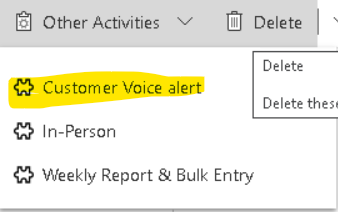
Remove Customer Voice Alert Button from Other Activities

(0) ShareShare
ReportReport
Posted on by 350

Is there a way to remove Customer Voice alert Button from Other Activities dropdown list.

Below image is for reference. 
pastedimage1645084039945v1.png

I am aware that this is Managed solution from MS but still do not have option to remove it . 

I have even tried to find the button from Ribbon work bench and remove it but still not having any option to find it .

I have the same question (0)
  • Suggested answer
    Bipin D365 Profile Picture
    28,985 Moderator on at

    Hi,

    Please try to remove Customer Voice Alert Entity from your App using App designer then save and publish your changes.

    https://docs.microsoft.com/en-us/powerapps/maker/model-driven-apps/create-edit-app

    Please mark my answer verified if this is helpful!

    Regards,

    Bipin Kumar

    Follow my Blog: xrmdynamicscrm.wordpress.com/

  • Sai Chaitanya Profile Picture
    350 on at

    I tried this too and don't see any option of removing that entity from App Designer .

  • Suggested answer
    Bipin D365 Profile Picture
    28,985 Moderator on at

    Hi,

    Can you show me what all entities you have added in your App and why you are not able to remove?

    Please mark my answer verified if this is helpful!

    Regards,

    Bipin Kumar

    Follow my Blog: xrmdynamicscrm.wordpress.com/

  • Sai Chaitanya Profile Picture
    350 on at

    I am not having this entity selected at all but still its showing up in other activities section.

    pastedimage1645094059366v1.png

  • Suggested answer
    Bipin D365 Profile Picture
    28,985 Moderator on at

    Hi,

    In that you can not do anything. It is managed by Microsoft and we don't any control to hide/remove that.

    To confirm my above statement, you could submit support ticket with Microsoft.

    There is a new feature coming in Wave1 2022 where only relevant actviities will be visible under Action dropdown which are available in App.

    d365goddess.com/.../

    Please mark my answer verified if this is helpful!

    Regards,

    Bipin Kumar

    Follow my Blog: xrmdynamicscrm.wordpress.com/

Under review

Thank you for your reply! To ensure a great experience for everyone, your content is awaiting approval by our Community Managers. Please check back later.

Helpful resources

Quick Links

Introducing the 2026 Season 1 community Super Users

Congratulations to our 2026 Super Stars!

Meet the Microsoft Dynamics 365 Contact Center Champions

We are thrilled to have these Champions in our Community!

Congratulations to the April Top 10 Community Leaders

These are the community rock stars!

Leaderboard > Customer experience | Sales, Customer Insights, CRM

#1
ManoVerse Profile Picture

ManoVerse 103 Super User 2026 Season 1

#2
11manish Profile Picture

11manish 83

#3
Muhammad Shahzad Shafique Profile Picture

Muhammad Shahzad Sh... 69 Most Valuable Professional

Last 30 days Overall leaderboard

Product updates

Dynamics 365 release plans
