web
You’re offline. This is a read only version of the page.
close
Skip to main content

Announcements

No record found.

News and Announcements icon
Community site session details

Community site session details

Session Id :
Microsoft Dynamics CRM (Archived)

CHANGE MANAGER button is not visible on User entity in Dynamics 365 UCI

(0) ShareShare
ReportReport
Posted on by 30

Hi,

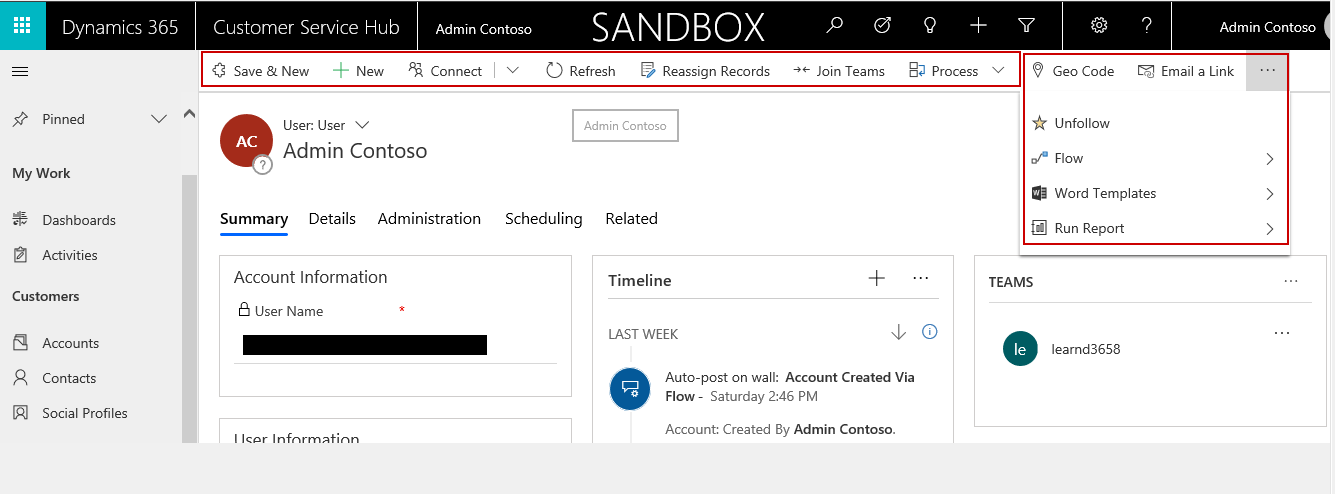
Anyone have any idea about why “CHANGE MANAGER” button is not visible on User entity in Dynamics 365 UCI?

It is visible in Web i.e. Classic mode of Dynamics 365 but missing in UCI mode.

Below are the screen clips for reference:

WEB:
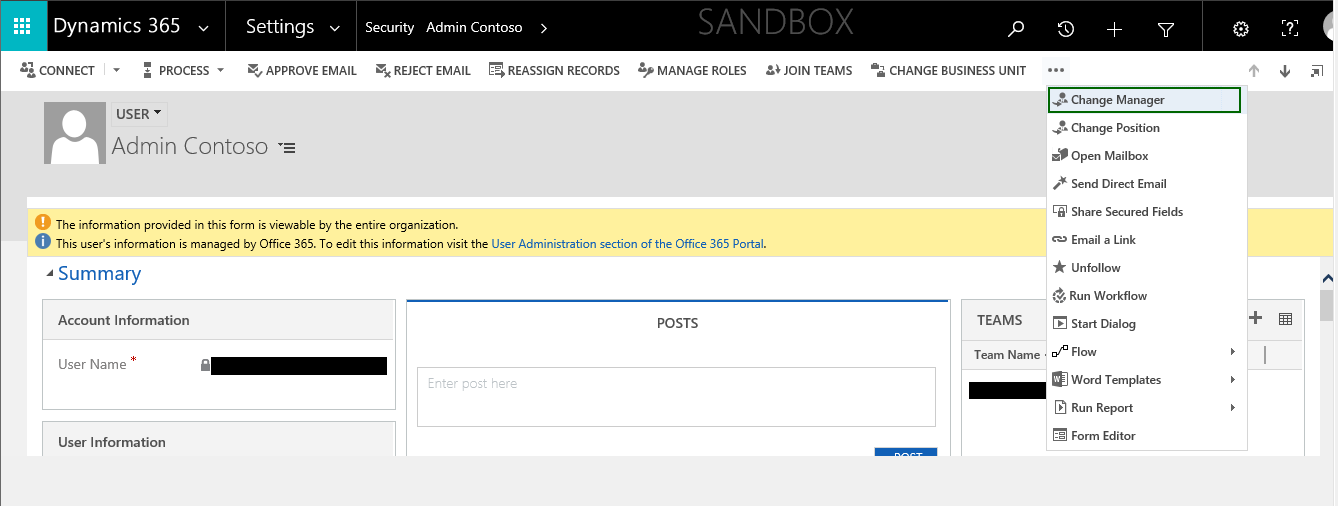
Screenclip-1.png

UCI:

Screenclip-2.png


Any help will be appreciated!


Thanks!

Akshay

*This post is locked for comments

I have the same question (0)
  • Suggested answer
    Charles Abi Khirs Profile Picture
    3,569 on at

    Hello,

    Maybe it is one of the pitfalls that Microsoft is working to improve in the UCI.

    The button is even not displayed if you select the record fron the list of users?

  • Suggested answer
    Kokulan Profile Picture
    18,054 on at

    Hi

    You can change the manager using the lookup on UCI

    ScreenClip-_5B00_493_5D00_.png

  • akshay.m92 Profile Picture
    30 on at

    Hi Charles,

    No, It does not displayed even though i select record in user list.

    "Maybe it is one of the pitfalls that Microsoft is working to improve in the UCI."- I think same way but just need to confirm.

    Thanks!

  • Suggested answer
    Charles Abi Khirs Profile Picture
    3,569 on at

    Did you try kokulan suggestion?

  • akshay.m92 Profile Picture
    30 on at

    Hi Kokulan,

    I'm able to change value in Manager field on User record.

    But did not understand why "CHANGE MANAGER" button is hidden in form ribbon and home ribbon too.

    Thanks!

  • Suggested answer
    Charles Abi Khirs Profile Picture
    3,569 on at

    Akshay,

    The new UCI provides new user experience and enhancements with responsive web design.

    The UCI is the future and we should get used to it. And of course, microsoft is working to improve the user experience by changing some functionalities between the classic web interface and the unified interface.

    Check this link for additional details about the new UCI: docs.microsoft.com/.../about-unified-interface

  • akshay.m92 Profile Picture
    30 on at

    Charles,

    Thanks for your response :) Appreciated your help.

  • Charles Abi Khirs Profile Picture
    3,569 on at

    Please don't forget to mark kokulan's answer as verified in order to close the thread and help other community members

  • akshay.m92 Profile Picture
    30 on at

    Hi Charles,

    I really appreciated that Kokulan provided his approach but i'm alreay able to see the field on User record. But it did not resolve what i'm looking for i.e. unable to see the CHANGE MANAGER "button" on Home Grid or User record in UCI.

    Thanks!

    Akshay

Under review

Thank you for your reply! To ensure a great experience for everyone, your content is awaiting approval by our Community Managers. Please check back later.

Helpful resources

Quick Links

Introducing the 2026 Season 1 community Super Users

Congratulations to our 2026 Super Stars!

Meet the Microsoft Dynamics 365 Contact Center Champions

We are thrilled to have these Champions in our Community!

Congratulations to the April Top 10 Community Leaders

These are the community rock stars!

Leaderboard > 🔒一 Microsoft Dynamics CRM (Archived)

Last 30 days Overall leaderboard

Featured topics

Product updates

Dynamics 365 release plans