web
You’re offline. This is a read only version of the page.
close
Skip to main content

Announcements

No record found.

News and Announcements icon
Community site session details

Community site session details

Session Id :
Finance | Project Operations, Human Resources, ...
Unanswered

SSRS Report calculation field issue

(0) ShareShare
ReportReport
Posted on by 406

Hello, i am having issues with calculation field on my sales invoice report. 

So what is actually happening is calculation in my report of many lines is different, what i mean is a line will have the calculation correct, while other line will be wrong.
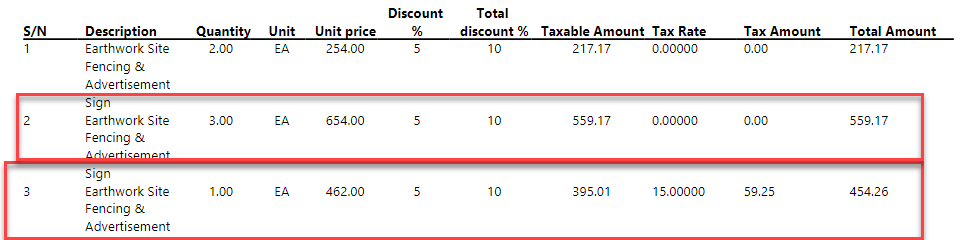
pastedimage1684406326108v1.png

As u can see, in line 2, the taxable amount calculation is wrong. the calculation is (UnitPRICE*QTY)-LineDisc% - totalDisc%

but for line 3, if u apply this formula, the calculation is correct.

What i am mapping on the taxable amount field is the field SourceBaseAmountCur FROM taxTrans table, and my field name is Ex_TaxBaseCur which is the EDT of SourceBaseAmountCur, and my table is salesinvoicetmp.

here is my code on salesinvoicedp extension class:

select taxTrans where taxTrans.InventTransId == _custInvoiceTrans.InventTransId;
if(taxTrans)
{
salesInvoiceTmp.Ex_TaxBaseCur = abs(taxTrans.SourceBaseAmountCur); // abs is used to show positive values.
}

else
{

salesInvoiceTmp.Ex_TaxBaseCur = 0;
}
}

i have been stuck with this issue for long, because if my issue is with the code it would give wrong value for all lines not one line correct and other wrong, it doesnt make sense.

anyone can help?

  • huijij Profile Picture
    19,813 on at

    Hi MounirDev,

    I think the only way to find the problem is to debug it and then look carefully at the line that reports the error and compare the results of each step with your own calculations.

  • D365FO DEV Profile Picture
    406 on at

    hi i did debug, but what i found is the taxable amount is only related to quantity 1 and not considering other quantities where also in line 2, the quantity is 3 and the calculation is based on quantity 1.

    also i opened table browser and when i filtered on the same id in taxtrans table, it had 2 records and the field related to taxable amount had also 2 amounts, one is correct and one incorrect.

  • D365FO DEV Profile Picture
    406 on at

    Hi my issue is fixed. i was able to fix it by adding a condition to my code. thanks

    but i have another question, when i deployed the package to UAT, this report has a QR code. when i  try to print it on UAT , the QR is not showing, i think some configuration are missing. is that possible u can help me with this issue?

Under review

Thank you for your reply! To ensure a great experience for everyone, your content is awaiting approval by our Community Managers. Please check back later.

Helpful resources

Quick Links

Season of Sharing Community Challenge Winners!

Congratulations to our community stars!

Women in Power Builds Momentum

Expanding mentorship, skilling, and AI innovation

Leaderboard > Finance | Project Operations, Human Resources, AX, GP, SL

#1
Martin Dráb Profile Picture

Martin Dráb 445 Most Valuable Professional

#2
André Arnaud de Calavon Profile Picture

André Arnaud de Cal... 309 Super User 2026 Season 2

#3
CU29091230-0 Profile Picture

CU29091230-0 192

Last 30 days Overall leaderboard

Product updates

Dynamics 365 release plans


