web
You’re offline. This is a read only version of the page.
close
Skip to main content

Announcements

No record found.

News and Announcements icon
Community site session details

Community site session details

Session Id :
Finance | Project Operations, Human Resources, ...
Answered

data entity import and export not working in D365

(0) ShareShare
ReportReport
Posted on by 439

Hi All,

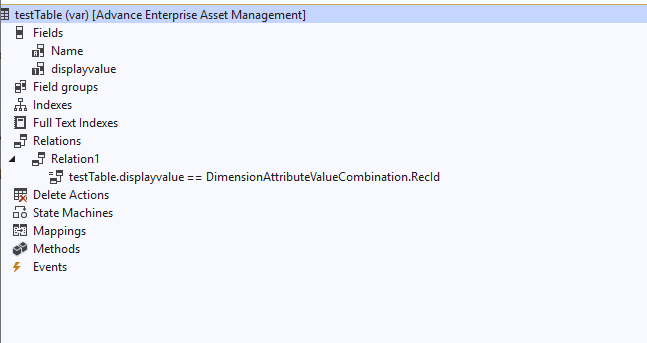
I have created a one table with the name testTable 

with 2 fields

1. Name (primary index)

2. displayvalue int64 and it is having relation with DimensionAttributeValueCombination

testTable .displayvalue == DimensionAttributeValueCombination.Recid
Image

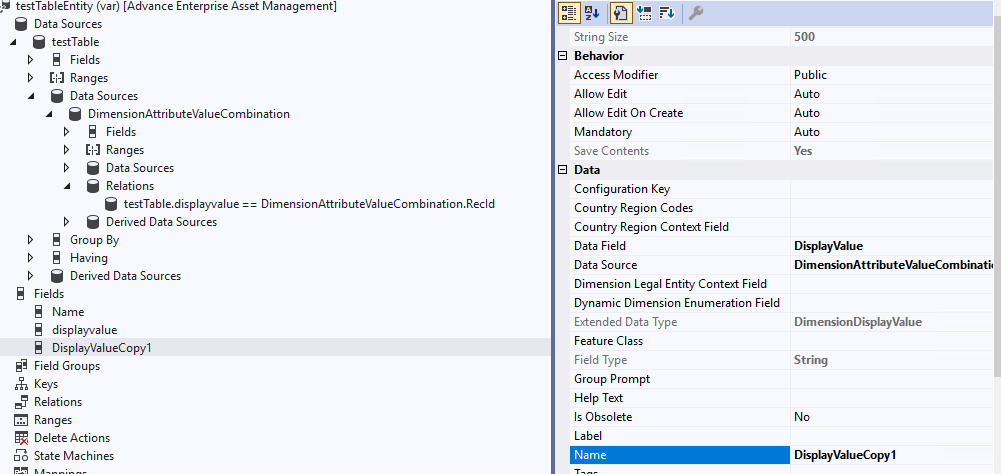
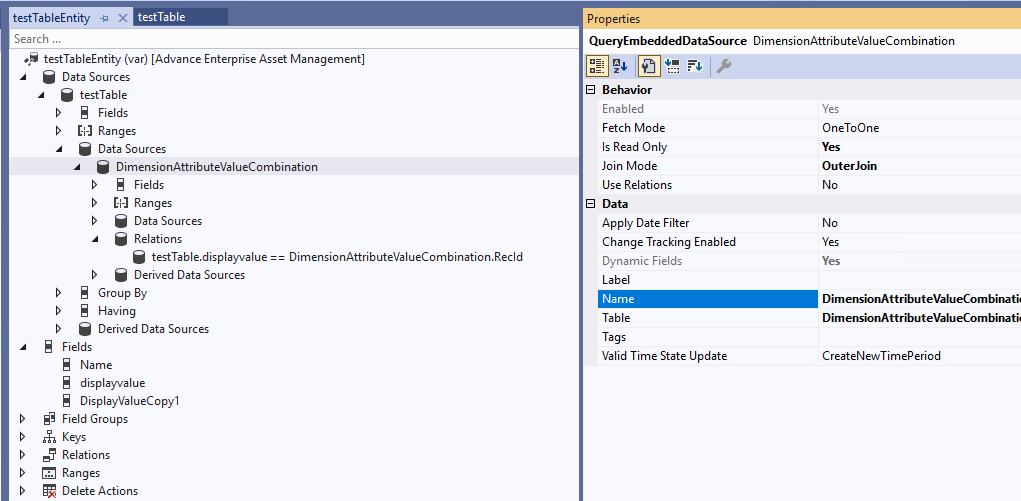
I have created  one entity for import and export for this table  as below 

as below structure
Image

Image

DisplayValueCopy1 is a readonly field  and I am fetching it from DimensionAttributeValueCombination  table used for import /export as it contact readable value not rec id 

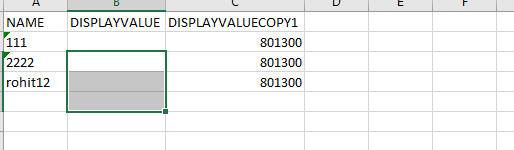
data file for import and export 
Image

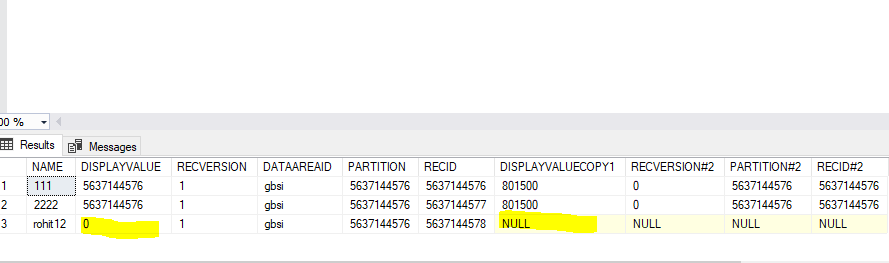
when I have created a project and imported the file it says success  but when I see the data in the SQL the  
Image

highliighted fields are not getting imported or updated any  idea how to resolve this 

I have tried to use the  entity  instead of  DimensionAttributeValueCombination but still the displayvalue  field from the  testTable  is not updated.

If t try to import new record name is getting created but the displayvalue field is not getting updated.
Image

Hi I have posted same question in other forum by mistake 

community.dynamics.com/.../data-entity-import-and-export-not-working-in-d365

I have the same question (0)
  • Suggested answer
    Gunjan Bhattachayya Profile Picture
    35,429 on at

    Hi Rohit,

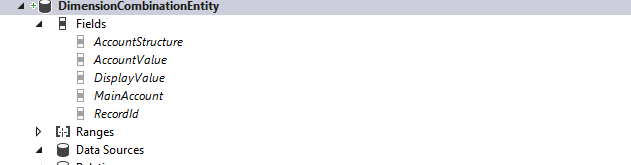
    The best example for you to follow is - LedgerJournalLineEntity. The base table in this entity is LedgerJournalTrans which has a relation to DimensionAttributeValueCombination table based on the field LedgerDimension.

    In the above mentioned entity, you can check that another entity (DimensionCombinationEntity) is used for the DisplayValue Field.

    pastedimage1650108476527v1.png\

    You can also check that the field Account in the entity (referencing field LedgerJournalTrans\LedgerDimension) has an access modifier "Private", which means that it won't be exposed.

    pastedimage1650108663704v2.png

    Field AccountDisplayValue has been added which references DimensionCombinationEntity\DisplayValue field. This field is used to update the LedgerDimension field in LedgerJournalTrans.

    pastedimage1650108836033v3.png

    You should use this entity for your custom table as well. Another suggestion will be to change the name of the field in TestTable from DisplayValue to LedgerDimension (or anything else). The name Display Value could create confusion down the line since it is a RefRecId field.

  • rohit1900 Profile Picture
    439 on at

    Hi Gunjan,

    Thanks for the input,

    I have followed the same steps before and it was not working and I have tried your steps again.

    let me show you this.

    i have folowed the entity LedgerJournalLineEntity and made smiliar changes

    table relation 

    pastedimage1650115285750v7.png

    Entity :

    pastedimage1650114763861v1.png

    pastedimage1650115234249v6.png

    pastedimage1650114810253v2.png

    import:

    I have created a export project and import project

    pastedimage1650114899213v3.png

    highlighted one is the new record and above 2 are existing record   

    Here when I tried to import this file it is showing as

    pastedimage1650115052027v4.png

    it says sucess 1 created and 2 updated.

    in SQL:

    pastedimage1650115100414v5.png

    when I see the newly created record it has blank ledger dimension and  for the updated records I have updated manually ,

    in shorts in DM project it is saying it got updated  

    but in reality the field is neither getting updated   while creating or updating .

  • rohit1900 Profile Picture
    439 on at

    The reason why I am doing this exercise is because  if it success  then I can implement similar logic in  real time data entity.

  • Gunjan Bhattachayya Profile Picture
    35,429 on at

    Hi Rohit,

    This might be because of the format in which you are setting the DisplayValue data. Please check the Financial dimension configuration for integrating applications form under General Ledger > Chart of accounts > Dimensions. Here you can check the active format for Ledger dimension.

    pastedimage1650117325109v1.png

    In your case, you can pass "801500--" (blanks for the other dimensions) as per the above example and try the import again. 

  • André Arnaud de Calavon Profile Picture
    305,155 Super User 2026 Season 1 on at

    Hi Rohit,

    Is the purpose of the dimension field in your test table to store a main account including the dimensions or the default dimensions only?

  • rohit1900 Profile Picture
    439 on at

    I want to store main account only  nothing else actually in projprojecteentity we have added a custom field like ledger dimension and there we are only showing main acount in the form , how ever it was not working  so for that reason i tried the same on my custom table with one field as ledger dimension  and unfortunately this is also not working . so to answer your question we are only storing main account (purpose of the dimension field).

  • rohit1900 Profile Picture
    439 on at

    Hi Andre

    pastedimage1650118822158v1.png

    The value it should display like the higlighted   DimensionCombinationEntity>>DisplayValue  nothing else 

    pastedimage1650118890471v2.png

  • rohit1900 Profile Picture
    439 on at

    Hi I tried the same thing 

    seem the below screenshot 

    pastedimage1650119189380v1.png

    it says completed  but when I open the SQL and run the query 

    pastedimage1650119244835v2.png

    still it is not updated

  • Gunjan Bhattachayya Profile Picture
    35,429 on at

    Hi Rohit,

    ProjLedgerPostingDefinitionEntity will be a better example for you, considering your requirement. You can check the field Main AccountDisplayValue. This entity also uses DimensionCombinationEntity for the DisplayValue.

  • rohit1900 Profile Picture
    439 on at

    Hi Gunjan  I need the data DimensionCombinationEntity  -> displayvalue

    again i guess it is the same thing as the above only diffrence is that field name is diffrent here as

    AccountDisplayValue

    pastedimage1650121094268v1.png

    here the datasource and field name is only different  every thing else is  same

    pastedimage1650121129341v2.png

Under review

Thank you for your reply! To ensure a great experience for everyone, your content is awaiting approval by our Community Managers. Please check back later.

Helpful resources

Quick Links

Introducing the 2026 Season 1 community Super Users

Congratulations to our 2026 Super Stars!

Meet the Microsoft Dynamics 365 Contact Center Champions

We are thrilled to have these Champions in our Community!

Congratulations to the April Top 10 Community Leaders

These are the community rock stars!

Leaderboard > Finance | Project Operations, Human Resources, AX, GP, SL

#1
Giorgio Bonacorsi Profile Picture

Giorgio Bonacorsi 797

#2
André Arnaud de Calavon Profile Picture

André Arnaud de Cal... 610 Super User 2026 Season 1

#3
Subra Profile Picture

Subra 534

Last 30 days Overall leaderboard

Product updates

Dynamics 365 release plans