web
You’re offline. This is a read only version of the page.
close
Skip to main content
Community site session details

Community site session details

Session Id :
Dynamics 365 Community / Forums / Field Service forum / Work Orders - Time and...
Field Service forum

Work Orders - Time and Date, Start and End, Window and Promised fields

(0) ShareShare
ReportReport
Posted on by 721

Can anyone clarify the differences between all the Time From/To Promised, Date Window Start/End and Time Window Start/End fields? 

Or does anyone have any links to information on these fields?

There are 8 fields in total. The two highlighted in red below are hidden out of the box, but they are automatically populated.
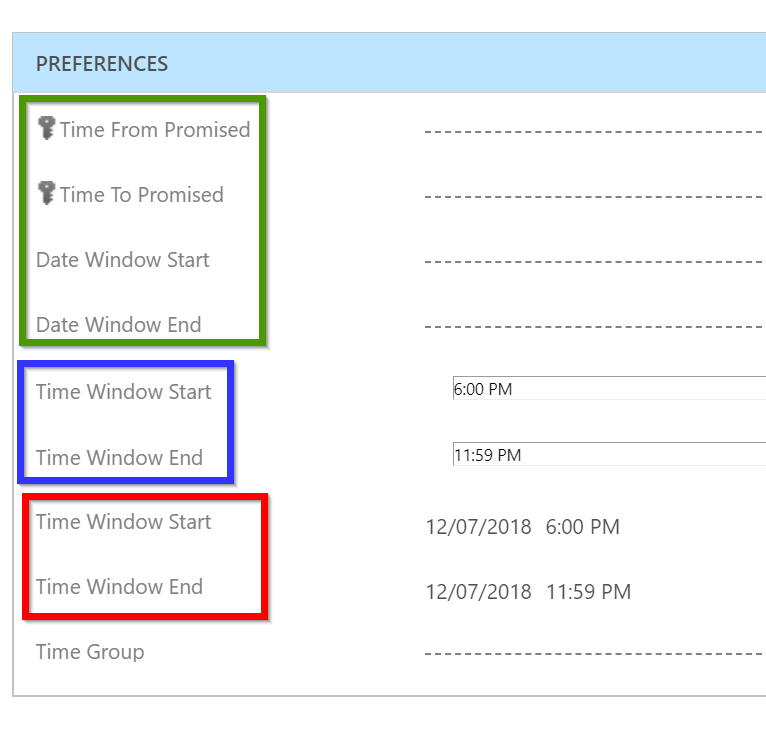
2018_2D00_07_2D00_18-12_5F00_21_5F00_02_2D00_WO-Time-Date-fields.png

How do these fields affect the scheduling of Work Orders and the Schedule Board? Which ones take precedence?

I have noticed that the Work Orders generated automatically via Agreements don't have these fields populated - except for the two highlighted in red and in this instance the date component was populated with the date the Agreement was created. 

I've also noticed that the fields in red update automatically when the Time Window Start/End fields (in blue) are changed and the date is always set to Today's date.

Any information on how these fields work would be greatly appreciated. 

Thanks!

Categories:
I have the same question (0)
  • PragmaticDevs Profile Picture
    239 on at
    RE: Work Orders - Time and Date, Start and End, Window and Promised fields

    All I have used in projects is the Time from promised and Time to Promised fields which are taken into account by the schedule assistant.

    On the schedule board, when you drag and drop a WO, it changes color from Green to Red if you trying to place the booking on a time period which is outside the window.

    I am checking with the Product team on what other fields are used for, will get back to you once I hear from them.

  • Inksrm Profile Picture
    721 on at
    RE: Work Orders - Time and Date, Start and End, Window and Promised fields

    Thanks PragmaticDevs.

    We were thinking the same thing by using only the Time from Promised and Time to Promised fields given that that none of the fields are populated for WO's generated automatically via an Agreement.

    I look forward to seeing what else you find out.

  • Suggested answer
    Thomas David Dayman Profile Picture
    11,323 on at
    RE: Work Orders - Time and Date, Start and End, Window and Promised fields

    Hi Inksrm.

    The rest of the fields are based from the Agreement.

    Agreement Booking Setup


    Pre Booking Flexibility - Is the number of days you are willing to book before the booking date of the work order

    Post Booking Flexibility - Is the number of days you are willing to book after the booking date of the work order 

    Time Window Start - The earliest time you are willing to start the work order

    Time Window End - The latest time you are willing to end the work order

    Screenshot_5F00_3.png

    Agreement Booking Dates


    As you can see when I created the booking date the Earliest Date and Latest Date are 1 day behind and ahead of the booking date.

    Screenshot_5F00_3.png

    Work Order


    When the Work Order gets created it will populate these fields based on the Agreement. Although my Work Order is saying that the date window end is the 05/11/2018 when it should be 02/11/2018

    Screenshot_5F00_2.png

Under review

Thank you for your reply! To ensure a great experience for everyone, your content is awaiting approval by our Community Managers. Please check back later.

Helpful resources

Quick Links

November Spotlight Star - Khushbu Rajvi

Congratulations to a top community star!

Forum Structure Changes Coming on 11/8!

In our never-ending quest to help the Dynamics 365 Community members get answers faster …

Dynamics 365 Community Platform update – Oct 28

Welcome to the next edition of the Community Platform Update. This is a status …

Leaderboard > Field Service

Last 30 days Overall leaderboard

Featured topics

Product updates

Dynamics 365 release plans


