web
You’re offline. This is a read only version of the page.
close
Skip to main content

Announcements

No record found.

News and Announcements icon
Community site session details

Community site session details

Session Id :
Microsoft Dynamics CRM (Archived)

Unified service desk : Close particular session from multiple sessions

(0) ShareShare
ReportReport
Posted on by

Hello,

I am facing the following issue,

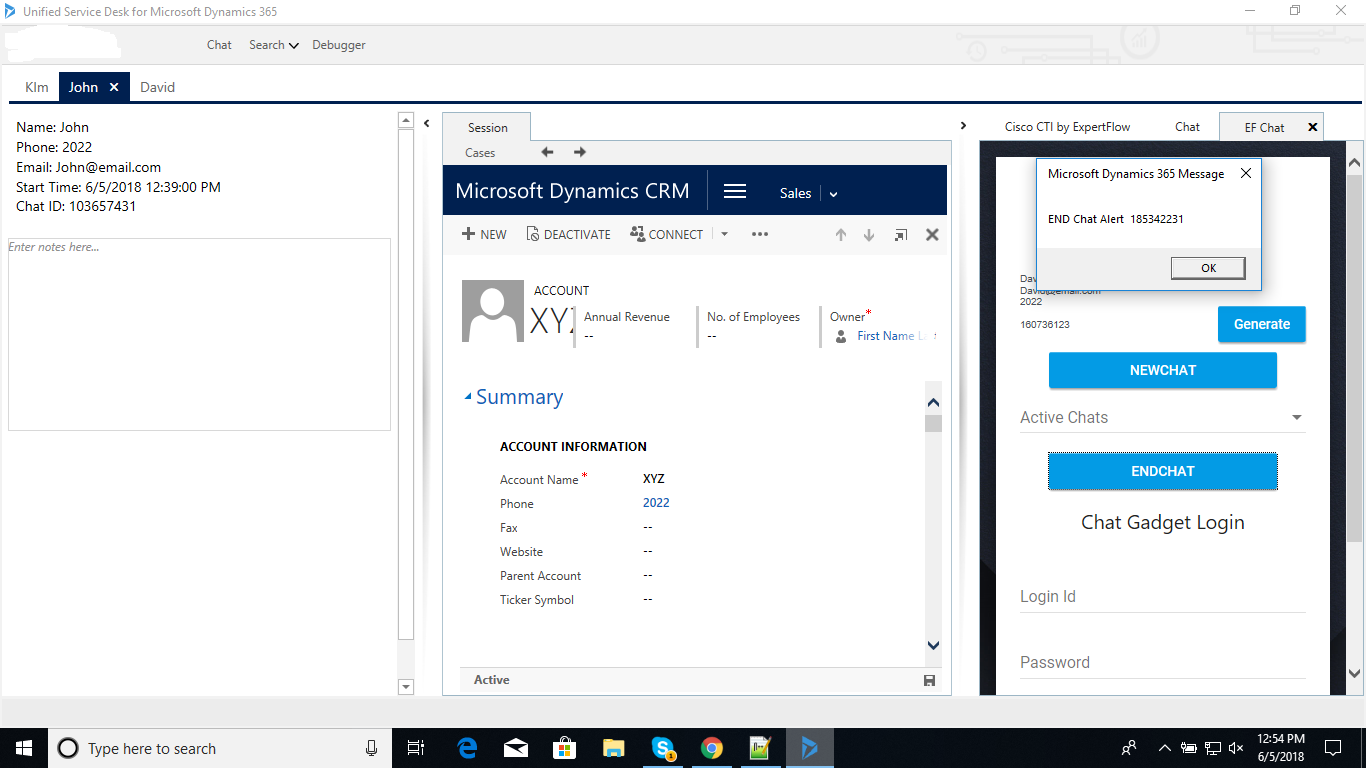
The agent is doing chat & handling three customers e.g Kim, David & John.Three sessions opened each for the customer on USD. David left the chat, I am able to raise the event in USD but unable to close David's session dynamically. or How can I iterate all opened USD sessions in the script so that I can get more control & perform particular tasks?

The pop up on right side come when the chat ends i-e customer customer left.

Any Ideas,
CloseSessionForChat.png

*This post is locked for comments

I have the same question (0)
  • Suggested answer
    Kaustubh Hegde Profile Picture
    330 on at

    Not sure on how you are calling the event, but are you able to get the SessionID of David's session there?

    If you are able to get the SessionId then follow below steps to Close that particular session

    1. Create an Action as displayed in the screenshot below. Replace the "<<GUID of the Session you want to close>>" with the sessionid of session you want to close.

    USD-Close-Session.PNG

    2. You can add this action in your event.

  • Suggested answer
    PranavShroti Profile Picture
    4,510 on at

    Hi Since you have already captured the close chat event, you can write a simple script to close the current tab also.

    check out the article

    neilparkhurst.com/.../usd-close-all-sessions

    If found useful, please mark the answer as verified

    Regards,

    Pranav

  • Verified answer
    Community Member Profile Picture
    on at

    Tested with USD version '2.2.0.755' but didn't work at all however when tested using version '3.0.0.859' did the job.

Under review

Thank you for your reply! To ensure a great experience for everyone, your content is awaiting approval by our Community Managers. Please check back later.

Helpful resources

Quick Links

Introducing the 2026 Season 1 community Super Users

Congratulations to our 2026 Super Stars!

Meet the Microsoft Dynamics 365 Contact Center Champions

We are thrilled to have these Champions in our Community!

Congratulations to the April Top 10 Community Leaders

These are the community rock stars!

Leaderboard > 🔒一 Microsoft Dynamics CRM (Archived)

Last 30 days Overall leaderboard

Featured topics

Product updates

Dynamics 365 release plans
