





Implementing field mapping using Xrm.WebApi
 Mahendar Pal
 45,095
 Like
Like Share
Share
 Report
In our last article we discussed Xrm.WebApi create, update and delete method. In this article we are going to provide sample code for using Xrm.WebApi retrieve method.
Many times we required to setup field mapping between parent and child entities, for example let’s say we need to bring following information based on the account selected under contact entity. We can easily set these fields mapping by editing account and contact relationship. But that relationship mapping will only work when contact record is created from account entity form.
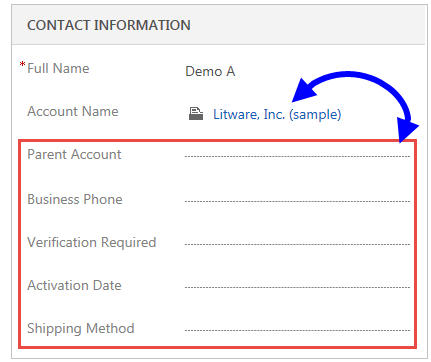
But if we are creating contact record directly relationship mapping won’t work here. So in this article we are providing sample code to implement above mapping using retrieve method.
//retrieve data based on primary entity id
function retrieveAccountDetails() {
  //read lookup value
  if (Xrm.Page.getAttribute("parentcustomerid").getValue() != null && Xrm.Page.getAttribute("parentcustomerid").getValue()[0].id != null) {
    var accountid = Xrm.Page.getAttribute("parentcustomerid").getValue()[0].id;

    //pass entity, fields, we can use expand to get related entity fields
    Xrm.WebApi.retrieveRecord("account", accountid, "?$select=telephone1,new_verificationrequired,new_activationdate,address1_shippingmethodcode&$expand=parentaccountid($select=accountid,name)").then(
      function success(result) {
        if (result != null) {
          //set text field
          if (result.telephone1 != null)
            Xrm.Page.getAttribute("telephone1").setValue(result.telephone1);
          //set lookup field
          if (result.parentaccountid != null) {
            var object = new Array();
            object[0] = new Object();
            object[0].id = result.parentaccountid.accountid;
            object[0].name = result.parentaccountid.name;
            object[0].entityType = "account";
            Xrm.Page.getAttribute(new_parentaccount).setValue(object);
          }
          //set two optionset
          if (result.new_verificationrequired != null)
            Xrm.Page.getAttribute("new_verificationrequired").setValue(result.new_verificationrequired);
          //set date field
          if (result.new_activationdate != null)
            Xrm.Page.getAttribute("new_activationdate").setValue(new Date(result["new_activationdate@OData.Community.Display.V1.FormattedValue"]));
          //set optionset field
          if (result.address1_shippingmethodcode != null)
            Xrm.Page.getAttribute("address1_shippingmethodcode").setValue(result.address1_shippingmethodcode);
        }
      },
      function(error) {
        alert(error.message);

      }
    );
  }
}
Stay Tuned for more Dynamics 365 Sample code !!
About US
We at HIMBAP are a team of highly skilled Microsoft Dynamics 365/CRM experts, with extensive experience in developing solution for diverse domains, across verticals.Contact US if you are looking for Microsoft Dynamics 365/CRM implementation/Upgrade/Customization/Training help.
*This post is locked for comments