




 Like
Like Share
Share
 Report
If you use the offline capability in Microsoft Dynamics CRM, did you know that you can make the go offline process automatic? So if you lose your internet connection, you can continue to work in CRM without having to hit the “Go Offline” button.
Turn on background local data synchronization. In CRM 2013 Update Rollup 1, this setting is not displayed in user settings, but it is still there. Open the Outlook client diagnostic and check the box for Offline Data Updates. Then click “Save.”
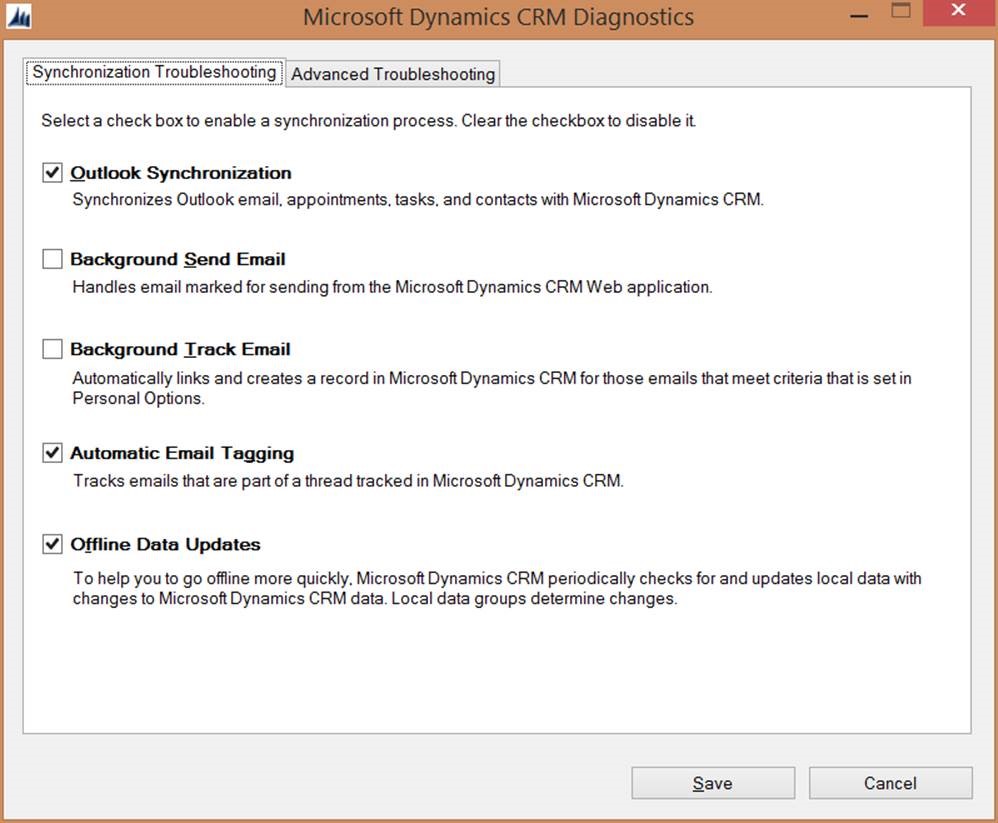
Once you enable Offline Data Updates, CRM will automatically synchronize data to the local database every 15 minutes. Then if you get disconnected from the internet, when you reopen Outlook, CRM will start in offline mode. when you get reconnected to the internet, when you reopen Outlook, CRM will start in Online mode.
*This post is locked for comments