




 11,279
 Like
Like Share
Share
 Report
Last post I talked about saving money by using Locally Redundant replication instead of Geo redundant (which is the default) on Dynamics AX VM. Here's a follow up on where the setting is:
1) If you don't already know which "Storage" holds your VM's disk, check the disk name first by looking at the Virtual machine settings.
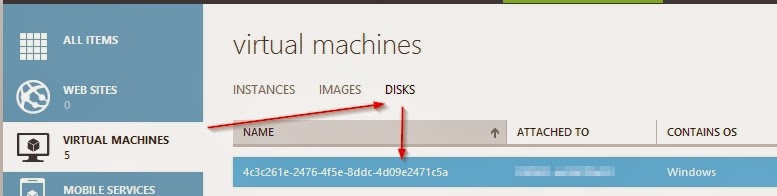
2) Then, you can confirm the Storage does hold that disk by going to a Storage, click Containers tab, then click the arrow besides a container name to check the contents.

3) Finally, go to the Configure tab and select a replication option.
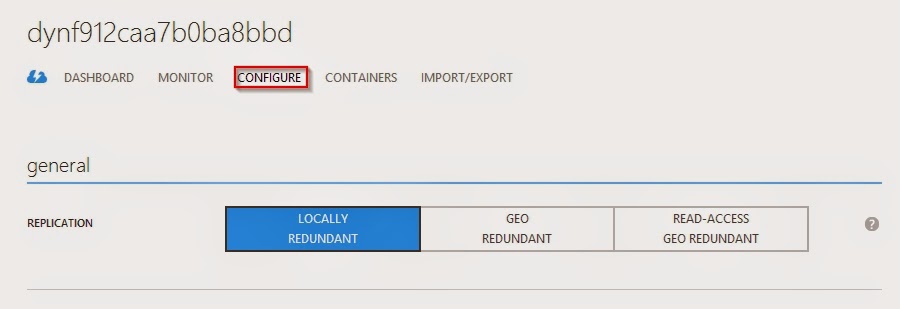
Detail descriptions on all three options can be found here.
Locally Redundant Storage (LRS) replicate the data synchronously to 3 different storage within the same region. To me it's decent enough for non production environments. And, more importantly, LRS cost around 50% less than Geo redundant storage (GRS). Why not? =]
1) If you don't already know which "Storage" holds your VM's disk, check the disk name first by looking at the Virtual machine settings.
2) Then, you can confirm the Storage does hold that disk by going to a Storage, click Containers tab, then click the arrow besides a container name to check the contents.
3) Finally, go to the Configure tab and select a replication option.
Detail descriptions on all three options can be found here.
Locally Redundant Storage (LRS) replicate the data synchronously to 3 different storage within the same region. To me it's decent enough for non production environments. And, more importantly, LRS cost around 50% less than Geo redundant storage (GRS). Why not? =]
This posting is provided "AS IS" with no warranties, and confers no rights.
*This post is locked for comments