web
You’re offline. This is a read only version of the page.
close
Skip to main content

Notifications

Announcements

No record found.

Community site session details

Community site session details

Session Id :

New Functionality In Microsoft Dynamics 365 Business Central 2022 Wave 2: Use New Dedicated APIs for Financial Reporting

Ian Grieve Profile Picture Ian Grieve 22,784
Microsoft Dynamics 365 Business CentralThis post is part of the New Functionality In Microsoft Dynamics 365 Business Central 2022 Wave 2 series in which I am taking a look at the new functionality introduced in Microsoft Dynamics 365 Business Central 2022 Wave 2.

The second of the new functionality in the Reporting section is use new dedicated APIs for financial reporting.

With dedicated APIs for finance reporting, it’s easier to create your own Excel-based financial reports. You can also consume the APIs in Power BI through the Business Central Power BI Connector.

Enabled for: users, automatically
General Availability: October 2022

The new APIs and datasets are created for selected data. The first datasets dedicated consist of data for:

  • General Ledger data, including G/L budgets and Dimensions.
  • Accounting Periods and Business Units.
  • Customers, Vendors, and Ledger entries, including detailed Ledger entries.
  • Webhook subscriptions and entity definitions.
  • With these APIs it’s easy to get data from Business Central for financial reporting in Excel, Power BI, or other reporting tools.

The APIs can be found under Advanced APIs and are called reportsFinance/beta.
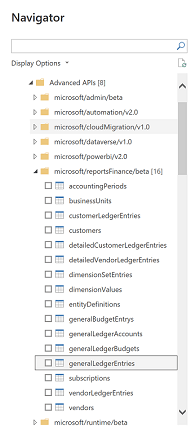
List of API nodes

New Functionality In Microsoft Dynamics 365 Business Central 2022 Wave 2

New Functionality In Microsoft Dynamics 365 Business Central 2022 Wave 2
Better Bank Reconciliation for Checks and Improved Reporting
Extended Text Functionality for VAT Clauses
Financial Reporting Replaces Account Schedules
Find Posted and Non-Posted Document Lines in Search
Flexible Sorting in the Planning Worksheet Page
Make Entry of Variant Codes Required
Post Item Charges for Each Step of the Process
Service Management – minor improvements
Simpler Shopify Connection
Track Items That Are Used in Projects, Including Picks
New VAT Date Field on documents and Entries
Set Up Data Exchange More Easily
Use Multiple Remit-to Addresses for Vendors
Reverse Payment Reconciliation Journal Entries
Check the GL Journal Balance by Correction – Czechia
Configurable and Redesigned Intrastat Solution
Specify a Default Bank Account by Currency – Czechia
Word Layout Email Template for CZ Documents
IRS 1096 Form (United States)
Service Declarations F01DGS for Belgium and Intrastat for Italy and France
Get More, Better Communications as Admin
Use Service-to-Service Authentication with Admin API
Cloud Migration Data Upgrade for Extensions
Update Licensed Users from Microsoft 365 Faster
Migrate more data from Dynamics GP
Restore Deleted Environments
Get More Visibility Into Outages
Personalize and Design the Automate Actions in the Web Client
Rely on Personalization to Show or Hide Power BI Parts on Lists
Switch Power Automate Features On or Off
Use a Power Automate Flow to Notify Business Central of Dataverse Entity Changes
Add Media/Image Support for Business Central Connectors
Power Apps and Power Automate Support for Document Attachments
Easily Access Setup Pages for New Apps
Easily Find Apps to Connect to Core Services
Easily Install and Set Up New Apps
New Field Descriptions Improve Clarity
Configure OneDrive Integration
Delegated Admins Can Edit in Excel
Share to Teams Action Now Includes Link Preview
Embed Business Central in Teams Tabs
Access Business Central With Your Microsoft 365 License
Choose the Report Layout on Request Page
Use New Dedicated APIs for Financial Reporting
Performance – Faster Data Stack

Read original post New Functionality In Microsoft Dynamics 365 Business Central 2022 Wave 2: Use New Dedicated APIs for Financial Reporting at azurecurve|Ramblings of an IT Professional


This was originally posted here.

Comments

*This post is locked for comments