




 45,095
 Like
Like Share
Share
 Report
We have seen this question many times in Dynamics CRM forums, “How can I show my custom db data into CRM forms with saving it into Dynamics CRM” and the possible options are to develop a custom control using scripting for example HTML or host a custom report/web page on iframe if you are working with CRM version 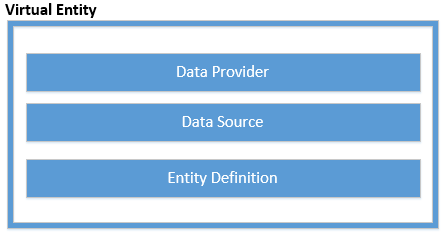
Data Provider is responsible for bringing data from external data sources, we can use build our own custom data provider or can use OData data provider which is included in Dynamics 365. You can get more details from here to create custom data provider . Data Source is a record in Dynamics 365 which stores details about data provider and required connection parameters. Finally entity definition stores structure of virtual entity just like other entities. It also stores information about which data source is used for this virtual entity.
We can create virtual entity just like other custom entities by navigating to Settings-> Customization-> Customize the System or we can also create our own custom solution and create virtual entity there. While creating virtual entity we need to select Virtual Entity checkbox and need to configure below 4 points:
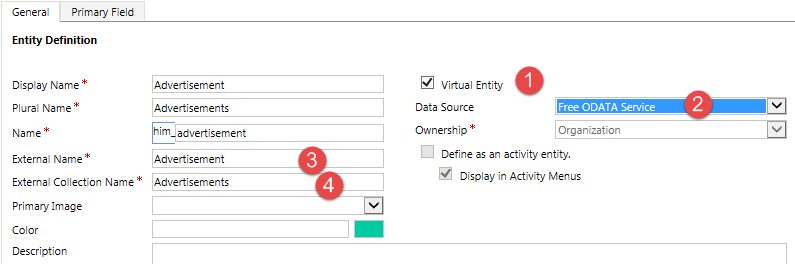
We are using a test service from odata.org as a data source, you can refer details steps here to use test service from odata.org. External Name is the name of the object that we want to show over virtual entity and external collection name is the name of object collection, for example employee is the object and employees is the name of collection here. While creating virtual entity, you need to make sure external name and external collection name should match to entity type name and entityset name exactly.
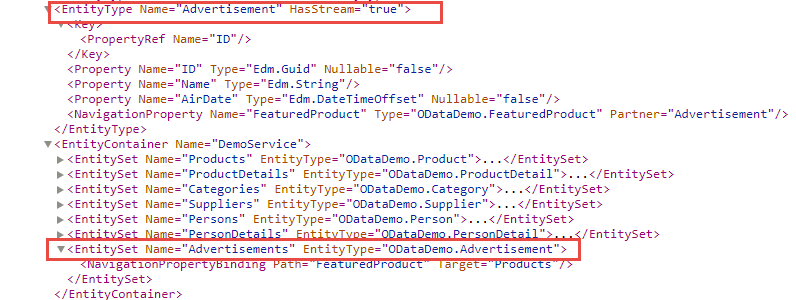
Virtual entity is created with just two out of the box fields primary id and primary field. But we can add custom fields and relationship as required. While adding other custom field keep in mind their data type should be exactly mapped to the data type of the external object’s properties. Apart from these, external object must have a unique key (GUID) which can be mapped to the primary id of virtual entity.
In next article we are going to demonstrate how to write our own OData Wep API for virtual entity, so stay tuned !!
About US
We at HIMBAP are a team of highly skilled Microsoft Dynamics 365/CRM experts, with extensive experience in developing solution for diverse domains, across verticals.Contact US if you are looking for Microsoft Dynamics 365/CRM implementation/Upgrade/Customization/Training help.
*This post is locked for comments