




 1,551
1,551 Like
Like Share
Share
 Report
Managed solutions are a type of solution which prevents unintentional changes to the customizations. You must start by creating an unmanaged solution and then deploy it as a managed solution in another instance of Dynamics 365.

Source: https://msdn.microsoft.com/en-us/library/gg334576.aspx
There are many approaches to defining the scope of a solution. You can make it modular by breaking it into multiple solutions. One extreme is to put all customizations in a single solution. The other extreme is to use multiple solutions in order to make it easier to reuse solutions across Dynamics 365 instances.
For Microsoft Grants Manager, we would use one solution for the standard Grants Manager Plus customizations, and another which contains customizations unique to a particular agency. A third solution is used for the customizations that relate to the PortVue portal.
Be careful about dependencies among solutions, because this can complicate deployment. If you end up with proliferation of too many solutions, you may want to re-examine them and determine whether some should be merged into fewer solutions.
Solutions are a distribution mechanism rather than being designed as a tool for managing a multi-developer project. There are better ways of coordinating coding than to have a solution for each developer. Three ways you could organize team development are:
- Single organization: One master solution
- Single orgnaization: Multiple developer solutions and one master solution
- One organization per developer
You can also apply patches in order to simplify solution updates. Solution patches can contain subcomponents of entities rather than the entire entity, reducing the risk of inadvertently overwriting assets by replacing the entire entity.
You need to consider maintenance implications of Dynamics 365 solutions. For instance, recently we were updating a client's CRM to a new version, only to find that a managed solution was installed that no one recognized.
Solutions are not always backwards compatible to earlier versions of Dynamics 365/CRM, as shown in the following figure:
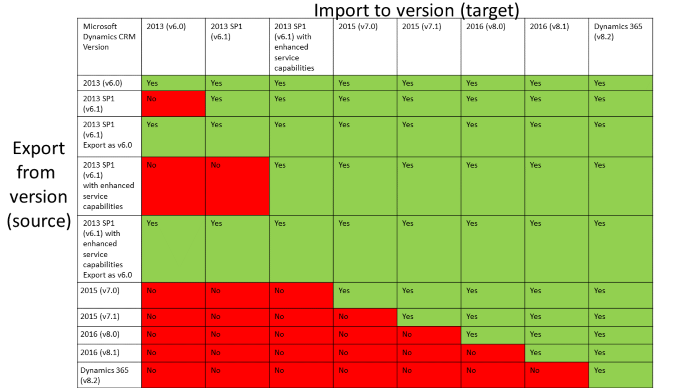
Source: https://msdn.microsoft.com/en-us/library/gg334576.aspx
If you would like to sell your app, you can publish your solution to AppSource, the Microsoft marketplace for Dynamics solutions. AppSource makes your apps visible to the community of Dynamics 365 users.
Note: This post is an updated version based on Planning for Dynamics CRM Solutions.
*This post is locked for comments