




 3,407
3,407 Like
Like Share
Share
 Report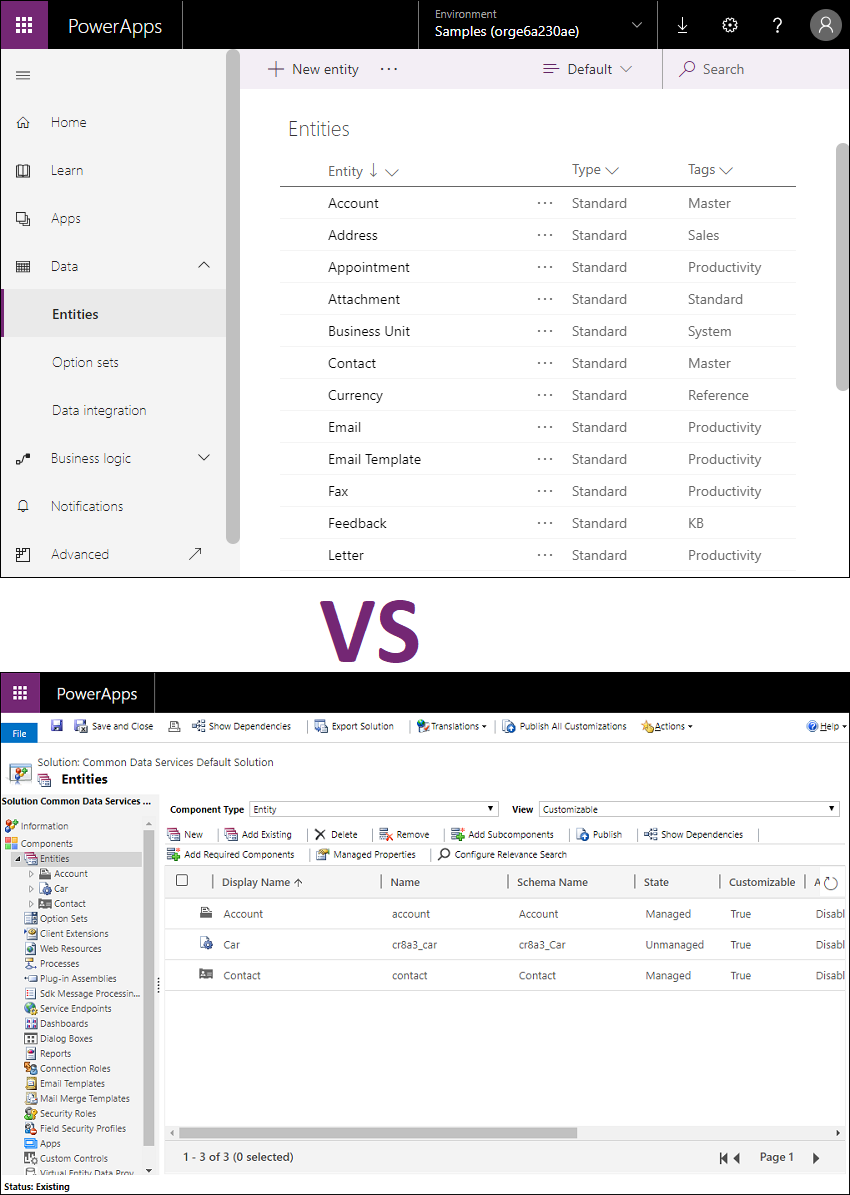
The Classic solution explorer has always been the place where we customise the system since the old Dynamics CRM days, and all system customisers with Dynamics background uses this up to this day. The Power Apps maker portal is where the Power Apps maker customises the Common Data Service, the model-driven apps and other Power Platform components. Since there are a lot of shared components between Power Apps and Dynamics 365, maker portal has been my preferred way to customise the system, especially with the introduction of the new WYSIWYG model-driven form designer and the new view designer for model-driven apps. I start my customisation from maker portal and only when I hit a roadblock due to the feature gap, that I click on the “Switch to classic” button to open up the Classic solution explorer and continue the task which I cannot do yet / not available yet in the maker portal.
But I still find a lot of the consultants within my circle who are reluctant to use the maker portal because of the feature gaps, and unawareness of the new features that are available in the maker portal. If the system customiser has that knowledge, the system customiser can pick up the right tool for the job – as the saying goes, “a tool is only as good as the hands that wield it”– so picking up the right tool for the right job will save you a lot of time and make your work a lot easier and faster to complete.
There is an official Microsoft documentation of feature capability comparison between Power Automate and classic workflow but I could not find one for the feature-capability comparison between Power Apps maker portal vs Classic solution explorer. So, I decided to start one up by myself and maintain it until there is such documentation available from Microsoft which will help the makers and system customisers to transition to the Power Apps maker portal.
This table summarises the comparison between Power Apps maker portal (referred to as “Modern”) and Classic solution explorer (referred to as “Classic”) capabilities.
The list is categorised into the following 5 different tables based on the nature of the capability.
Note: Features which are available in both designers and are redundant/(almost) deprecated features (like "Enable Business Process Flow for Entity", "Phone Express", "Reading pane in Dynamics 365 for Outlook", etc.) are not included in this list.
| Capability | Modern | Classic | Comparison | Remarks |
|---|---|---|---|---|
| Use solution checker | Yes | No | Use solution checker to validate the model-driven apps in Power Apps Ref: https://docs.microsoft.com/en-us/powerapps/maker/common-data-service/use-powerapps-checker | New Feature |
| Manage Canvas Apps | Yes | No | Canvas apps components can only be visible in the maker portal. Ref: https://docs.microsoft.com/en-us/powerapps/maker/canvas-apps/add-app-solution | New Feature |
| Manage Environment Variable | Yes | No | Environment variables are only available in the maker portal. Ref: https://docs.microsoft.com/en-us/powerapps/maker/common-data-service/environmentvariables | New Feature |
| Manage Automated / Scheduled Flows | Yes | No | In the solution designer, flows are shown as Processes with Category "Modern Flow" but those cannot be edited. The new flows cannot be created from the solution designer either, only in the maker portal. Ref: https://flow.microsoft.com/en-us/blog/solutions-in-microsoft-flow/ | New Feature |
| Manage Custom Connectors | Yes | No | Custom connectors are only visible in the maker portal. Ref: https://docs.microsoft.com/en-us/connectors/custom-connectors/customconnectorssolutions | New Feature |
| Add existing AI models | Yes | No | Distributing an AI model using the solution is only available in the maker portal. Ref: https://docs.microsoft.com/en-us/ai-builder/distribute-model | New Feature |
| Add existing Export to Data Lake Configs | Yes | No | Exporting CDS data to Azure Data Lake Ref: https://powerapps.microsoft.com/en-us/blog/exporting-cds-data-to-azure-data-lake-preview/ | New Feature |
| Delete / Remove solution components of different types at the same time | Yes | No | The maker portal allows to delete or remove solution components of different types at the same time, while in the solution explorer, only the same type of components be deleted or removed at the same time. | New Feature |
| Create a new Email Template | No | Yes | The New Email template button is not working currently in the maker portal. | Feature Gap |
| Create a new Process | No | Yes | There is no option to create a new Process (Action, BPF, Workflow) in the maker portal even though the existing processes can be added to the solution. | Feature Gap |
| Add existing Application Ribbon | No | Yes | Adding Application Ribbon to the solution is currently failing with the following error in the maker portal "Failed to add application ribbons. Subcomponent <<GUID>> cannot be added to the solution because the root component RibbonCustomization is missing." | Bug |
| View List of Referenced Components upon Deletion Failure | No | Yes | When a component is being deleted In the maker portal and then failed due to the dependency, the error message says "component cannot be deleted because it is referenced by x other components. For a list of referenced components, use the RetrieveDependenciesForDeleteRequest." There is no easy option to click on the "Details" hyperlink in the error message to pop up the window of "Dependent Components Detected" list as in solution designer. | Feature Gap |
| View Solution Layers | No | Yes | Solution Layers cannot be viewed in the maker portal at this stage. | Feature Gap |
| View Subcomponents within a parent solution | No | Yes | Once a patch is created, everything is disabled in the parent solution which makes it hard to view the sub-components of each component and there is no way to Switch to Classic solution explorer either. | Feature Gap |
| Capability | Modern | Classic | Comparison | Remarks |
|---|---|---|---|---|
| Create an entity faster | Yes | No | When using the Modern Entity Designer to create an entity, the entity will be provisioned in the background and the UI allows you to continue to make any additional customisations. This allows you to create an entity faster in comparison to the Classic entity designer which freezes the screen for a few seconds and does not allow you to continue with your work until the entity creation is completed. Ref: https://powerapps.microsoft.com/en-us/blog/creating-new-entities-is-faster-than-ever/ | New Feature |
| Pre-populate Plural Name | Yes | No | When any noun (e.g. "Happy Child") is entered into the Display Name field, the Modern entity designer will pre-populate the proper Plural Display Name (e.g. "Happy Children"). | New Feature |
| Set Primary Field Property | Yes | Yes | In the Modern entity designer, the properties for Primary Field (other than Display and Schema Name) can only be set in the list of fields after creating an entity. | Different Behaviour |
| Select Primary Image | No | Yes | The Primage Image of the entity cannot be selected in the maker portal at this stage. | Feature Gap |
| Set Entity Colour | N/A | Yes | Theme Settings are not fully implemented in Unified Interface yet as well as the entity colour. No comparison in this area at this stage. | Feature Gap |
| Create as Virtual Entity | No | Yes | Not available in the maker portal, only in the solution explorer at this stage. | Feature Gap |
| Add to Sitemap | N/A | Yes | With the introduction of model-driven app concept, this feature is no longer required. | Feature Gap |
| Set Auditing Settings | No | Yes | Not available in the maker portal, only in the solution explorer at this stage. | Feature Gap |
| Add Entity Subcomponents | Yes | Yes | In the modern entity designer, the subcomponents can only be added by selecting the entity within the solution and it cannot be done from the entity subcomponents list view (e.g. fields, forms, views, etc.) as in solution explorer. | Inferior Feature |
| Select Entity Subcomponents | Yes | Yes | In the modern entity designer, only 4 columns, the Display Name, Name, Field Type, and Managed externally are shown in subcomponents selection of any type. This causes some difficulties in choosing: - Relationships because it is harder to identify the type of relationship (1:N, N:1 or N:N), Display Name of the Other Entity - Business Rules because the Scope and State (Activated, Deactivated) is not available - Views because the View Type is not available - Forms because the Form Type is not available and there can be the forms with the same name (x3 Information forms with different types) | Inferior Feature |
| Include fields for Add Existing Entity | Yes | Yes | "Search fields" textbox is not working (not able to set the cursor) in the field selection for Add Existing Entity in the modern entity designer. | Bug |
| Filter the Entity Subcomponents by Type | Yes | Yes | In the modern entity designer, the list of subcomponents can be filtered to show Managed, Custom, Default or All items, while the solution explorer allows you to filter by All, Custom, Customizable or Mappable. | Different Behaviour |
| Set Managed Properties of the Entity Subcomponents | No | Yes | Not available in the maker portal, only in the solution explorer at this stage. | Feature Gap |
| Show Dependencies of the Entity Subcomponents | No | Yes | Not available in the maker portal, only in the solution explorer at this stage. | Feature Gap |
| View Field Properties in the List | Yes | Yes | In the modern entity designer, some of the field properties are not available in the list view such as the Schema Name, Field Type - Simple/Rollup/Calculated, Field Security, Audit Status, Description. Instead, the list contains some additional components which are not in the solution explorer such as the Type - Standard/Custom, Required and Searchable. | Different Behaviour |
| Display Primary and Related Entity in Relationship Definition | Yes | Yes | The visual presentation of the relationship is better in the modern entity designer to identify which side is Primary (One) entity and which one is Related (Many) entity, which one is the current entity and in which entity the lookup field will be created. | Improved Feature |
| Pre-populate Relationship Name for new Relationship | Yes | Yes | Just as in creating a new lookup field, different entity designers pre-populate the relationship name differently when the new relationship is created. Classic: <Prefix>_<Target Entity Logical Name>_<Current Entity Logical Name>_<Lookup Field Name without prefix> Modern: <Prefix>_<Current Entity Schema Name without Prefix>_<Lookup Field Name without prefix>_<Target Entity Schema Name> | Different Behaviour |
| Set Searchable property of the Relationship | No | Yes | Not available in the maker portal, only in the solution explorer at this stage. | Feature Gap |
| Create Self-referential Hierarchical Relationship | No | Yes | Not available in the maker portal, only in the solution explorer at this stage. | Feature Gap |
| Set Lookup Field Requirement in Relationship Definition | Yes | Yes | In the modern entity designer, the Field Requirement for the Lookup Field can only be set in the list of fields after creating a relationship. | Different Behaviour |
| Update Navigation Pane Item for Primary Entity | No | Yes | Show/hide or change custom label/order of the Related entity (Associated entity Navigation Pane) on the Primary entity of the relationship cannot be done in the modern entity designer. | Feature Gap |
| Add/Remove field Mappings for the Relationship | No | Yes | Not available in the maker portal, only in the solution explorer at this stage. | Feature Gap |
| Delete the Business Rule | No | Yes | Not available in the maker portal, only in the solution explorer at this stage. | Feature Gap |
| Activate / Deactivate the Business Rule from the List | No | Yes | Not available in the maker portal, only in the solution explorer at this stage. | Feature Gap |
| Configure Security Roles to the Form | No | Yes | Not available in the maker portal, only in the solution explorer at this stage. | Feature Gap |
| Specify the Form Order | No | Yes | Not available in the maker portal, only in the solution explorer at this stage. | Feature Gap |
| Activate / Deactivate the Form | No | Yes | Not available in the maker portal, only in the solution explorer at this stage. | Feature Gap |
| Publish the Entity-specific Dashboard | No | Yes | Not available in the maker portal, only in the solution explorer at this stage. | Feature Gap |
| Add Required Components to the Entity-specific Dashboard | No | Yes | Not available in the maker portal, only in the solution explorer at this stage. | Feature Gap |
| Configure Security Roles to the Entity-specific Dashboard | No | Yes | Not available in the maker portal, only in the solution explorer at this stage. | Feature Gap |
| Set the Entity-specific Dashboard as Default | No | Yes | Not available in the maker portal, only in the solution explorer at this stage. | Feature Gap |
| Clone the Entity-specific Dashboard using "Save As" | No | Yes | Not available in the maker portal, only in the solution explorer at this stage. | Feature Gap |
| Export / Import Chart | No | Yes | Not available in the maker portal, only in the solution explorer at this stage. | Feature Gap |
| View Status of new Key and Reactivating for failed indexing job | No | Yes | In the Modern entity designer, there is no way to see whether the newly created key is Active or still Pending. And there is also no option to reactivate entity key for the failed job. | Feature Gap |
| Preview Data of the entity in the system | Yes | No | The Modern entity designer allows previewing the existing data with the Default Public View in the maker portal without opening the model-driven app. Ref: https://powerapps.microsoft.com/en-us/blog/introducing-the-new-view-designer-for-model-driven-apps/ | New Feature |
| Edit data in Excel | Yes | No | The Modern entity designer allows opening entity data in Microsoft Excel to easily view and edit data by using the Microsoft Power Apps Excel Add-in. Ref: https://docs.microsoft.com/en-us/powerapps/maker/common-data-service/data-platform-excel-addin | New Feature |
| Get Data using Power Query | Yes | No | The Modern entity designer allows using Power Query to add data to an existing entity. Ref: https://docs.microsoft.com/en-us/powerapps/maker/common-data-service/data-platform-cds-newentity-pq | New Feature |
| Export data to CSV | Yes | No | One-time data export from a standard entity or custom entity to CSV can be done in the Modern entity designer. Ref: https://docs.microsoft.com/en-us/powerapps/maker/common-data-service/data-platform-import-export#export-data-to-csv | New Feature |
| Export to data lake | Yes | No | There is an option to export to Azure data lake in the Modern entity designer. Ref: https://powerapps.microsoft.com/en-us/blog/exporting-cds-data-to-azure-data-lake-preview/ | New Feature |
| Capability | Modern | Classic | Comparison | Remarks |
|---|---|---|---|---|
| Create/Update fields, key, and relationships in Batch | Yes | No | Unlike the Classic entity designer, the Modern entity designer does not immediately create/update the fields. This allows the user to quickly create/update multiple fields without waiting in-between and all changes can be pushed to the server in batch in the end. With the Modern entity designer, the data type of the attribute can be quickly changed by deleting the attribute and re-creating it with the same name. Modern entity designer pros and cons: Pros: Ability to discard all changes by not saving the entity Cons: Risk of losing all pending changes if the user forget to save the entity Ref: https://docs.microsoft.com/en-us/powerapps/maker/common-data-service/create-edit-field-portal#save-new-field | New Feature |
| Validate Duplicate Field Name / Relationship | Yes | No | If the new field or relationship name is a duplicate, the Modern entity designer shows a warning about the duplicated name even before the field/relationship is saved. | New Feature |
| Enable Field Security | No | Yes | Not available in the maker portal, only in the solution explorer at this stage. | Feature Gap |
| Enable Auditing | No | Yes | Not available in the maker portal, only in the solution explorer at this stage. | Feature Gap |
| Configure field settings for interactive experience dashboards | No | Yes | Not available in the maker portal, only in the solution explorer at this stage. | Feature Gap |
| Create Auto Number Field | Yes | No | Previously this functionality was only exposed through the API, but Auto Number fields can be created in the Modern entity designer now. Ref: https://docs.microsoft.com/en-us/powerapps/maker/common-data-service/autonumber-fields#create-an-autonumber-field | New Feature |
| Create Local Option Set | No | Yes | Maybe this is a feature gap, but I think it is just a hint that there is no benefit of creating local option set. There is no way to create a local option set in the Modern entity designer. | Feature Gap |
| Order Option Set Options | No | Yes | Not available in the maker portal, only in the solution explorer at this stage. | Feature Gap |
| Update Value of Existing Option Set Options | No | Yes | And it is making matters worse when there is no option to Switch to Classic for Global Option Set because it is just a flyout and not a new window. | Feature Gap |
| Set Description and for Option Set Items | No | Yes | Not available in the maker portal, only in the solution explorer at this stage. | Feature Gap |
| Set Colour Code for Option Set and Two Options Items | No | Yes | Not available in the maker portal, only in the solution explorer at this stage. | Feature Gap |
| Define External Type Name and External Value in Global Option Set | No | Yes | Not available in the maker portal, only in the solution explorer at this stage. | Feature Gap |
| Update the default values of a Status Reason (StatusCode) field | No | Yes | Not available in the maker portal, only in the solution explorer at this stage. | Feature Gap |
| Make changes to items of a Status Reason (StatusCode) field | No | Yes | Not available in the maker portal, only in the solution explorer at this stage. | Feature Gap |
| Order Two Options for List Control | N/A | Yes | List Control Formatting for Two Options in the Unified Interface does not consider the order that was set in the Two Options field property. It follows the 0 (i.e. No) then 1 (i.e. Yes) sort order. | Feature Gap |
| Create Image Data Type Attribute | No | Yes | Not available in the maker portal, only in the solution explorer at this stage. | Feature Gap |
| Set IME Mode for Whole Number field | No | Yes | Not available in the maker portal, only in the solution explorer at this stage. | Feature Gap |
| Set IME Mode for Multiple Lines of Text field | No | Yes | Not available in the maker portal, only in the solution explorer at this stage. | Feature Gap |
| Change Format Type of Date and Time field | No | Yes | Somehow, Date and Time and Date Only are considered as a different Data type in Modern entity designer and the system does not allow to change it for existing Date and Time fields. | Bug |
| Pre-populate Relationship Name for Lookup field | Yes | Yes | Even though both entity designers populate the Relationship Name for a new Lookup field, the format is quite different: Classic: <Prefix>_<Target Entity Logical Name>_<Current Entity Logical Name>_<Lookup Field Name without prefix> Modern: <Prefix>_<Current Entity Schema Name without Prefix>_<Lookup Field Name without prefix>_<Target Entity Schema Name> | Different Behaviour |
| Set Maximum file size in File data type field | Yes | No | Maximum file size in File data type field cannot be set in the solution explorer. | New Feature |
| Manage Special Type Fields such as ActivityTypeCode or PartyList fields | No | Yes | Not available in the maker portal, only in the solution explorer at this stage. | Feature Gap |
| Capability | Modern | Classic | Comparison | Remarks |
|---|---|---|---|---|
| Preview live WYSIWYG form for Unified Interface | Yes | No | A live WYSIWYG form preview in the modern form designer enables makers to see exactly how the form will appear to end-users. Ref: https://powerapps.microsoft.com/en-us/blog/introducing-the-new-wysiwyg-model-driven-form-designer-public-preview/ | New Feature |
| Visualise the hierarchy of a form’s fields and controls | Yes | No | The tree view in the modern form designer shows the visual hierarchy of the fields and controls on the form. The icons in the tree view help makers quickly identify the types of fields and controls. Ref: https://powerapps.microsoft.com/en-us/blog/introducing-the-new-wysiwyg-model-driven-form-designer-public-preview/ | New Feature |
| Switch between various form factors (screen sizes) | Yes | No | The form factor switcher in the modern form designer enables makers to preview the responsive behaviour of the form and see how their form will appear on various screen sizes. Makers can also zoom in and out of the preview using the zoom slider or click on the auto-fit button to achieve the best fit based on the available width and height. Ref: https://powerapps.microsoft.com/en-us/blog/introducing-the-new-wysiwyg-model-driven-form-designer-public-preview/ | New Feature |
| Search and filter in the fields list | Yes | No | The fields list in modern form designer supports incremental search as well as the ability to filter and see only custom fields, making the task of finding and adding fields to the form fast and easy. No more browser search (Ctrl + F) as in classic form designer to find the field in a long list. Ref: https://powerapps.microsoft.com/en-us/blog/introducing-the-new-wysiwyg-model-driven-form-designer-public-preview/ | New Feature |
| Save and publish the form in one click | Yes | No | In the modern form designer, save and publish is also a single combined action helping reduce the clicks for one of the most common actions. Ref: https://powerapps.microsoft.com/en-us/blog/introducing-the-new-wysiwyg-model-driven-form-designer-public-preview/ | New Feature |
| Undo changes to the form | Yes | No | Changes in the modern form designer are instantly reflected in the form preview and can also be reverted using the Undo button in the command bar. | New Feature |
| Create a new field | Yes | Yes | When the new field is added in the classic form designer using a non-IE browser, the field is not available immediately and either the form needs to be refreshed or the New Field button needs to be clicked again to see the field. With the modern form designer, the new field is shown up in the list immediately after being created. | Improved Feature |
| Drag and drop OOB Custom Controls | Yes | No | The modern form designer allows to drag and drop limited OOB Custom Control such as Flip, Linear Gauage, Radial Knob, Business Card Reader, etc. in the form. | New Feature |
| Configure High-density Header and Header Flyout | Yes | No | High-density form headers and header flyout can only be configured in the modern form designer Ref: https://docs.microsoft.com/en-us/powerapps/maker/model-driven-apps/form-designer-header-properties | New Feature |
| Visualise one column format of Unified Interface Quick Create Form | Yes | No | Only with the modern form designer, the one-column format of Unified Interface Quick Create Form can be visualised and the classic form designer shows the three-column layout of the legacy web client. Ref: https://powerapps.microsoft.com/en-us/blog/extend-the-power-of-wysiwyg-form-authoring-to-quick-create-and-quick-view-forms/ | New Feature |
| Create Option Set field | No | Yes | Option Set field cannot be created in the modern form designer at this stage. | Feature Gap |
| Create Multi Select Option Set field | No | Yes | Multi Select Option Set field cannot be created in the modern form designer at this stage. | Feature Gap |
| Create Customer field | No | Yes | Customer field cannot be created in the modern form designer at this stage. | Feature Gap |
| Create File field | No | Yes | File field cannot be created in the modern form designer at this stage. | Feature Gap |
| Increase Field Height | Yes | Yes | There is a bug in the modern form designer with increasing the field height of the multiline fields which causes the fields below to shift away to another dimension and make those fields invisible. That issue has been fixed in make.preview.powerapps.com and hopefully, it will be rolled out soon. | Bug |
| Manage Subgrid Additional Options | No | Yes | In the modern form designer, Subgrid Additional Options such as "Display Search Box", "Display Index" are not available. | Feature Gap |
| Turn off automatic resolutions and disable MRU for the Lookup Field | No | Yes | Not available in the maker portal, only in the solution explorer at this stage. | Feature Gap |
| Filter Lookup Field using Related Records Filtering | No | Yes | Not available in the maker portal, only in the solution explorer at this stage. | Feature Gap |
| Change Field/Subgrid Width | No | Yes | Not available in the maker portal, only in the solution explorer at this stage. | Feature Gap |
| Change Control Formatting (e.g. Checkbox, List for Two Options Field) | No | Yes | Not available in the maker portal, only in the solution explorer at this stage. | Feature Gap |
| Update PCF Custom Control of the Field | No | Yes | Not available in the maker portal, only in the solution explorer at this stage. | Feature Gap |
| View the Original Display Name or Schema Name of the Field | No | Yes | Once the field label is changed, there is no way to identify which field it is because there is no way to view the original Display Name or Schema Name of the field in the modern form designer. | Feature Gap |
| Edit the Existing Field from the Form Designer | No | Yes | Not available in the maker portal, only in the solution explorer at this stage. | Feature Gap |
| Manage Form Libraries (JavaScript) and Event Handlers to the Fields | No | Yes | Not available in the maker portal, only in the solution explorer at this stage. | Feature Gap |
| Create / Update Card Form | No | Yes | Not available in the maker portal, only in the solution explorer at this stage. | Feature Gap |
| Capability | Modern | Classic | Comparison | Remarks |
|---|---|---|---|---|
| Add columns using the plus button in the canvas | Yes | No | In the modern view designer, the columns can easily be added using the plus button in the canvas or by selecting fields in the left-hand field drawer. Ref: https://powerapps.microsoft.com/en-us/blog/introducing-the-new-view-designer-for-model-driven-apps/ | New Feature |
| Reorder columns and resize columns using drag-and-drop | Yes | No | With drag-and-drop capabilities in the modern view designer, the columns can easily be reordered and resized to the perfect width. Ref: https://powerapps.microsoft.com/en-us/blog/introducing-the-new-view-designer-for-model-driven-apps/ | New Feature |
| Visualise the view with live preview data | Yes | No | With the live preview in the modern view designer, the makers no longer have to save and publish to determine if the column widths are right. Ref: https://powerapps.microsoft.com/en-us/blog/introducing-the-new-view-designer-for-model-driven-apps/ | New Feature |
| Search and filter in the fields list | Yes | No | The fields list in modern view designer supports incremental search as well as the ability to filter and see only custom fields, making the task of finding and adding fields to the view fast and easy. No more browser search (Ctrl + F) as in classic view designer to find the field in a long list. | New Feature |
| Save and publish the view in one click | Yes | No | In the modern view designer, save and publish is also a single combined action helping reduce the clicks for one of the most common actions. | New Feature |
| Undo changes to the view | Yes | No | Changes in the modern view designer are instantly reflected in the view preview and can also be reverted using the Undo button in the command bar. | New Feature |
| Create a new field | Yes | No | In the modern view designer, a new field can be created as in the modern form designer. | New Feature |
| Sort by more than 2 columns | Yes | No | The modern view designer allows sorting more than two columns which was not possible previously via the user interface in the classic form designer. | New Feature |
| Add filters and sorting inline | Yes | No | The modern view designer allows to add filters and sorting inline by clicking on the arrow beside each column. | New Feature |
| Edit filters using the advanced expression builder | Yes | Yes | For more complex filter, the advanced expression builder can be used to filter on fields which are not in the view. For example, Accounts that do not have any related child Contact records need to be shown. This can be achieved in Advanced Find with “Does not contain data” filter added in version 9.0. But system view with such filter criteria couldn't be created previously due to the limitation of classic view designer. But in advanced expression builder of the modern view designer, the makers have the ability to add any types of available clauses from the Advanced Find to the system views. | Improved Feature |
| Configure Custom Controls for the View | No | Yes | Configuring the Custom Controls for the View (e.g. Editable Grid, Calendar View) is not available in the maker portal, only in the solution explorer at this stage. | Feature Gap |
I will update the list as and when I find more updates to the Power Apps maker portal in the future.
Please leave a comment if you find any missing functionality or any frustrating behaviour with the Power Apps maker portal which is not in the list above and I will include those in the list.
*This post is locked for comments