




 14,419
 Like
Like Share
Share
 Report
Hi all,
This article is for me to remember the colour codes that system indicator style have. I always get confused and always looking for what option will bring what colour in my system indicator style when I select it in my company information.
So if you know if already, you can move ahead and Save some time...
But those who have same issues like me, below is the image which provides you what system indicator style to choose when you set it up in company information.
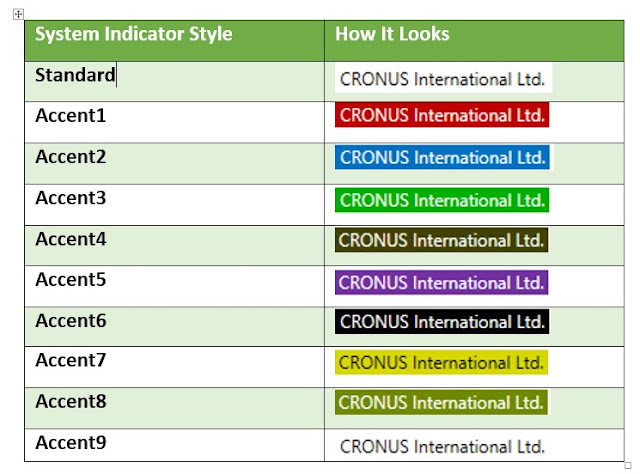
So now I will remember what to choose.
As we are discussing this let me know your views (comments) on what you setup in a Test Database and in a Production Database when you setup a Company.
I Prefer - Accent1 = Test Database (All Companies).
Accent3 = Production Database (All Companies).
Those who don't know what it is -
- It was released with Microsoft Dynamics NAV 2009 R2 (if I am not wrong).
- You can set it up in Company information under system indicator Tab.
Video to help you out how to set it up -
A Tip to developers, if you have multiple companies you can create a batch and run that for all companies using ChangeCompany function to setup system indicator.
Let me know your views.
Regards,
Saurav Dhyani
saurav-nav.blogspot.com
This article is for me to remember the colour codes that system indicator style have. I always get confused and always looking for what option will bring what colour in my system indicator style when I select it in my company information.
So if you know if already, you can move ahead and Save some time...
But those who have same issues like me, below is the image which provides you what system indicator style to choose when you set it up in company information.
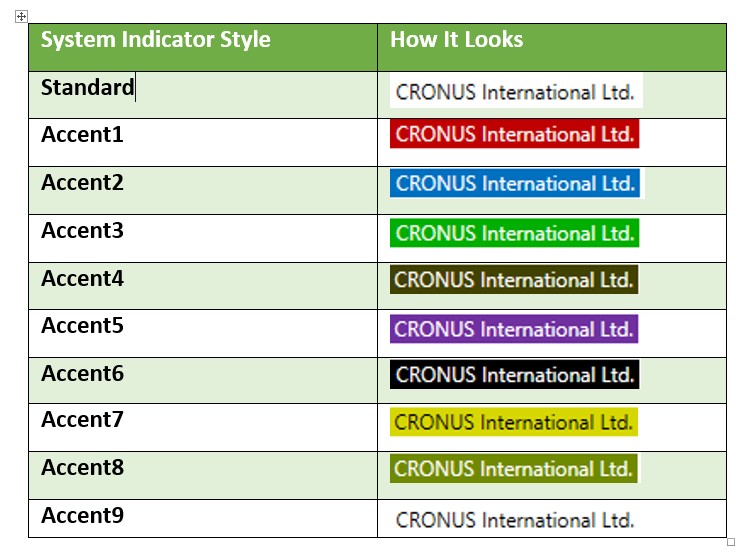
So now I will remember what to choose.
As we are discussing this let me know your views (comments) on what you setup in a Test Database and in a Production Database when you setup a Company.
I Prefer - Accent1 = Test Database (All Companies).
Accent3 = Production Database (All Companies).
Those who don't know what it is -
- It was released with Microsoft Dynamics NAV 2009 R2 (if I am not wrong).
- You can set it up in Company information under system indicator Tab.
Video to help you out how to set it up -
A Tip to developers, if you have multiple companies you can create a batch and run that for all companies using ChangeCompany function to setup system indicator.
Let me know your views.
Regards,
Saurav Dhyani
saurav-nav.blogspot.com
*This post is locked for comments