




 22,769
 Like
Like Share
Share
 Report
The May 2009 Flexible Solutions GP Reports Newsletter brings us a tip for dynamically changing decimal places in Crystal Reports. This can be really useful for creating Sales Order Processing (SOP) reports for Dynamics GP, where GP stores the number of decimal places for each line item in the SOP10200 and SOP30300 tables.
Here are the steps to have Crystal dynamically determine how many decimal places to use for the quantity fields:
-
Right click on the report field and choose Formal Field
-
Go to the Number tab and click Customize
-
Click on the Formula button next to Decimals:

-
Enter the formula that determines how many decimal places to use – the result of the formula will be the number of decimal places the report will use
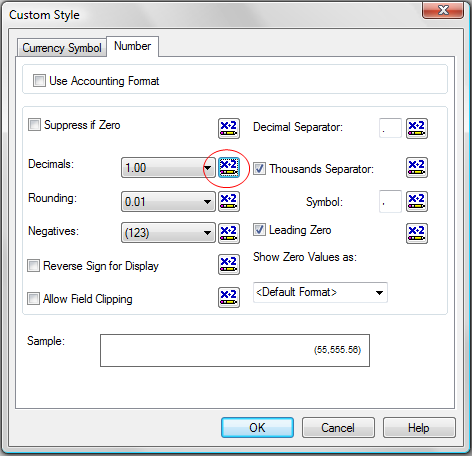
In the Dynamics GP SOP example, for SOP quantities the formula should be:
{SOP10200.DECPLQTY}-1
If you want do use a formula for the currency amounts, use the following:
{SOP10200.DECPLCUR}-1
And check out the latest demo video for GP Reports Viewer showing how easy it is to replace Dynamics GP’s SOP reports with Crystal Reports!
Posted in Crystal Reports, Dynamics GP, GP Reports Tagged: Crystal Reports, Dynamics GP, Sales Order Processing


*This post is locked for comments