




 831
831 Like
Like Share
Share
 Report
As a Dynamics AX Upgrade Factory and ISV Development Center, we find rare and unusual issues when working on the numerous upgrade and development projects we undertake each year. In this series, Dynamics AX Obscurities, we share our experiences, insights and workarounds for these unknowns in hopes to save you time, headaches and costs in your future Dynamics AX upgrade and development project.
With this blog post we want to highlight that at first glance, things may not always be what they seem: like when upgrading from AX 2009 to AX 2012 the data may look to have been migrated incorrectly. In fact, that isn’t the case. Instead, the standard data display has changed in the forms of target AX 2012 solution. Let’s dive into how the issue presents and how to work around it!
Obscure Dynamics AX Issue:
After a standard upgrade from AX 2009 to AX 2012 R3, you cannot directly open original document with which the transaction is posted.
Obscure Dynamics AX Solution:
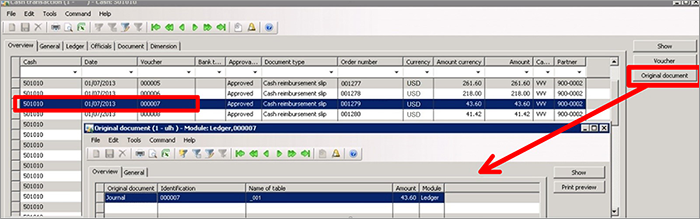
In AX 2009, Bank -> Inquiries -> Cash transactions -> Original document [button] opens the journal where the cash transaction is posted.
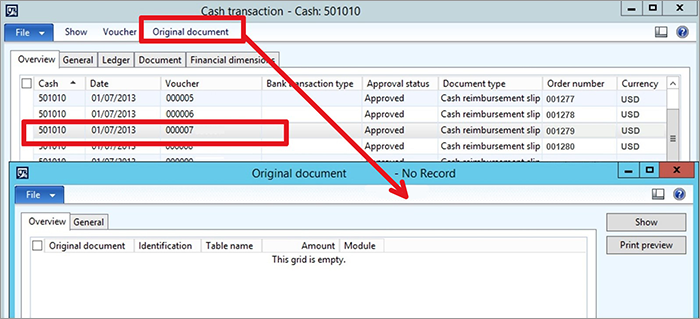
In AX 2012 Cash transaction form “Original document” [action menu] opens blank form and may look like the link is missing.
However, the fact is that all the data is good and the data is linked. You can see this when opening original document from menu Cash and bank management->Inquires -> Cash transactions -> Voucher -> Original document.
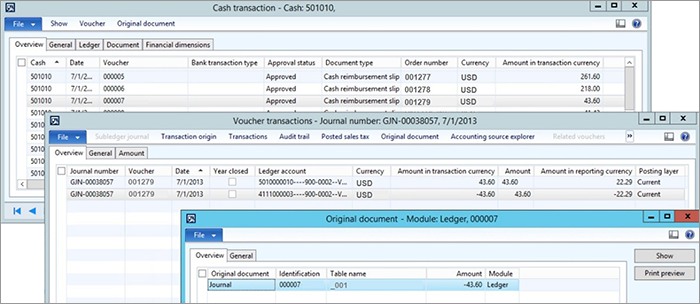
This problem arises from the standard Dynamics AX changes - the action menu Original document in form #RCash works as intended only for RU localization.

As a side note, it is important to realize that a significant part of the cash functionality in AX 2012 is assigned to RU localization. I hope that helps you to save some valuable time.
Happy AX Upgrading!
If you run into a Dynamics AX Obscurity you’d like us to investigate, email our team at: services@1ClickFactory.com.
*This post is locked for comments