




 Like
Like Share
Share
 Report
This may seem pretty basic to many, but it is such a common issue for me that I want to discuss it in the hopes of clarifying it for GP customers.
I sell several ISV "add-on" solutions for Microsoft Dynamics GP. To allow customers to use trial versions of the software, and ultimately license the software to customers, I generate software license keys.
Like the Dynamics GP license keys, my ISV license keys are based on the "Site Name" that is entered in the Dynamics GP Registration window, under the Tools -> Setup -> System -> Registration menu (or Administration page -> System -> Registration).
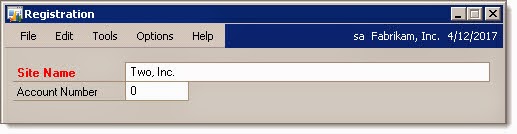
This window is where you type the company name that is provided to Microsoft to generate your Dynamics GP license keys. Microsoft performs some type of hash or calculation with the company name, licensing scheme, and modules to create Dynamics GP license keys that will allow you to use the software and perhaps also additional modules that you have purchased.
When you trial or purchase an ISV "add-on" solution, the ISV typically generates its own separate license key based on the Site Name. So in my case, when a customer wants to try Post Master Enterprise, I ask that the customer send me their exact Site Name so that I can generate a trial key.
Surprisingly, I regularly have customers who don't know what it means to find their Site Name, have a hard time finding their exact site name, or more commonly, they send me the wrong site name.
When finding your Dynamics GP Site Name, every single character matters, and the name must be exact.
The following are five different Site Names:
Consolidated Holding Company Inc
Consolidated Holding Company Inc.
Consolidated Holding Company, Inc
Consolidated Holding Company, Inc.
Consolidated Holdings Company, Inc.
The spelling, spaces, commas, and periods matter. And, I don't know if it matters for the GP reg keys, but for my reg keys, capitalization also matters.
So it matters if you send your ISV a name of "Consolidators Unlimited, Ltd." with a comma and period, or without the comma or period, or with LTD capitalized.
As a side note, I used to ask people to send me a screen shot of their Dynamics GP Help -> About window, as that window shows both the GP version number and the Site Name. But there is a catch.

The Help -> About window has a limited amount of space to display the Site Name. So if the customer has a very long site name, the name will be truncated when it is displayed on the About window. Once I discovered that, I had to stop using the About window as an option.
There is another popular location to find the Dynamics GP site name, and that is in the Microsoft VOICE system where partners can view and manage their registered customers. When I am working with partners, they typically understand the Site Name and the need to get it exact, so they either send me a screen shot from VOICE, or know to get the exact site name from the GP registration window.
To help make make our licensing process a little easier, both I and Envisage Software now display the full site name on our registration key windows.

So when a customer tells us that the license key doesn't work, we ask them to send us a screen shot of the License window so that we can verify the site name. In most cases, the customer missed a comma, period, apostrophe, or misspelled something.
One other problem that I have had is with Microsoft Office and its "Smart Quotes" feature. When a customer emails me their site name, if the site name contains an apostrophe, I can't always copy the name into my license key generator.
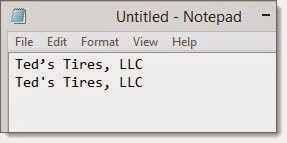
In the above example, the first line was copied from Microsoft Outlook and pasted into Notepad. I typed the second line. Notice that the apostrophe is different. If I generate a license key by copying the first line, I will generate an invalid key--something I did just yesterday. I then need to remember to fix the apostrophe or just re-type the entire name instead.
With that said, I have found that Dynamics GP has a relatively simple and easy licensing system that is very easy for ISV solutions to piggy-back on for their keys. Just make sure to send your ISV your exact site name, exactly as it appears in your GP Registration window!
Steve Endow is a Dynamics GP Certified Trainer and Dynamics GP Certified IT Professional in Los Angeles. He is also the owner of Precipio Services, which provides Dynamics GP integrations, customizations, and automation solutions.
*This post is locked for comments