




 14,419
 Like
Like Share
Share
 Report
Hi all,
During implementation of MultiTenant we have discussed that there are some data common to all companies tables which remain in the application database.
Let's open the application database from SQL Server and see the list.

Now let's open the Windows Client and try to add records in any of these tables.
Yes you end up with an error message saying -
"You do not have permission to insert '' records because the tenant is mounted with the application database as read-only. Contact your system administrator."
Below is the screen shot when i tried to Create a new Chart.
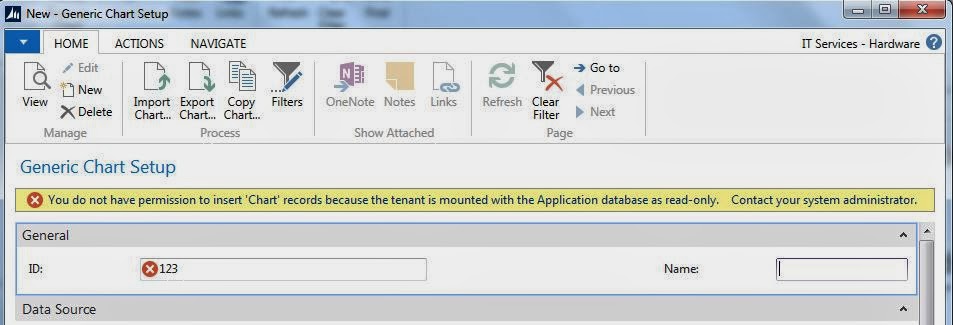
I thought it might be from SQL or NAV. Tried both places but the database was set to read-write mode. Later on i checked the service tier and found the resolution.
Resolution -
1. If you remember in Last Post we discussed about Tenant Configuration file.
2. Let's open the Tenants.config File from the service Instance Folder.
3. Search for Parameter allowAppDatabaseWrite and change the value for all tenant to True as shown below.

4. If you also want NAS to be run on MultiTenant then change the nasServicesEnabled to True as shown below.

5. Restart the Service Instance and we are good to go as shown below.

Regards,
Saurav Dhyani
During implementation of MultiTenant we have discussed that there are some data common to all companies tables which remain in the application database.
Let's open the application database from SQL Server and see the list.
Now let's open the Windows Client and try to add records in any of these tables.
Yes you end up with an error message saying -
"You do not have permission to insert '' records because the tenant is mounted with the application database as read-only. Contact your system administrator."
Below is the screen shot when i tried to Create a new Chart.
I thought it might be from SQL or NAV. Tried both places but the database was set to read-write mode. Later on i checked the service tier and found the resolution.
Resolution -
1. If you remember in Last Post we discussed about Tenant Configuration file.
2. Let's open the Tenants.config File from the service Instance Folder.
3. Search for Parameter allowAppDatabaseWrite and change the value for all tenant to True as shown below.
4. If you also want NAS to be run on MultiTenant then change the nasServicesEnabled to True as shown below.
5. Restart the Service Instance and we are good to go as shown below.
Regards,
Saurav Dhyani
*This post is locked for comments