




 7,396
7,396 Like
Like Share
Share
 Report
Syndicated from - https://d365demystified.com/2019/01/25/d365-quick-tip-why-bpf-wouldnt-appear-in-d365-unified-interface/
Got stuck trying to figure out why the Business Process Flow you created/modified couldn’t be seen in the Unified Interface?
Like I have this BPF called ‘Onboarding Process’

But when I look at the form on the Sales Hub, it won’t show up

And when I Switch Process and try to apply, it won’t apply either

Where could we check to make sure it appears –
- Whether it was Activated.
- Whether it was corrected ordered in the Order Process Flow
- Logged in user had correct privileges to access it.
- Even trying to switch to the process won’t make it appear!
and so on.
But there’s one thing that needs attention when
App Designer is the answer
The reason is the App Designer for the Unified Interface app you are in.
- In this case, the Sales Hub app.
Open the Sales Hub app and look for Business Process Flows section and expand it.

- On the right hand pane, find your BPF and add it in the App Designer

- Once you added, it should appear in the included BPFs. Save and Publish once confirmed
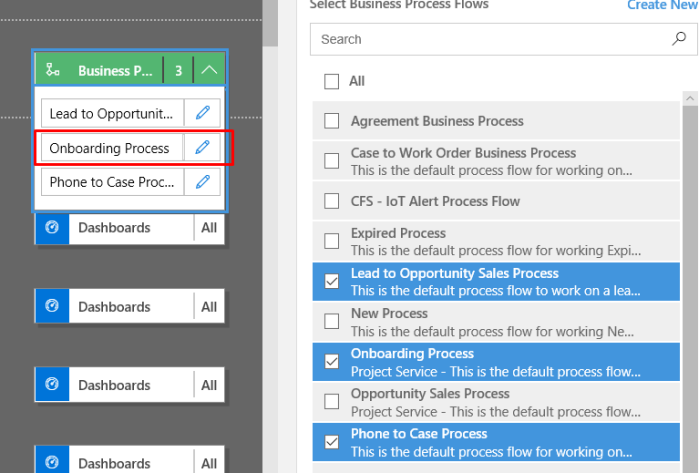
BPF is now applied
Now, your BPF is finally added and you can work on it.

Hope this helped! 
*This post is locked for comments