




 14,419
 Like
Like Share
Share
 Report
Hi Readers,
As we are discussing what's new in Microsoft Dynamics NAV 2017.
Today we will discuss so new changes that have been introduced in Sales & Receivables Setup and Purchases & Payables Setup.
For Already Published articles about NAV 2017, Click Here.
In NAV 2017, Sales & Receivables Setup have three new Fields added -
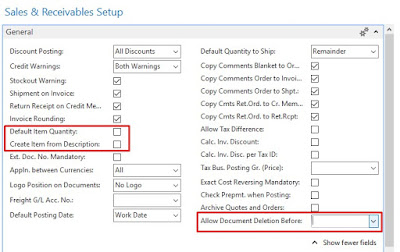
In NAV 2017, Purchases & Payables Setup have one new Fields added -

Allow Document Deletion Before -
After assigning a Date on the Sales and/or Purchase Setup, System will check the Posting Date of Invoice and Cr. Memo when user try to Delete one of these document.
[Refer Codeunit - 363, 364 (IsDocumentDeletionAllowed)]
Default Item Quantity -
Create Item from Description -
As we are discussing what's new in Microsoft Dynamics NAV 2017.
Today we will discuss so new changes that have been introduced in Sales & Receivables Setup and Purchases & Payables Setup.
For Already Published articles about NAV 2017, Click Here.
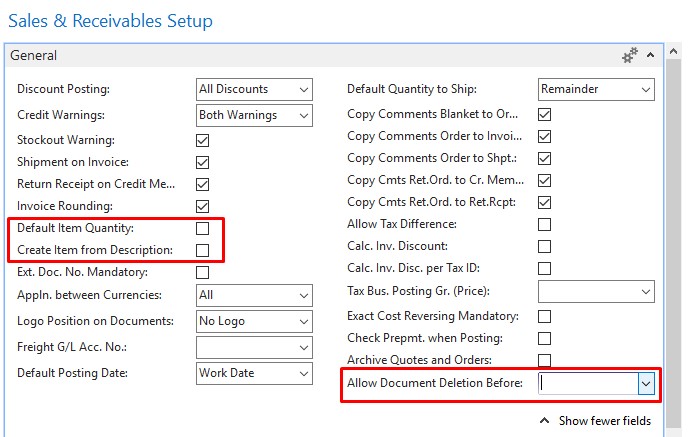
In NAV 2017, Sales & Receivables Setup have three new Fields added -
- Allow Document Deletion Before
- Default Item Quantity
- Create Item from Description
In NAV 2017, Purchases & Payables Setup have one new Fields added -
- Allow Document Deletion Before
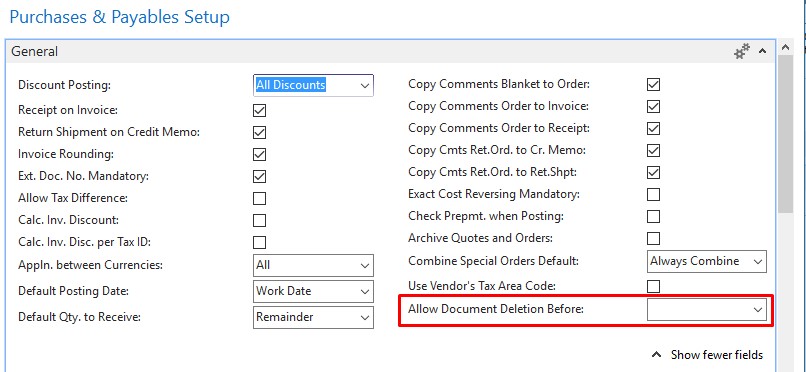
Allow Document Deletion Before -
After assigning a Date on the Sales and/or Purchase Setup, System will check the Posting Date of Invoice and Cr. Memo when user try to Delete one of these document.
[Refer Codeunit - 363, 364 (IsDocumentDeletionAllowed)]
Default Item Quantity -
- The Default Value of the Field is False.
- If we change the value to True in Sales & Receivables Setup, the Default Quantity of a Sales Line of Type Item will automatically set to 1.
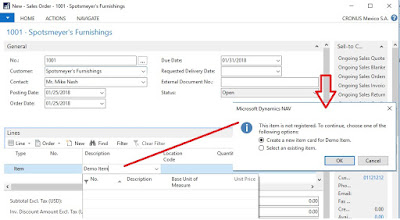
Create Item from Description -
- The Default Value of the Field is False.
- If we change the value to True in Sales & Receivables Setup, and User Enters an Item Description in sales Line that does not exist, the system will prompt the user to create a New item or Select an Item From Existing List, as shown below.

Let me know your views about feature or article.
Stay connected there is a lot more coming for NAV 2017.
Regards,
Saurav Dhyani
*This post is locked for comments