




 6,230
6,230 Like
Like Share
Share
 Report
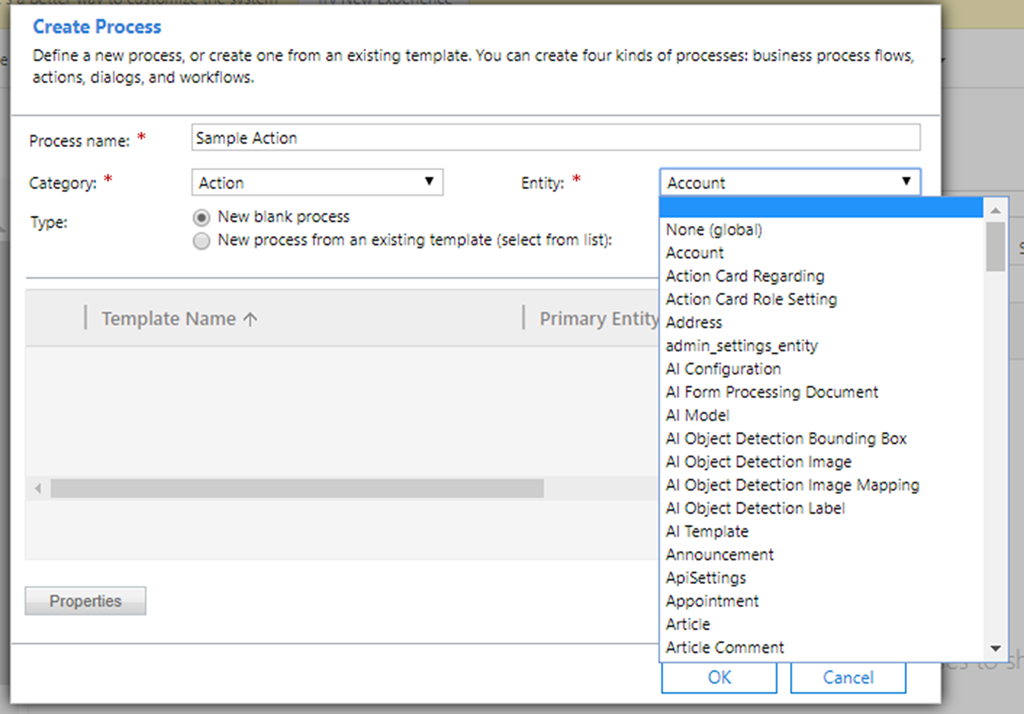
Executing actions from Dynamics 365 Web API is a neat feature that allows you to execute server-side code/functions from the client side. When implementing this there are a few hurdles that I had to overcome, these hurdles came when I was using actions that are bound to an entity rather than an unbound global action. An action can be run under ‘None (global)’ or under a specific entity, we’ll execute an action that is entity bound to Account in this blog.
Setting the parameters
When an action is bound to an entity there’s a few different things you have to do compared to an unbound action, you can read Microsoft’s documentation here. Firstly, set the property ‘boundParameter’ to “entity”, this tells Dynamics 365 that you’re using a bound action. There’s an input parameter that you must set, it’s called ‘entity’. You need to set this parameter, to the bound entity, in this case Account. You can see how I set this in the code below using the 'target' object.
Code:
MAG.fireAction = function (formContext) {
    var accountId = formContext.data.entity.getId();
    accountId = MAG.cleanIdField(accountId);

    var req = {};
    var target = { entityType: "account", id: accountId }
    req.entity = target;

    req.getMetadata = function () {
        return {
            boundParameter: "entity",
            operationType: 0,
            operationName: "mag_SampleAction",
            parameterTypes: {
                "entity": {
                    "typeName": "mscrm.account",
                    "structuralProperty": 5
                }
            }
        }
    };

    Xrm.WebApi.online.execute(req).then(function (response) { alert("Success!") }, function (e) { alert(e.message); });
}

MAG.cleanIdField = function (id) {
    id = id.replace("{", "");
    id = id.replace("}", "");
    return id;
}
}
Cleaning the ID
You may notice when getting the variable ‘accountId’ there’s a function call on the following line that cleans the ID by removing the curly braces. When retrieving an ID of a record from the form context it comes back in the format as shown here: "{3E3F7F97-C510-EA11-A813-000D3A79770C}". Dynamics 365 Web API allows curly braces when passing the ID to the action but when firing logic such as a plugin or a Power Automate Flow off this action, you’ll need to use the function ‘MAG.cleanIdField’ prior to passing it through. This is only needed when you get a ‘Bad Request - Error in query syntax’ error.
In summary, there are some slight nuances between entity bound actions and global actions. I hope that this blog facilitates your development when working with them and the Dynamics 365 Web API.
*This post is locked for comments