




 1,424
1,424 Like
Like Share
Share
 Report
Purpose:
The purpose of this document is to describe how we can quickly post general journals (also known as GL opening balances or simply GL balances) across all the companies in X++.
Business requirement:
Ability to post GL balances across all the companies in X++ along with the posting log.
Prerequisites:
Fiscal periods are open for the relevant periods.
Assumptions:
The number sequence for the Journal batch number contains a constant segment “_GL” to designate it as a GL balance entry. Based on this assumption the given code filters GL balance record from the LedgerJournalTable.
Development:
1. Create a posting log table MAKLedgerJournalPostLog with the following fields:
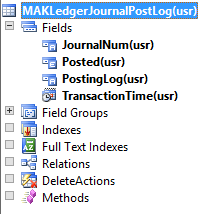
where,
JournalNum – uses LedgerJournalId EDT
Posted – uses NoYesId EDT
PostingLog – uses Log EDT
TransactionTime – uses DateTimeExecuted EDT
2. Create an AOT job with the following code:
static void MAKLedgerJournalPost(Args _args)
{
    LedgerJournalTable      ledgerJournalTable;
    LedgerJournalName       ledgerJournalName;
    LedgerJournalCheckPost  ledgerJournalValiate, ledgerJournalPost;
    Log                     errorMessage;
    SysInfologEnumerator    sysInfologEnumerator;
    MAKLedgerJournalPostLog postingLogTable;

    //Private method
    void insertLog(log _log, ledgerjournalid _journalNum, NoYes _post)
    {
        postingLogTable.clear();
        postingLogTable.PostingLog = _log;
        postingLogTable.JournalNum = _journalNum;
        postingLogTable.TransactionTime = DateTimeUtil::utcNow();
        postingLogTable.Posted = _post;
        postingLogTable.insert();
        infolog.clear();
    }

    delete_from postingLogTable;

    while select crossCompany * from ledgerJournalTable
        where ledgerJournalTable.JournalNum like '*_GL*'
            && ledgerJournalTable.Posted == NoYes::No
    {
        try
        {
            changeCompany(ledgerJournalTable.dataAreaId)
            {
                ledgerJournalName = LedgerJournalName::find(ledgerJournalTable.JournalName);
                ledgerJournalValiate = ledgerJournalCheckPost::newLedgerJournalTable(
                    ledgerJournalTable,
                    NoYes::No);

                ledgerJournalValiate.run();

                if (!ledgerJournalValiate.tableErrorLog())
                {
                    ledgerJournalPost = ledgerJournalCheckPost::newLedgerJournalTable(
                        ledgerJournalTable,
                        NoYes::Yes);

                    ledgerJournalPost.run();

                    insertLog(
                        ledgerJournalValiate.tableErrorLog(),
                        ledgerJournalTable.JournalNum,
                        NoYes::Yes);
                }
                else
                {
                    insertLog(
                        ledgerJournalValiate.tableErrorLog(),
                        ledgerJournalTable.JournalNum,
                        NoYes::No);
                }
            }
        }
        catch(Exception::Error)
        {
            sysInfologEnumerator = SysInfologEnumerator::newData(infolog.infologData());
            errorMessage = "";

            while (sysInfologEnumerator.moveNext())
            {
                errorMessage += sysInfologEnumerator.currentMessage() + "; ";
            }

            insertLog(
                errorMessage,
                ledgerJournalTable.JournalNum,
                NoYes::No);
        }
    }

    info("Posting completed. Please check log for posting results.");
}
3. After running the above AOT job, you can find the posting log by querying records in table MAKLedgerJournalPostLog from SQL server client.


*This post is locked for comments