




 45,095
 Like
Like Share
Share
 Report
So finally customer data type is available in Dynamics CRM 2016, let’s see how it can be useful in your next CRM Implementation. In Dynamics CRM customer information can be stored using two entities Account and Contact.
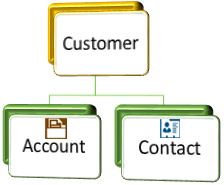
Generally account is used to represent a company whereas contact is used to represent individual clients or a point of contact from some company. Depending on the requirement sometime we use account and sometime we use contact to store customer information, but some time a record can be related to account or contact, for example case. We many get a support case request from account or contact. To deal these kind of requirements some of the CRM entity contains a special Customer lookup field which is a system field. Following are the list of entity which have Customer lookup, where we can set account or contact:
- Case
- Lead
- Opportunity
- Quote
- Order
- Invoice
- Contract
Earlier there was no supported way to create similar type of lookup, so when we need to deal with customer we need to create two separate lookup one for account and one for contact. But with the release Dynamics CRM 2016 update 1, we can create new customer lookup. Let’s see how we can create customer field in our custom entity.
- Navigate to Settings->Customizations->Customize the System.
- Navigate to your custom entity -> Fields->New.
- Select Customer data type from data type dropdown and you will see Relationship Names like below. It will setup two N:1 relationship between your custom entity and account, similarly with contact entity.
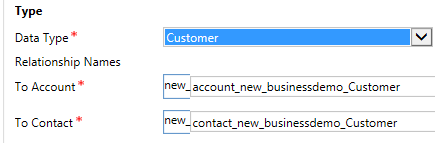
After placing this lookup field we can set account or contact in this field. 
Now next time if you need to deal with customer, no need to create two lookup and if you are already using two lookup in your custom entities, you can create customer field and can use on-demand workflow to copy value from old lookups to new customer lookup.
Stay tuned for more updates !!
Follow @HimbapinfoHIMBAP | Need any help in Microsoft CRM Contact US
*This post is locked for comments