




 22,784
 Like
Like Share
Share
 Report
 This post is part of the In Microsoft Dynamics 365 Business Central (Administration), how do I… series and of the wider In Microsoft Dynamics 365 Business Central, how do I… series which I am posting as I familiarise myself with Microsoft Dynamics 365 Business Central.
Having just finished posting a series on the New Functionality In Microsoft Dynamics 365 Business Central 2022 Wave 2, I thought it might be useful to take a quick look at the rollout timeline for Dynamics BC.
There was a lot of changes in recent years to the Microsoft Dynamics GP rollout timeline in recent years, which I was working with until quite recently. I think the rollout timeline for Dynamics BC also went through some flux at the same time, but both have now settled down to a regular cadence.
There are two types of update for Dynamics BC; major and minor.
New capabilities roll out in “release waves” which consist of both major and minor updates. The series I just finished posting, was the announcement of the release wave from October to March and included both major and minor releases staged throughout that time period. While most of the new functionality comes in the major update, some will become at later times in minor updates and critical updates will be rolled out as soon as possible after they pass testing.
Major updates are released twice a year with availability typically in early April and early October; previews and sandboxes are usually available four to five weeks before this date so that you can do testing prior to rollout starting.
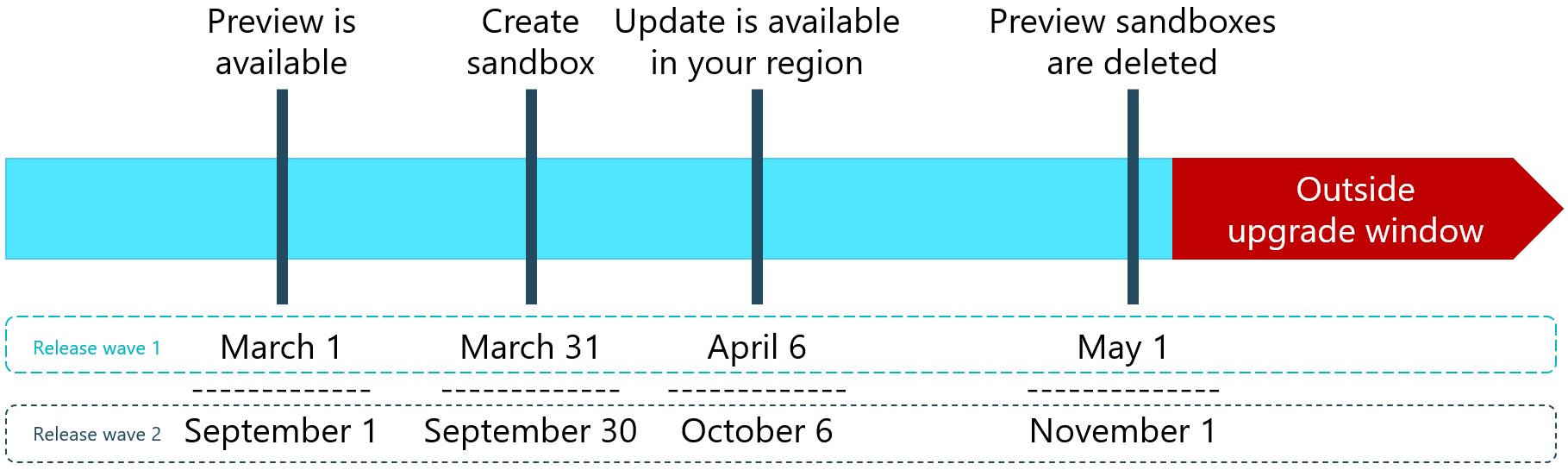
When a release is about to begin, the general dates you will need to work around are:
- 1st March or 1st September when previews are available and you can create a new sandbox environment on the new preview for test purposes (see here for more details).
- 31st March or 30th September is when you should create a new sandbox environment based on your production environment in readyness for the release rollout to start.
- 6th April or 5th October when the update is available in your region and you can roll it out to the sandbox you created based on your production environment. The update date for your production environment should be weeks, rather than days, later than the sandbox update date so you have time to fully test you system to ensure there won;t be issues, or if there are, that you have time to resolve them before live is updated.
- 1st May or 1st November when Microsoft will delete the preview sandboxes; there is no option to retain these or export any data.
Full details of the process can be found on the Update Rollout Timeline page.
In addition to the twice yearly major rollouts there are also monthly minor rollouts which will usually be critical improvements and regulatory updates. You can choose when to schedule these updates, but if you do not schedule or apply an update within 30 days then Microsoft will do this for you. With Dynamics BC you can only delay an update for a very short time.
In Microsoft Dynamics 365 Business Central, how do I…
Read original post In Microsoft Dynamics 365 Business Central (Administration), how do I… Understand the Update Rollout Timeline at azurecurve|Ramblings of an IT Professional
*This post is locked for comments