




 2,500
2,500 Like
Like Share
Share
 Report
Open source Exchange rate provider on Codeplex [AX 2012]
Now I will show how you can use the same framework to import from a folder. I didn’t want to modify the dialog for allowing a file. I wanted to have a low code foot print and decided to go with the folder import option.Lets see how it work.
1. Set up the Configure exchange rate providers form. You will see some key value pairs to used as parameters. They are self explanatory.
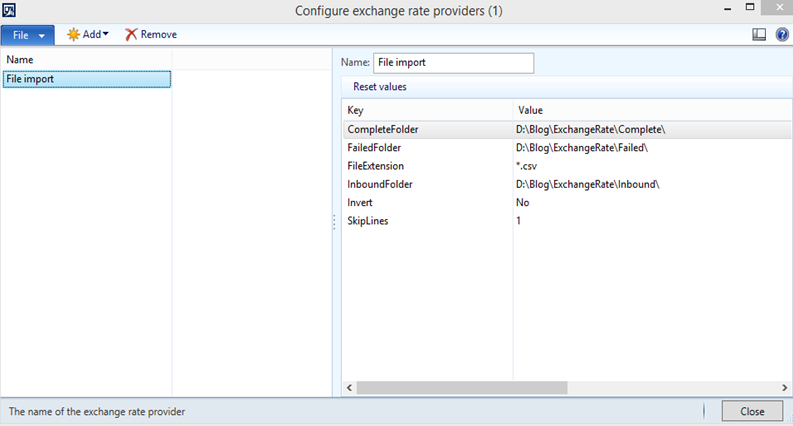
2. Drop the csv file in the Inbound folder. If it is successfully imported, it will move the complete folder. If it is failed to import, it will move to the failed folder.
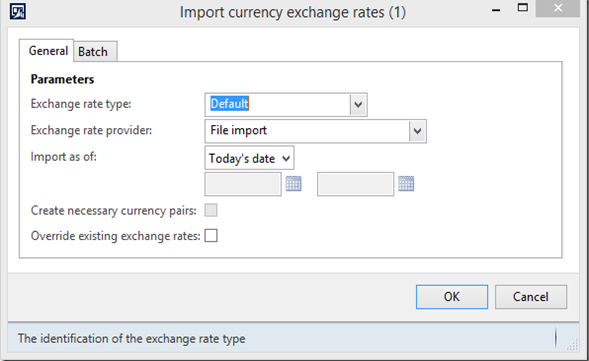
3. Run the import. It is not completely respecting the parameters. I haven’t coded that yet. But you get the idea.
Once again, I xpo is available on codeplex as a patch.
https://www.codeplex.com/Download?ProjectName=ax2012exchangerateproviders&DownloadId=982682
*This post is locked for comments