web
You’re offline. This is a read only version of the page.
close
Skip to main content

Notifications

Announcements

No record found.

Community site session details

Community site session details

Session Id :

In Microsoft Dynamics 365 Business Central (Administration), how do I… Use Company Badges to Identify Companies or Environments

Ian Grieve Profile Picture Ian Grieve 22,784
Microsoft Dynamics 365 Business CentralThis post is part of the In Microsoft Dynamics 365 Business Central (Administration), how do I… series and of the wider In Microsoft Dynamics 365 Business Central, how do I… series which I am posting as I familiarise myself with Microsoft Dynamics 365 Business Central.

one of the new items of new functionality in Dynamics BC 2022 Wave 2 is the “company badges” which was announced as part of the switch companies across environments enhancement.

Company badges are shown in the app bar at the top of the window next to the environment identifier. The company badges are set on the Company Information page which you can access by searching for comp inf and selecting Company Information under Go to Pages and Tasks:
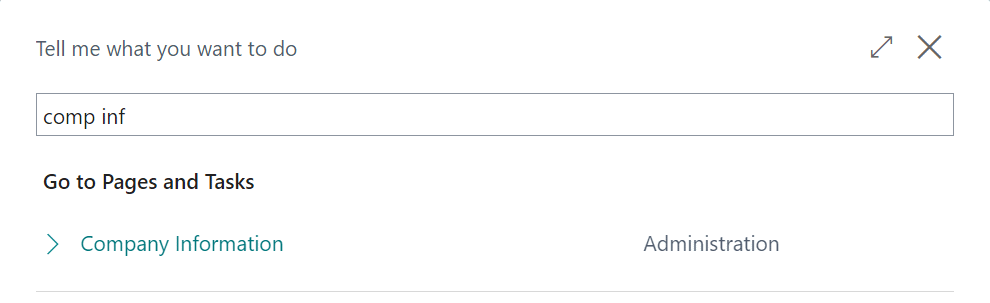
Search results for comp inf

The Company Badge fasttab has three fields which you can set for the badge you want to add;

  • Company Badge which has options of None (the default) and Custom which you need to set it to for a badge to show.
  • Company Badge Style which has ten colours to choose from. I’d generally recommend picking one colour per environment so you can tell at a glance if you’re in production (or potentially different production environments should you have more than one), test, development and so on.
  • Company Badge Text which can be up to six characters long.
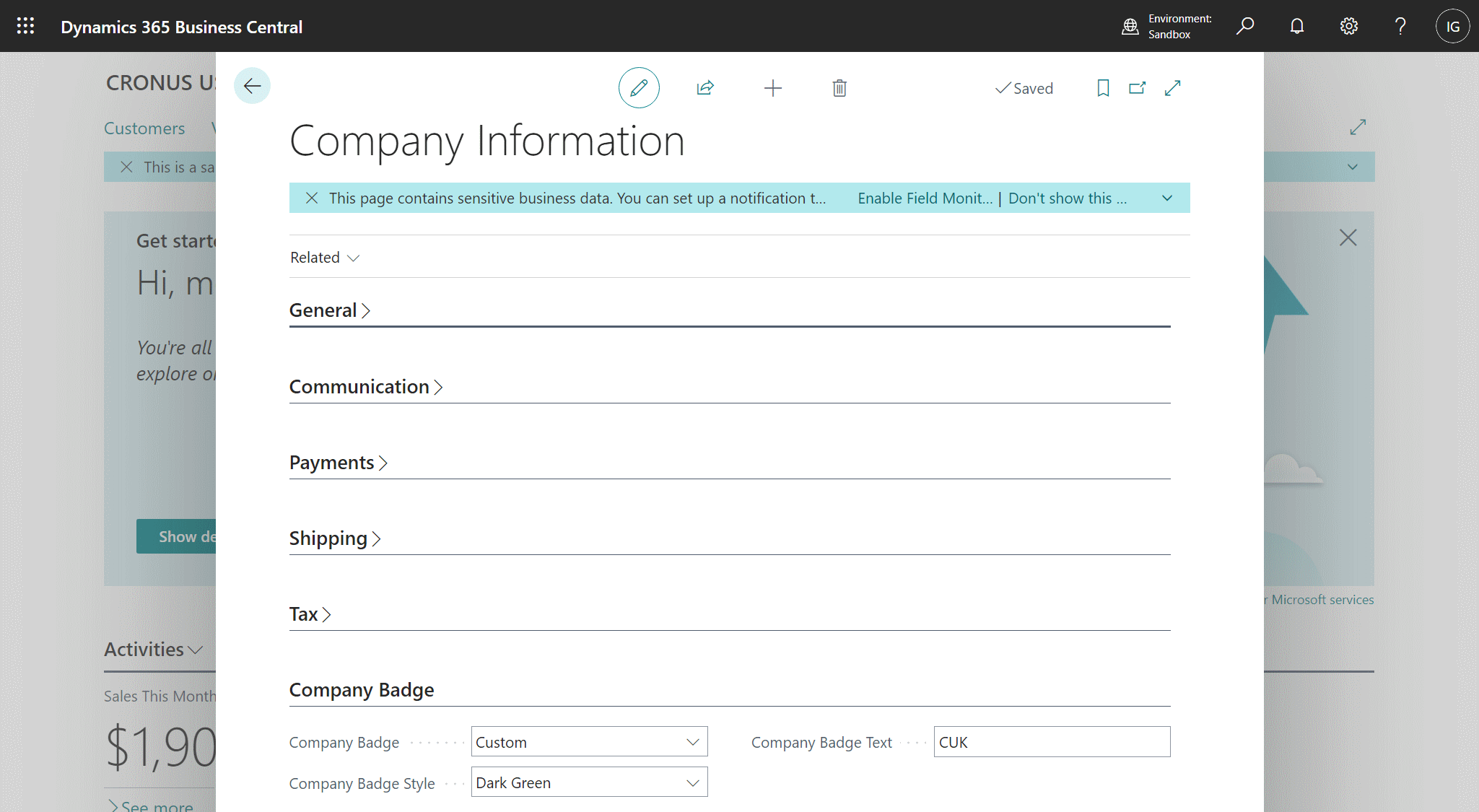
Company Information Page

Once you’ve set these values, close the window to save the change; Dynamics BC will automatically refresh to show the company badge in the app bar.

You can click on the app bar to switch between environments:
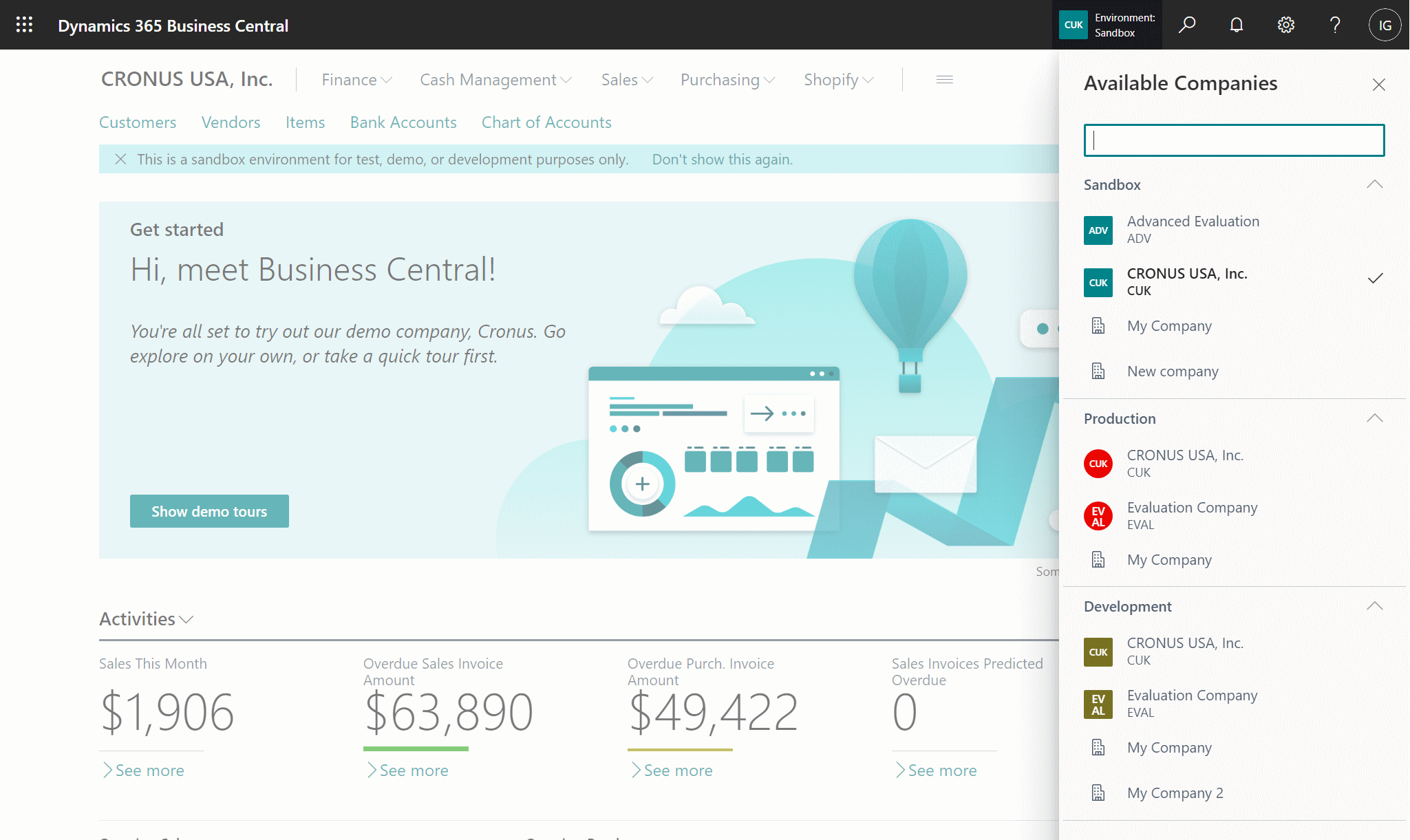
App switching

As you can see in thr example above, my production environment uses red badges, sandbox uses dark green and development uses dark yellow.

One difference between environments, which you can’t change, is that production environments use circle company badges and sandboxes use square ones.

In Microsoft Dynamics 365 Business Central, how do I…

In Microsoft Dynamics 365 Business Central, how do I…
In Microsoft Dynamics 365 Business Central, how do I… Sign Up For a Trial
In Microsoft Dynamics 365 Business Central, how do I… Get Access to the Microsoft 365 Admin Center
In Microsoft Dynamics 365 Business Central, how do I… Create a Company
In Microsoft Dynamics 365 Business Central, how do I… Copy a Company
In Microsoft Dynamics 365 Business Central, how do I… Switch Between Companies
In Microsoft Dynamics 365 Business Central, how do I… Create a Sandbox Environment With Cronus
In Microsoft Dynamics 365 Business Central, how do I… Access Dynamics BC Admin Centre
In Microsoft Dynamics 365 Business Central, how do I… Create a Sandbox Environment With a Copy of Production
In Microsoft Dynamics 365 Business Central, how do I… Create a User
In Microsoft Dynamics 365 Business Central, how do I… Add a User In 365 Admin Center
In Microsoft Dynamics 365 Business Central, how do I… Add a User in Dynamics BC
In Microsoft Dynamics 365 Business Central, how do I… Change My Role
In Microsoft Dynamics 365 Business Central, how do I… Create an Advanced Evaluation Company
In Microsoft Dynamics 365 Business Central (Administration), how do I… Understand the Role Center
In Microsoft Dynamics 365 Business Central, how do I… Change the User Experience in a Company from "Essentials" to "Premium"
In Microsoft Dynamics 365 Business Central (Administration), how do I… Understand the Update Rollout Timeline
In Microsoft Dynamics 365 Business Central, how do I… Hide the Teaching Tips
In Microsoft Dynamics 365 Business Central (Administration), how do I… Set Update Date
In Microsoft Dynamics 365 Business Central (Administration), how do I… Set Update Window
In Microsoft Dynamics 365 Business Central (Administration), how do I… Extend Trial
In Microsoft Dynamics 365 Business Central (Administration), how do I… Understand Search
In Microsoft Dynamics 365 Business Central (Administration), how do I… Understand the Types of Pages Available
In Microsoft Dynamics 365 Business Central (Administration), how do I… Know Which Keyboard Shortcuts Are Available
In Microsoft Dynamics 365 Business Central (Administration), how do I… Switch Between Companies
In Microsoft Dynamics 365 Business Central (Administration), how do I… Use List Pages
In Microsoft Dynamics 365 Business Central (Administration), how do I… Use Advanced Filters on Lists
In Microsoft Dynamics 365 Business Central (Administration), how do I… Use Card Pages
In Microsoft Dynamics 365 Business Central (Administration), how do I… Understand the FactBox
In Microsoft Dynamics 365 Business Central (Administration), how do I… Understand the Action Bar
In Microsoft Dynamics 365 Business Central (Administration), how do I… Use Company Badges to Identify Companies or Environments
In Microsoft Dynamics 365 Business Central (Customisation), how do I… Personalize a Page
In Microsoft Dynamics 365 Business Central (Customisation), how do I… Remove Personalization from a Page
In Microsoft Dynamics 365 Business Central (Customisation), how do I… Personalize Card Pages
In Microsoft Dynamics 365 Business Central (Customisation), how do I… Understand the Best Way of Customising a Card Page
In Microsoft Dynamics 365 Business Central (Customisation), how do I… Personalize the FactBox
In Microsoft Dynamics 365 Business Central (Customisation), how do I… Personalize the Action Bar
In Microsoft Dynamics 365 Business Central (Customisation), how do I… Understand the Best Way of Personalizing the Action Bar
In Microsoft Dynamics 365 Business Central (Customisation), how do I… Create Customizations for Other Users Using Profiles
In Microsoft Dynamics 365 Business Central (Customisation), how do I… Copy Profile Personalizations to Another Environment
In Microsoft Dynamics 365 Business Central (Administration), how do I…
In Microsoft Dynamics 365 Business Central, how do I… Sign Up For a Trial
In Microsoft Dynamics 365 Business Central, how do I… Get Access to the Microsoft 365 Admin Center
In Microsoft Dynamics 365 Business Central, how do I… Create a Company
In Microsoft Dynamics 365 Business Central, how do I… Copy a Company
In Microsoft Dynamics 365 Business Central, how do I… Switch Between Companies
In Microsoft Dynamics 365 Business Central, how do I… Create a Sandbox Environment With Cronus
In Microsoft Dynamics 365 Business Central, how do I… Access Dynamics BC Admin Centre
In Microsoft Dynamics 365 Business Central, how do I… Create a Sandbox Environment With a Copy of Production
In Microsoft Dynamics 365 Business Central, how do I… Create a User
In Microsoft Dynamics 365 Business Central, how do I… Add a User In 365 Admin Center
In Microsoft Dynamics 365 Business Central, how do I… Add a User in Dynamics BC
In Microsoft Dynamics 365 Business Central, how do I… Change My Role
In Microsoft Dynamics 365 Business Central, how do I… Create an Advanced Evaluation Company
In Microsoft Dynamics 365 Business Central (Administration), how do I… Understand the Role Center
In Microsoft Dynamics 365 Business Central, how do I… Change the User Experience in a Company from "Essentials" to "Premium"
In Microsoft Dynamics 365 Business Central (Administration), how do I… Understand the Update Rollout Timeline
In Microsoft Dynamics 365 Business Central, how do I… Hide the Teaching Tips
In Microsoft Dynamics 365 Business Central (Administration), how do I… Set Update Date
In Microsoft Dynamics 365 Business Central (Administration), how do I… Set Update Window
In Microsoft Dynamics 365 Business Central (Administration), how do I… Extend Trial
In Microsoft Dynamics 365 Business Central (Administration), how do I… Understand Search
In Microsoft Dynamics 365 Business Central (Administration), how do I… Understand the Types of Pages Available
In Microsoft Dynamics 365 Business Central (Administration), how do I… Know Which Keyboard Shortcuts Are Available
In Microsoft Dynamics 365 Business Central (Administration), how do I… Switch Between Companies
In Microsoft Dynamics 365 Business Central (Administration), how do I… Use List Pages
In Microsoft Dynamics 365 Business Central (Administration), how do I… Use Advanced Filters on Lists
In Microsoft Dynamics 365 Business Central (Administration), how do I… Use Card Pages
In Microsoft Dynamics 365 Business Central (Administration), how do I… Understand the FactBox
In Microsoft Dynamics 365 Business Central (Administration), how do I… Understand the Action Bar
In Microsoft Dynamics 365 Business Central (Administration), how do I… Use Company Badges to Identify Companies or Environments

Read original post In Microsoft Dynamics 365 Business Central (Administration), how do I… Use Company Badges to Identify Companies or Environments at azurecurve|Ramblings of an IT Professional


This was originally posted here.

Comments

*This post is locked for comments