The Day My Code Quietly Killed Performance…
The Painful Beginning
It was one of those perfect days.
Deployment went smooth.
No errors. No complaints.
Everything looked… stable.
Until it didn’t.
Calls started coming in:
- “System is slow.”
- “Forms are taking forever to load.”
- “Something feels off.”
At first, it didn’t look serious. Maybe a temporary glitch.
But within an hour, it was clear — this wasn’t normal slowdown.
This was something deeper.
The Usual Blame Game
Naturally, I started with the usual suspects:
- Database issue?
- Network lag?
- Batch jobs running wild?
Everything looked fine.
Which made it worse.
The Real Culprit
After digging through traces and code, I found it.
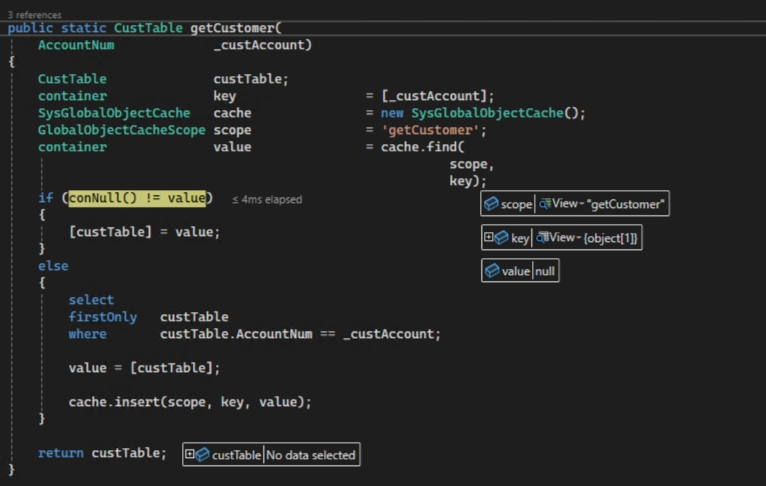
A very simple method:
Nothing fancy. Nothing suspicious.
But here’s the catch:
- This method was being called thousands of times
- With the same input
- Inside loops
And this wasn’t just theoretical. It was happening everywhere:
- Sales orders with hundreds of lines calling it repeatedly
- Data imports processing thousands of records
- Batch jobs looping through transactions
- Forms calling it in display methods again and again
Meaning…
👉 Same query
👉 Same result
👉 Repeated database hits
Again. And again. And again.
The Moment of Realization
The issue wasn’t complexity.
It was repetition.
I wasn’t doing anything wrong logically…
But I was doing the same thing unnecessarily.
“Wait… Why Am I Asking This Again?”
Somewhere during debugging, it hit me:
👉 "Why am I asking the database the same question again and again?”
It felt like:
“Hey, give me customer data.”
“Thanks.”
“Hey… give me customer data again.”
“Thanks.”
“Hey… just one more time…”
At that point, even the database was like:
👉 “Bro… just remember it.”
And that’s exactly what this does: SysGlobalObjectCache
This is where things changed.
Think of SysGlobalObjectCache as:
👉 A shared memory space for your application
👉 A place to store and reuse results
👉 A way to avoid hitting the database repeatedly
Fixing the Problem
Here’s how the same method looks with caching:
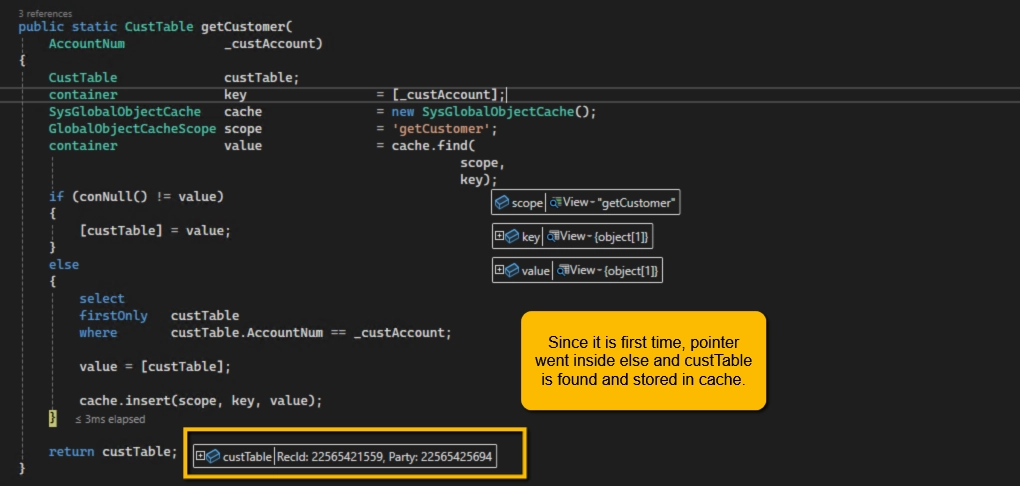
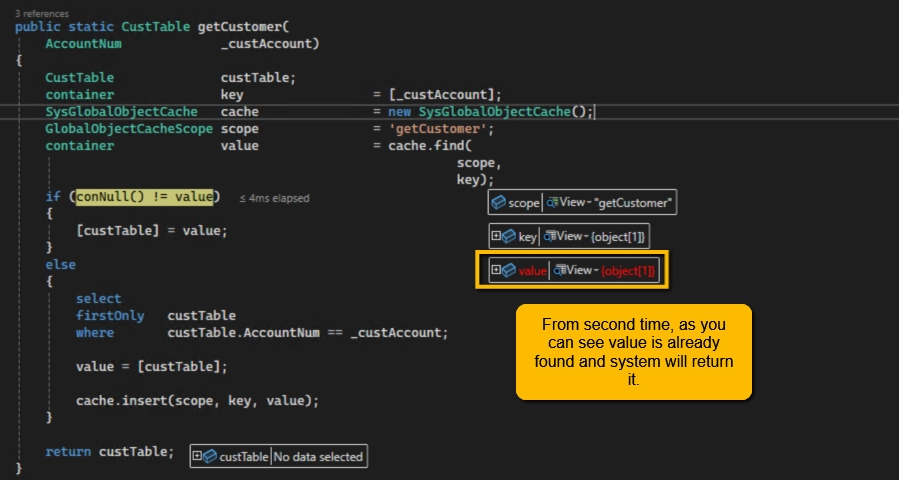
What Actually Changed?
| Scenario | Without Cache | With Cache |
|---|
| DB Calls | Thousands | Just one |
| Performance | Slow | Fast |
| Work Done | Repeated | Reused |
Simple Way to Think About It
You ask someone a question.
They answer.
Instead of remembering it, you ask again… every time.
At some point, the problem isn’t the answer — it’s that you refuse to remember it.
That’s exactly what caching solves.
When Should You Use It?
Good use cases:
- Repeated lookups with same input
- Data that doesn’t change frequently
- Configuration or reference data
When to be careful:
- Large datasets
- Frequently changing data
- Situations where stale data can cause issues
One Important Thought
Caching improves performance…
But it also introduces responsibility.
You need to think about:
👉 When to cache
👉 What to cache
👉 When to refresh
"Can I Just Keep Caching?”
When I first discovered `SysGlobalObjectCache`, my instinct was:
👉 “Let’s cache everything!”
But here’s the reality…
Is There a Limit?
There’s no fixed limit like 1000 or 5000 entries.
You can keep adding more.
But the real limit is:
👉 Memory (AOS/server memory)
Where Things Go Wrong, If you cache:
- Too many entries
- Large objects
- Data that is rarely reused
Then you’re not improving performance…
👉 You’re just shifting load from database → memory
Simple Rule
Before caching, ask:
👉 “Will I reuse this?”
If not, don’t cache it.
“Cache smart, not everything.”
Clearing the Cache (Important!)
Sometimes, you fix the code…but the system still behaves the same.
That’s when cache might be holding old data.
You can clear it using:
- Running SysFlushAOD
- Or clearing cache from the UI (depending on your access and environment)
Always remember:
👉 If data feels outdated, cache is often the reason.
Most performance problems are not because the system is weak.
They happen because:
👉 We make the system do the same work repeatedly
“Performance is not just about speed — it’s about avoiding unnecessary work.”


