web
You’re offline. This is a read only version of the page.
close
Skip to main content

Notifications

Announcements

No record found.

Community site session details

Community site session details

Session Id :

New Functionality In Microsoft Dynamics 365 Business Central 2023 Wave 1: Modern Tooltips Are Easy To Read And Understand

Ian Grieve Profile Picture Ian Grieve 22,784
Microsoft Dynamics 365 Business CentralThis post is part of the New Functionality In Microsoft Dynamics 365 Business Central 2023 Wave 1 series in which I am taking a look at the new functionality introduced in Microsoft Dynamics 365 Business Central 2023 Wave 1.

The second of the new functionality in the Onboarding section is Modern Tooltips Are Easy To Read And Understand.

A smooth experience onboarding to Business Central is important to quickly becoming productive and getting return on investment. Tooltips for fields play an important role in understanding the values and purposes of fields, and how they fit into business processes.

Enabled for: Users, automatically
Public Preview: Mar 2023
General Availability: Apr 2023

Feature Details

Microsoft are enriching many tooltips on often-used fields to help self-learning users better understand how to use Business Central. Microosft have updated the content of tooltips to help ensure that users can complete the tasks the fields are part of. Plus, they’ve modernized the look and feel of tooltips so that they’re easier to use.
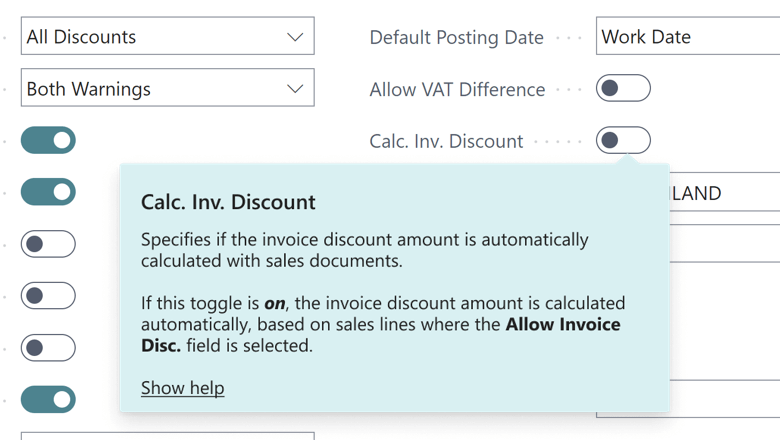
Modern tooltip UI for great user assistance: easy to read, easy to understand.

My Opinion

The tooltips in Dynamics BC are already pretty good, but improving them further is something that I welcome as they can be a great resource for users to understand better the fields on the page.

New Functionality In Microsoft Dynamics 365 Business Central 2023 Wave 1

New Functionality In Microsoft Dynamics 365 Business Central 2023 Wave 1
Use Business Events To Notify And Trigger External Systems
Get Started With More Sample Power Automate Templates And Power Apps
New Approval Workflow Experience With Power Automate Templates
Support Dynamic Environment And Company In Power Platform Connector
Remove Modification Limits For Triggering Flows
Use Power Automate To Post Adaptive Card Or Link To Business Central Record
Adjust Exchange Rates Easily, Replace The Built-In Batch Job
Use Different General Ledger Accounts For Payables, Receivables
Avoid Document Number Errors When You Post Item Journals
Company Hub Now Lets Admins Add User-Specific Settings
Define Content Of Created Warehouse Documents With Filters
Intercompany Posting Setup Supports More Transaction Types And Streamlines Flows
Preview Item Journals Before Posting
Review General Ledger Accounts Faster
Set Up And Sync Master Data Across Companies
Ship And Receive Non-Inventory Items On Warehouse Documents
Shopify Connector Becomes Extensible
Synchronize Returns, Refunds From Shopify
Undo Transfer Shipments
Swedish Localization Delivered As Extension
Supporting More Countries And Regions
AL Explorer And AL Home In Visual Studio Code AL Extension
Attach AL Debugger To Active Session Or Next Session
Improved Compiler Resource Handling And Faster Code Analyzers
Optimized Runtime Package Generation For Sharing
Provide Title And Custom Actions To Error Dialogs
Control Database Locking Behaviour
AL-Go For Github – Modern Devops For Partners
ISVs Can Organize A Preview For Their Appsource Apps
Experience Improved App Management Settings
Get An Improved Cloud Migration Status Overview
Include Or Exclude Tables From Cloud Migration
Transfer Environments Between Azure Ad Tenants
Non-Deductible, Partly Deductible Vat Expands Functionality
Audit File Export Eases Saf-T Compliance
Easily Find And Install Payroll Apps From Within Business Central
Modern Tooltips Are Easy To Read And Understand
Refresh Of Content To Support Modern Tooltip UI

Read original post New Functionality In Microsoft Dynamics 365 Business Central 2023 Wave 1: Modern Tooltips Are Easy To Read And Understand at azurecurve|Ramblings of an IT Professional


This was originally posted here.

Comments

*This post is locked for comments