




 1,614
1,614 Like
Like Share
Share
 Report
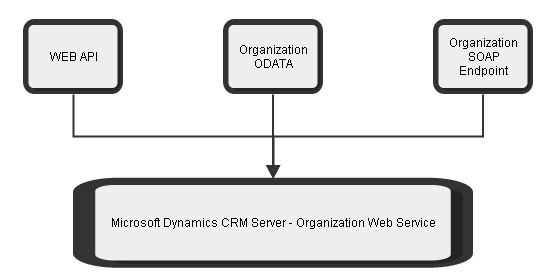
Every action in Microsoft Dynamics CRM subscribes to an event. Every action perform on CRM client are handled by Organization web service, which is part of CRM server. There are ways to extract data from dynamics CRM. Example
1. Web API
2. Organization Data Services (Deprecated in 2016)
3. Organization Service - SOAP endpoints
Each of these methods are wrapper to fetch CRM data which internally linked to the CRM server organization web service.
When any event is raised in CRM system, Server generates Organization web service request message which is then passed to series of stages. Stage 10 Pre-Validation, stage 20 Pre-Operation and stage 40 Post-Operation are only available for the Plug-in registration.
Any WEB API HTTP request to update a property of an entity will be internally catered by Organization web service.
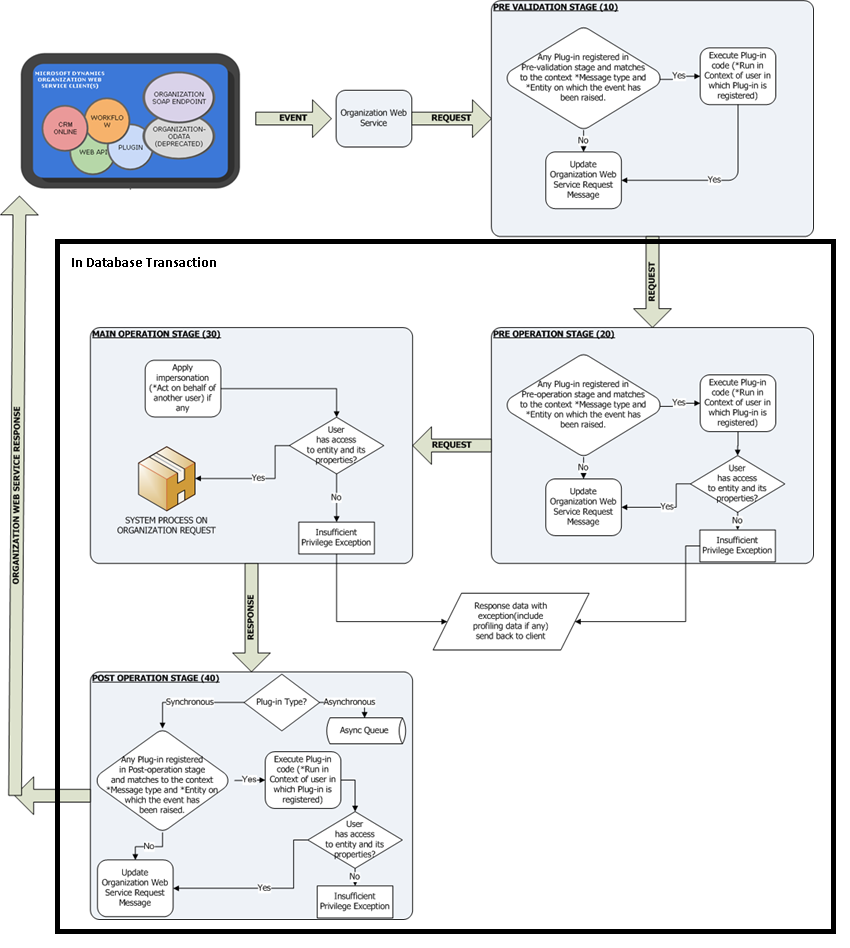
In the above flow, organization request passes from stage 10 to stage 40, each of the stage has significance and can update the organization message accordingly.
Stage 10: Pre-Validation: Use this stage when to perform any task prior to any security check. An example, transaction amount should be greater than $500. If user has entered any value in transaction amount field which is less than expected value then the whole execution process should be aborted. Also Stage 10 is not part of database transaction, any create, update or delete operation perform on any entity will not roll back in case any exception raised in stage 20, 30 and 40.
Stage 20: Pre-Operation: Use this stage when you want to perform any operation before the main operation in database transaction. An example, you want to log some analytic data in custom entity before main operation performs. However you want any exception in Main operation will also roll-back custom entity record.
Plug-in code in pre-operation runs under the security context of the user (Calling, Adminstrator, System etc). In case user does not have permission on entity, properties or entity images, then the process will be aborted and exception will thrown by system.
Stage 30: Main Operation: You cannot register Plugins in this stage, this is reserved for system core operation. Main operation executes in the context of impersonated user. In case impersonated user doesn't have sufficient privileges, the core system operation will be aborted and exception will be thrown.
On successful execution, an organization response message will be generated and passed to the next stage.
Stage 40: Use this stage when to perfom any operation after the main operation. An example, whenever an account is created it must be assigned to some agent. So account has been created in stage 30, and response message will be having GUID value populated in ID field. You can use this id value and assign it to some agent.
*Stage 20, 30 and 40 executes in database transaction. Any exception in either of stage will roll-back the whole transaction i.e. error in stage 40 will roll back stage 30 and stage 20 operations. However any operation performed in stage 10 will not roll back.
The final response message is send back to the client.
1. Web API
2. Organization Data Services (Deprecated in 2016)
3. Organization Service - SOAP endpoints
Each of these methods are wrapper to fetch CRM data which internally linked to the CRM server organization web service.
When any event is raised in CRM system, Server generates Organization web service request message which is then passed to series of stages. Stage 10 Pre-Validation, stage 20 Pre-Operation and stage 40 Post-Operation are only available for the Plug-in registration.
Any WEB API HTTP request to update a property of an entity will be internally catered by Organization web service.
In the above flow, organization request passes from stage 10 to stage 40, each of the stage has significance and can update the organization message accordingly.
Stage 10: Pre-Validation: Use this stage when to perform any task prior to any security check. An example, transaction amount should be greater than $500. If user has entered any value in transaction amount field which is less than expected value then the whole execution process should be aborted. Also Stage 10 is not part of database transaction, any create, update or delete operation perform on any entity will not roll back in case any exception raised in stage 20, 30 and 40.
Stage 20: Pre-Operation: Use this stage when you want to perform any operation before the main operation in database transaction. An example, you want to log some analytic data in custom entity before main operation performs. However you want any exception in Main operation will also roll-back custom entity record.
Plug-in code in pre-operation runs under the security context of the user (Calling, Adminstrator, System etc). In case user does not have permission on entity, properties or entity images, then the process will be aborted and exception will thrown by system.
Stage 30: Main Operation: You cannot register Plugins in this stage, this is reserved for system core operation. Main operation executes in the context of impersonated user. In case impersonated user doesn't have sufficient privileges, the core system operation will be aborted and exception will be thrown.
On successful execution, an organization response message will be generated and passed to the next stage.
Stage 40: Use this stage when to perfom any operation after the main operation. An example, whenever an account is created it must be assigned to some agent. So account has been created in stage 30, and response message will be having GUID value populated in ID field. You can use this id value and assign it to some agent.
*Stage 20, 30 and 40 executes in database transaction. Any exception in either of stage will roll-back the whole transaction i.e. error in stage 40 will roll back stage 30 and stage 20 operations. However any operation performed in stage 10 will not roll back.
The final response message is send back to the client.
*This post is locked for comments