




 Like
Like Share
Share
 Report
If you use automatic record creation and update rules in Dynamics 365/CDS to create cases automatically from emails, you should know the default behavior is to set the Customer field on the case to the parent company of the email sender and set the contact field to the email sender.
This is great for many companies, but in some cases, you want the customer to be set to the sender of the email, such as when service is provided to individuals, not their company/employer.
If you want to change the default behavior, when you create the record creation and update details, on the case form you will notice that the customer field is mapped to {null(Channel Properties)}
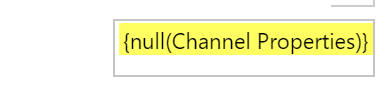
Remove the field mapping and using the form assistant, set the value of the customer field to the sender of the email.
Thanks Brandi Bozek for the tip. Got a tip? Send it to jar@crmtipoftheday.com.
Cover photo by Roman Arkhipov
*This post is locked for comments