




 401
401 Like
Like Share
Share
 Report
Previously, an entry with a type of Reversing Variable or Reversing Fixed would automatically reverse on the next day from posting, so a reversing journal entry on 31/01/2022 would reverse on 01/02/2022. Please refer to the screenshots below.
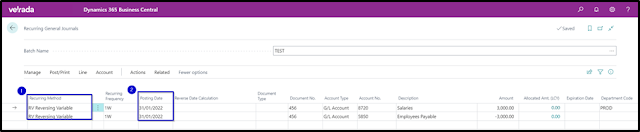

Business Central now allows the user to specify a calculation date for the reversal of an entry. Add the column field called Reverse Date Calculation on the Recurring General Journals page.


Note: If you cannot see Reverse Date Calculation field on your screen, please use Personalization to add it.


Hope you find it interesting.
#businesscentral #msdyn365bc #erponsulting #technologythesedays #microsoft #dynamics365businesscetral #copygeneraljournals #recurringgeneraljournals #reversedjournals
*This post is locked for comments