




 14,671
 Like
Like Share
Share
 Report
Purchase Agreements — What new in Dynamics 365 Supply Chain Management 10.0.6 release
As part of the recent release, there are two small features that Microsoft released related to Trade agreements:
1. Purchase agreement responsible party
2. Purchase agreement closed status
Both features are controlled by Feature management:
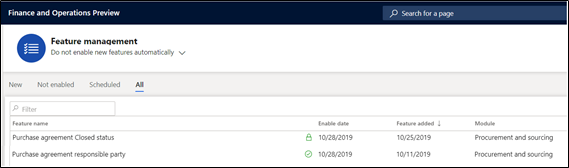
While “Purchase agreement responsible party” can be turned on and off, “Purchase agreement closed status” feature once turned on, can’t be turned off. This information is displayed to user in different ways (Notice the lock sign in screenshot above). See below from the Feature management details tab.

We tried to explore these new features and first issue was that we couldn’t find how to enable the feature, neither found it on “All” tab or “New” tab. In pursuit, found the feature on “Not enabled” tab and enabled the feature. To enable, there is a button at the right side of the bottom of the page.

We enabled both features successfully, now that we have enabled both features, let’s review them one by one and how can they be used.
Purchase agreement responsible party
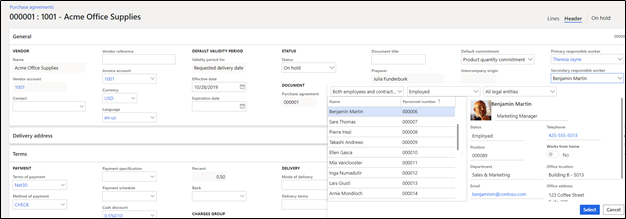
Often times, we need to define on a document who is the main contact for the document, this detail was missing from Purchase agreement so far, with latest release, the GAP has been filled by adding two fields on purchase agreement header (Fields are not visible on list page).
1. Primary responsible worker
2. Secondary responsible worker

The drop down in both fields are Employees and Workers. See detail below when employees have been populated on these fields.
Now that these fields have been populated, they can be used on different reports that are available out of the box.
Purchase agreement closed status
As part of recent release, a new option “Closed” is displayed in the drop down.
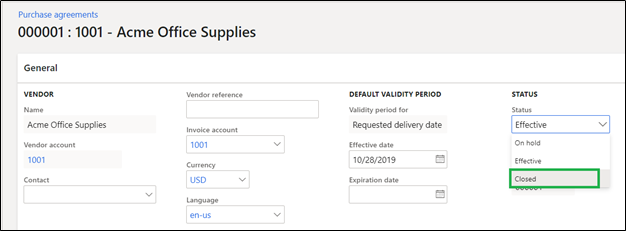
The value seems to be available in the drop down irrespective of turning on the feature. If the feature is not turned on and user try to select closed value, user is displayed with message “This value can only be selected when the Purchase agreement Closed status feature is enabled in Feature management.”
When the purchase agreement is set to “Closed”, it impacts some of the functionalities:
1. Purchase agreement can no longer be released to create a new purchase order.
2. Purchase agreement Pro forma confirmations can’t be done.
3. Purchase agreement confirmations can’t be done.
The closed status is temporary in nature and at this point can be flipped to another status (On-hold, effective). However this feature will allow users to track which purchase agreements are actually closed.
It would be interesting to see if product team make additional enhancement on this recently released feature and start to drive functionalities around these.
*This post is locked for comments