




 3,100
3,100 Like
Like Share
Share
 Report
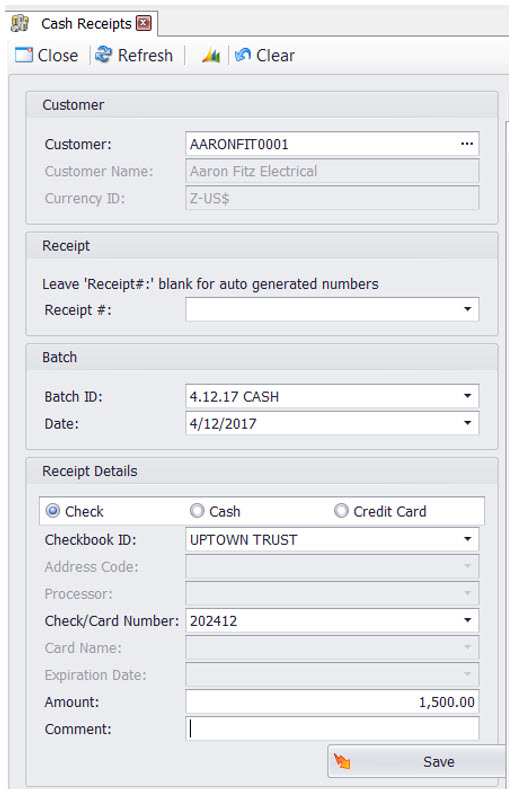
In the past, most Accounts Receivables (A/R) transactions needed to be done by Dynamics GP users. However, SalesPad has been adding functionality into the Desktop product; part of which includes creating Cash Receipt transactions.
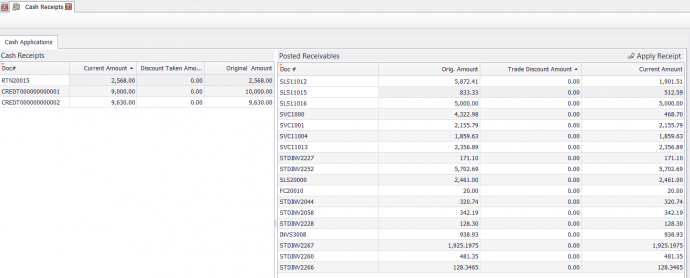
SalesPad Cash Receipts allows you to create the same transactions you would create in Dynamics GP. When the new cash receipt has been saved it is added to the list of receipts and can then be applied to open A/R transactions.
 There are a couple of important notes to keep in mind:
- The cash receipt still needs to be posted in Dynamics GP.
- You can apply transactions, you cannot currently un-apply them.
This new features gives companies using Microsoft Dynamics GP and SalesPad more flexibility and allows more options for completing A/R transactions.
For more Microsoft Dynamics GP and SalesPad tips visit https://www.calszone.com/tips and sign up for our e-newsletter.
CAL Business Solutions is a Connecticut based Microsoft Dynamics GP & Acumatica Partner specializing in SalesPad for the distribution industry. If you are a distribution company that is evaluating ERP software contact us at 860-485-0910 or sales@calszone.com.
By CAL Business Solutions, www.calszone.com

The post SalesPad Tip: Creating Cash Receipts appeared first on CAL Business Solutions-Acumatica-Microsoft Dynamics GP-ERP Partner.
*This post is locked for comments