




 707
707 Like
Like Share
Share
 Report
Today I will demonstrate a short piece of code that will help you to fetch sales Tax value from a Purchase order .
We often get such requirements like show sales Tax amount, percentage and other tax information on SSR Reports. This kind of information is usually found on the Sales tax transactions (image below) and are stored on tmpTaxWorkTrans table.

The code below is used to initialize the temporary table tmpTaxWorkTrans on buffer, making available most, if not all, tax information of a purchase order.
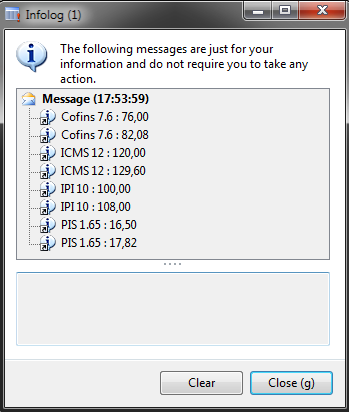
On the example below I want to show all taxes and tax value of purchase order BRMF-000012.
1. Create a new Job.
2. Paste the following code:
static void calculateTax(Args _args)
{
    TmpTaxWorkTrans             tmpTax;
    PurchTable                  purchTable;
    PurchTotals                 purchTotals;
    ;

    purchTable  = PurchTable::find( 'BRMF-000012');
    purchTotals = purchTotals::newPurchTable(purchTable);

    // Calculate Tax
    purchTotals.calc();

    // Load tmpTaxWorkTrans
    tmpTax.setTmpData(purchTotals.tax().tmpTaxWorkTrans());

    // Showing taxes with tax value
    while
        select tmpTax
    {
        info( strFmt('%1 : %2' , tmpTax.TaxCode, tmpTax.TaxAmount));
    }
}
Results:


*This post is locked for comments