




 385
385 Like
Like Share
Share
 Report
If you’re like me, you use OneNote for everything from grocery lists to taking notes when meeting with customers. So you can only imagine my excitement when Microsoft announced that we can now upload OneNote notes to CRM. Once in CRM a user can link them to a customer, opportunity, case, record or whatever you choose. The OneNote and Dynamics CRM integration is one of the new features included in CRM Online Update 1 (“Carina”), which is already available.
Here’s a quick rundown of some of the benefits you can expect:
- HTML support and enriched text anywhere you are
- Quick To Do task list creation
- Voice and video note integration
- Easily organize your notes
- Take pictures of business cards and documents
- Real-time collaboration
- Copy-paste from Excel, Word, etc.
- Draw over your notes
- Spellcheck
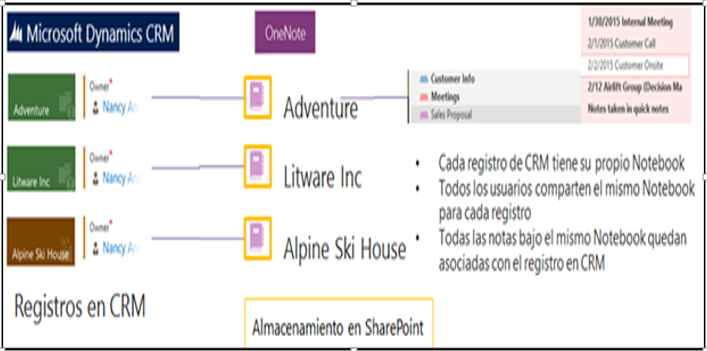
Notebooks are created using SharePoint Integration, so that means that the entities must be enabled for both document management and OneNote. By default these entities include: Account, Article, Lead, Opportunity, Product, Quote, and Sales Literature.
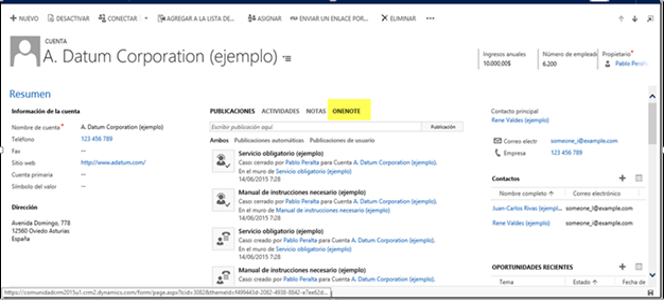
What’s the difference between CRM Notes and OneNote Integration?
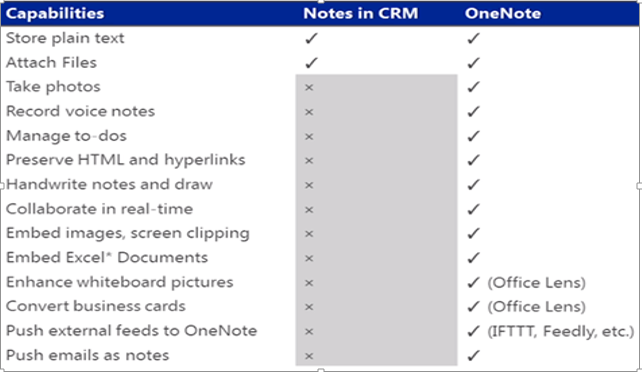
This integration doesn’t replace the current Notes feature, but gives users another way to access notes stored in OneNote. Let’s take a look at the differences between using out-of-the-box Notes in CRM vs. using OneNote. The chart below provides a great overview. You’ll see a mention of Office Lens. You definitely have to check out this new document scanner and whiteboard image enhancement App available for Windows, iOS and Android devices.
Here are a few additional details to keep in mind:
- Record VoiceNotes: Why implement from scratch when OneNote already does this, and a allows you to share those notes with others
- With Office Lens: You can take a picture of those cards, quickly export them to OneNote and, using OneNote’s “Copy Text from Picture” functionality, quickly convert the information into text to use to create contacts
Want to learn more about OneNote and Dynamics CRM integration? Contact Alta Vista Technology today.
The post OneNote and CRM… Wait What? appeared first on Alta Vista Technology.
*This post is locked for comments