




 11,325
 Like
Like Share
Share
 Report
Hi,
We were showing a custom SSRS report inside an iframe in one of our CRM 2011 Dashboards. We wanted to hide the Tool Bar from the report.
To achieve that we need to pass the &rc:Toolbar=false parameter to our report’s URL, which we set for the IFrame.
http://localhost/ReportServer/Pages/ReportViewer.aspx?%2fCIBPhaseIIAnD_MSCRM%2fBEA&rs:Command=Render&rc:Toolbar=false
This hides the tool bar.

Now in one of our other SSRS reports, we were doing filtering based on a report parameter. So we wanted to show only the Parameter toolbar to appear and hide the other toolbar that shows Export, Zoom, Print etc. option.
To do so we first figured out the CSS class being used for it,

this turned out to be ToolBarButtonsCell
Now what we did next was to create a simple CSS file with the following content to hide the tool bar
.ToolBarButtonsCell{display: none;}
And placed that file at the following location of the server
C:\Program Files\Microsoft SQL Server\MSRS10.MSSQLSERVER\Reporting Services\ReportServer\Styles
Now next we had to use the rc:stylesheet parameter for our report’s URL and pass the name of the above CSS file just created ( for e.g. hideToolBar.css)
So our new URL was like this
http://localhost/ReportServer/Pages/ReportViewer.aspx?%2fCIBPhaseIIAnD_MSCRM%2fBEA&rs:Command=Render&rc:stylesheet=hideToolBar
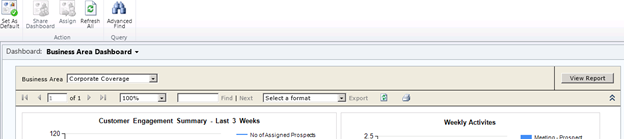
After applying the new style sheet parameter to the report’s URL

Check out the following link
http://msdn.microsoft.com/en-us/library/ms152835.aspx (URL Access Parameter Reference)
Hope it helps.
Filed under: CRM 2011, SqlServer Reporting Services, SSRS Tagged: CRM 2011, CRM SQL Reporting Services, Microsoft Dynamics CRM, SSRS


*This post is locked for comments