




 Like
Like Share
Share
 Report
A client was trying to test some Dynamics GP AddIns on their server, but when they copied the DLL files to the AddIns folder, they could no longer launch GP. It would crash immediately.
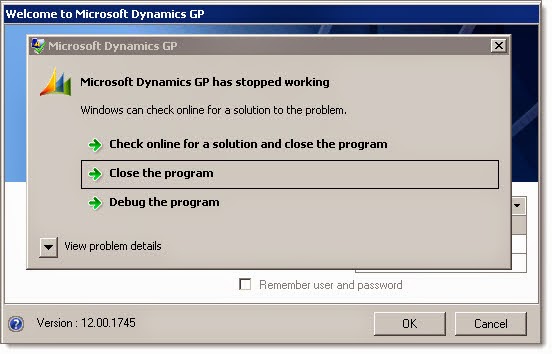
When we clicked on View problem details, it displayed a rather convoluted and generally meaningless pile of technical error information.
The only thing that seemed recognizable was this detail:

Problem Signature 09: System.IO.FileLoadException
So presumably GP or the AddIn couldn't load a file. While a clue, it doesn't narrow things down very much. Is that due to a missing dependency? Permission issue? .NET version issue? x64 vs. x86 issue?
After some searching, I found a GP forum post where another user had the same problem. A very astute forum reader pointed me to Patrick Roth's blog post where he describes the general problem, but he doesn't mention the System.IO.FileLoadException detail.
http://blogs.msdn.com/b/developingfordynamicsgp/archive/2014/02/07/dynamics-gp-crashes-after-installing-addin.aspx
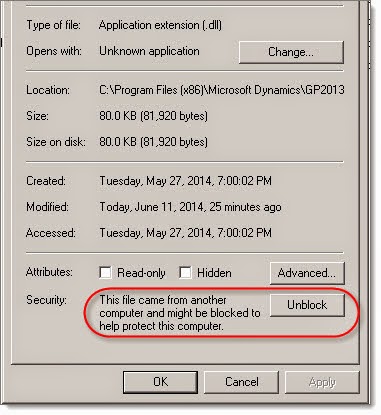
Patrick explains that he finally tracked the problem to the Windows security feature that automatically blocks certain files when they are downloaded from another source. I don't know the proper name for this annoying feature, but I call it "Block" / "Unblock".
When an EXE or DLL is downloaded, particularly using a web browser, Windows blocks access to the file until you go unblock it. In the case of DLLs, it seems the only way to do this is to go into the file Properties and click on Unblock.
This feature is insidious for software developers who have to distribute EXE and DLL files. When the file is blocked, it is done at such a low level that you have very little information to track down the problem. And with the growing use of services like OneDrive, DropBox, Box, etc., I speculate that downloaded customizations will run into this issue more frequently.
Anyway, many thanks to Patrick Roth for posting his observations, and for user Mary on the forums who pointed me in the right direction!
Steve Endow is a Dynamics GP Certified Trainer and Dynamics GP Certified IT Professional in Los Angeles. He is also the owner of Precipio Services, which provides Dynamics GP integrations, customizations, and automation solutions.
*This post is locked for comments