




 27,686
 Like
Like Share
Share
 Report
We all know when field is set to read-only on the form it won’t be saved until we set SumbitMode = “always” . For example if you populate value of the field2 ( Read-only) based on field1 on the form using Business rule when you save the record, field2 value won’t be saved as it’s a read-only field on the form.
To fix this issue add field2 to the form one more time with “Show by dafault” unchecked and as read-write.
Basically we have Field2 twice in the form , one field set to read-only ( Field Read-only checked) and “Visible by default” checked . Other one is read-write ( Field Read-only Unchecked) and “Visible by default” unchecked ( not visible in the form). When we populate Field2 value using Business rule it sets the Value on both the instance of the field2. As one instance of the field is read-write, system automatically saves the field value.
1. Field “Test1″ added twice in the form, one is read-only and set “Visible by Default” checked , other one set to Read-write and “Visible by default ” unchecked

2. Business Rule to Update Test1″ field value whenever email changes.

3.Form when you create new record or existing record
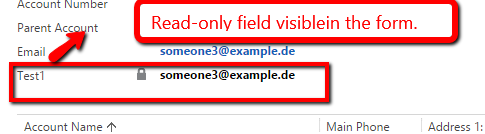
4. Field “Test1″ value saved even though it set to read-only on the form.


*This post is locked for comments