




 45,095
 Like
Like Share
Share
 Report
Associate and disassociate request is used to link and unlink records having relationship. We can link and unlink records depending on their relationship type for example, We can link records having 1:N using update request (setting lookup). In our earlier sample we demonstrated how we can update lookup field using Web API. In this post we are going to discuss associating and disassociating N:N relationship.
Let’s say we have a custom entity called Building and which is related to account using N:N relationship, so a single account can be related to multiple buildings, similarly single building can be related to multiple accounts.

So if we need to associate account record with building entity record, we can write POST request using following syntax:
[OrganizationURL]+"/api/data/v8.0/accounts(0370F447-C9B2-E511-80DF-3863BB35DED8)/him_building_account/$ref"
Where him_building_account is the name of the relationship, we can check it by opening N:N relationship record:
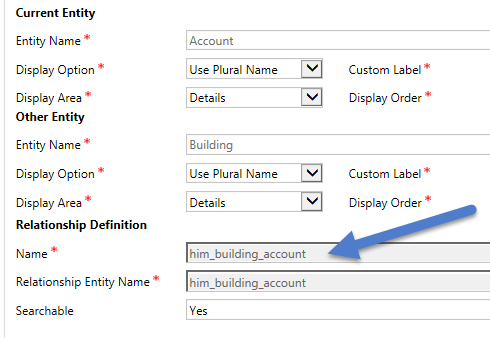
We can use following code in our java script web resource for associate request:
function associateRequest(accountID, buildingID) {
    var associate = {
        "@odata.id": serverURL + "/api/data/v8.0/him_buildings(" + buildingID + ")"
    };
    var serverURL = Xrm.Page.context.getClientUrl();
    var req = new XMLHttpRequest();
    req.open("POST", serverURL + "/api/data/v8.0/accounts(" + accountID + ")/him_building_account/$ref", true);
    req.setRequestHeader("Accept", "application/json");
    req.setRequestHeader("Content-Type", "application/json; charset=utf-8");
    req.setRequestHeader("OData-MaxVersion", "4.0");
    req.setRequestHeader("OData-Version", "4.0");
    req.onreadystatechange = function() {
        if (this.readyState == 4 /* complete */ ) {
            req.onreadystatechange = null;
            if (this.status == 204) {
                alert('Record Associated');
            } else {
                var error = JSON.parse(this.response).error;
                alert(error.message);
            }
        }
    };
    req.send(associate);
}
And to disassociate records we can write following request using DELETE method:
function disassociateRequest(accountID, buildingID) {

    var serverURL = Xrm.Page.context.getClientUrl();
    var req = new XMLHttpRequest();
    req.open("DELETE",serverURL+"/api/data/v8.0/accounts("+accountID+")/him_building_account/$ref?$id="+serverURL+"/api/data/v8.0/him_buildings("+buildingID+")", true);
    req.setRequestHeader("Accept", "application/json");
    req.setRequestHeader("Content-Type", "application/json; charset=utf-8");
    req.setRequestHeader("OData-MaxVersion", "4.0");
    req.setRequestHeader("OData-Version", "4.0");
    req.onreadystatechange = function() {
        if (this.readyState == 4 /* complete */ ) {
            req.onreadystatechange = null;
            if (this.status == 204) {
                alert('Record Disassociated');
            } else {
                var error = JSON.parse(this.response).error;
                alert(error.message);
            }
        }
    };
    req.send();
}
Note: You can get complete system and custom entity reference for Web API using
[Organizaiton URL] + “/api/data/v8.0/
Stay tuned for more Web API Samples !!
Follow @HimbapinfoHIMBAP | Need any help in Microsoft CRM Contact US
*This post is locked for comments