




 Like
Like Share
Share
 Report
In Dynamics 365 for Finance and Operations we have to deploy changes to environments by creating deployable packages and installing these via Lifecycle Services (LCS). This usually works pretty well, but sometimes it can fail.
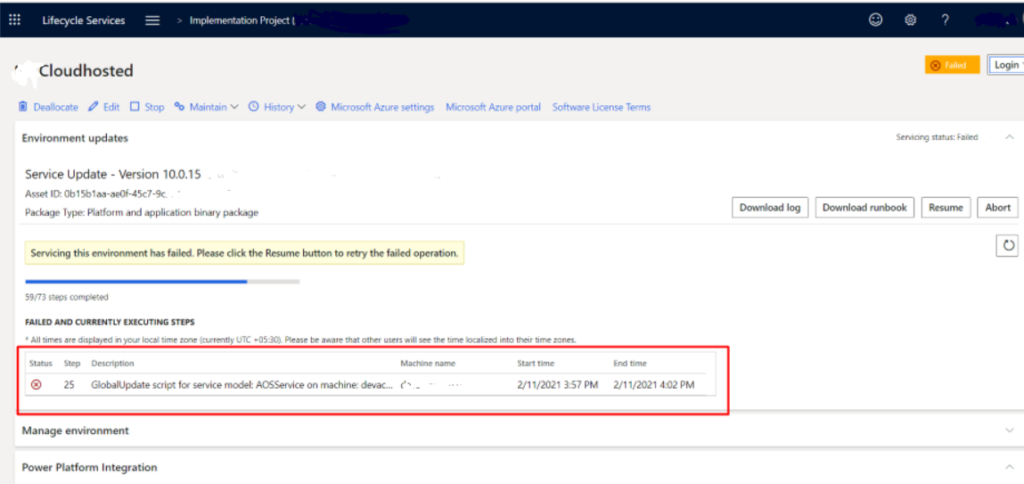
While doing environment update and getting error in Step 25.
Database Sync error.
You can resolve this issue by performing below steps:
Open environment VM, Inside VM locate the below path.
Locating DBSync
DbSync (syncEngine.exe) will typically be located in the following directory under the service volume: \AosService\PackagesLocalDirectory\bin
Open Cmd in administartor mode and Run Command:
Running DBSync
Below is the template for the command to run a Full Sync.
[ServiceDriveLetter]:\AOSService\PackagesLocalDirectory\bin\syncengine.exe -syncmode=”fullall” -metadatabinaries=”[ServiceDriveLetter]:\AOSService\PackagesLocalDirectory” -connect=”Data Source=[Servername];Initial Catalog=[DatabaseName];Integrated Security=False;User ID=[];Password=[]” -verbosity=”Diagnostic” > DbSync.log 2> DbSync.err
Replaced with below details:
[ServiceDriveLetter] = G
[ServerName] = customerServer
[DatabaseName] = customerAxDb
[UserName] = ________ // Typically: axdbadmin
[Password] = ________
After run this command, go to below path.

Open DBSync file, you will see the Output of the DBSync.
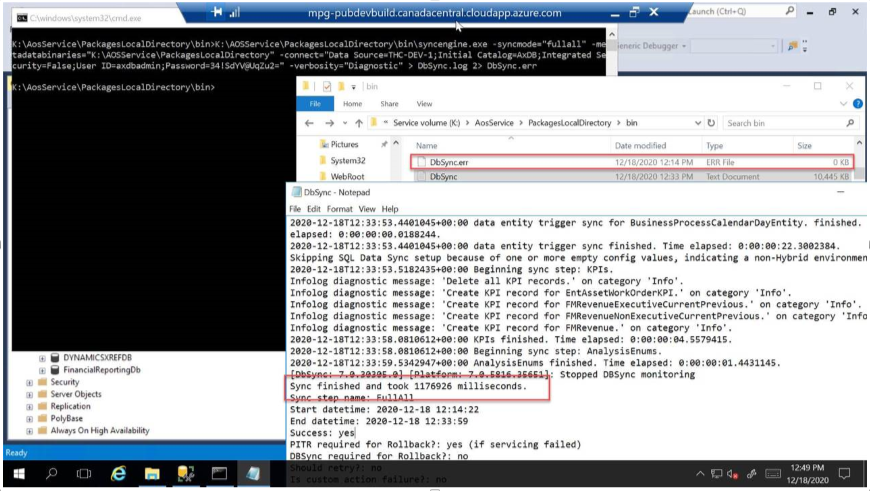
Once it’s successfully Sync. Retry the deployment then this issue will resolve.
Hope this help!!
The post Deployment failed In LCS Because Of DB Sync error appeared first on Cloudfronts - Microsoft Dynamics 365 | Power BI | Azure.
*This post is locked for comments