




 14,419
 Like
Like Share
Share
 Report
Hi all,
In Previous post related to ODATA we saw how to publish and consume a Odata Web Services from NAV 2013 & 2013 R2.
For Articles Related to ODATA & web services posted before today please Refer Label Web Services.
Today we will see how to Using FlowFilters in OData URIs.
The Example shown below is from NAV 2013 R2 and using a Page web Service. The Steps remain same for Query Web Services and in NAV 2013.
In this procedure, we will create and publish a web service from the Item Card page in Microsoft Dynamics NAV and then query the data in that web service by using a FlowFilter.
How to Publish a Web Service?
The Service Should of Type Page with ID 30 and Web Service Name as MyItems.
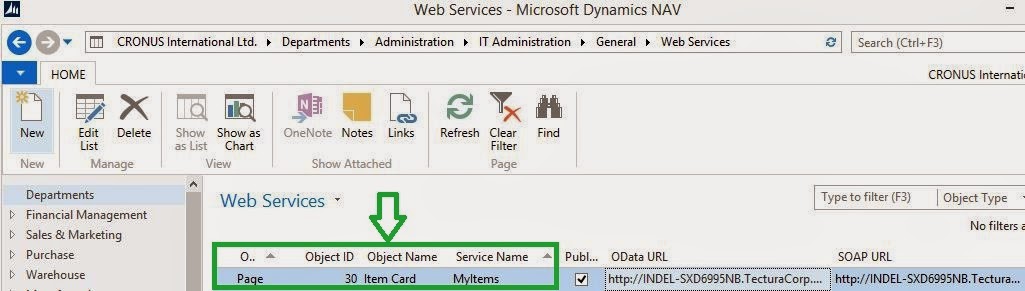
Now Let's Check the Metdata of the Created Service (As discussed in earlier Post).
http://<Server>:<WebServicePort>/<ServerInstance>/OData/$metadata
In My Case the URL is -
http://INDEL-SXD6995NB.TecturaCorp.net:6514/PersonalDB/OData/Company('CRONUS%20International%20Ltd.')/MyItems
http://localhost:6514/PersonalDB/OData/$metadata
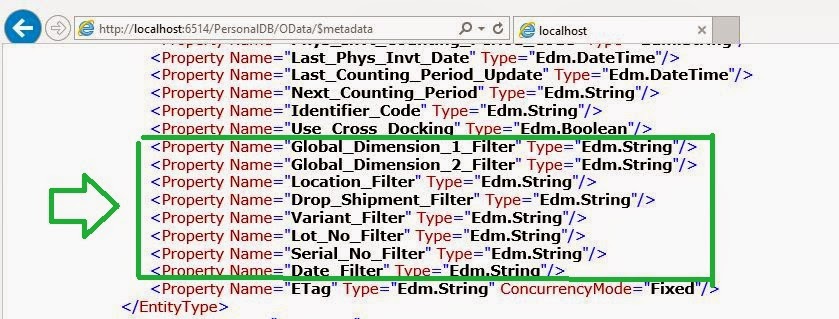
Below is the ScreenShot of My Page WebService Metadata.

Navigate to End of the Browser Page, you will find that end in the word Filter, as shown below.
Create a URI that returns information for a single item card. For example:
http://localhost:6514/PersonalDB/OData/Company('CRONUS%20International%20Ltd.')/MyItems('1906-S')
And Output is Something Like as shown below. Just Check Value of Qty_on_Sales_Order.
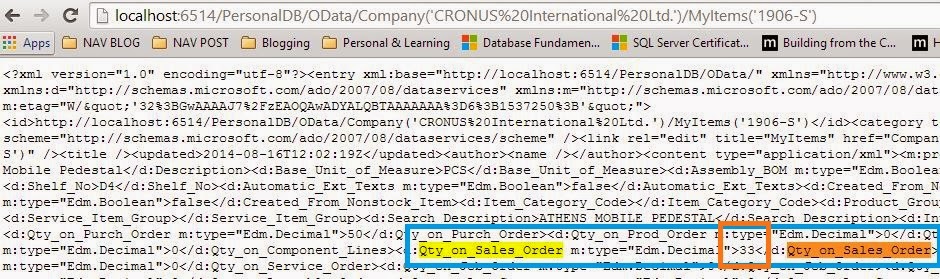
Apply a FlowFilter to that item and specify GREEN as the value for the Location_Filter:
http://localhost:6514/PersonalDB/OData/Company('CRONUS%20International%20Ltd.')/MyItems('1906-S')?$filter=Location_Filter eq 'GREEN'
And Output is Something Like as shown below. Just Check Value of Qty_on_Sales_Order.

For Just for Verification Purpose Let's Check same Item In Navision.

That Completes the task of this post. In Next Post we will see something more about ODATA.
Regards,
Saurav Dhyani
saurav-nav.blogspot.com
In Previous post related to ODATA we saw how to publish and consume a Odata Web Services from NAV 2013 & 2013 R2.
For Articles Related to ODATA & web services posted before today please Refer Label Web Services.
Today we will see how to Using FlowFilters in OData URIs.
The Example shown below is from NAV 2013 R2 and using a Page web Service. The Steps remain same for Query Web Services and in NAV 2013.
In this procedure, we will create and publish a web service from the Item Card page in Microsoft Dynamics NAV and then query the data in that web service by using a FlowFilter.
How to Publish a Web Service?
The Service Should of Type Page with ID 30 and Web Service Name as MyItems.
Now Let's Check the Metdata of the Created Service (As discussed in earlier Post).
http://<Server>:<WebServicePort>/<ServerInstance>/OData/$metadata
In My Case the URL is -
http://INDEL-SXD6995NB.TecturaCorp.net:6514/PersonalDB/OData/Company('CRONUS%20International%20Ltd.')/MyItems
http://localhost:6514/PersonalDB/OData/$metadata
Below is the ScreenShot of My Page WebService Metadata.
Navigate to End of the Browser Page, you will find that end in the word Filter, as shown below.
Create a URI that returns information for a single item card. For example:
http://localhost:6514/PersonalDB/OData/Company('CRONUS%20International%20Ltd.')/MyItems('1906-S')
And Output is Something Like as shown below. Just Check Value of Qty_on_Sales_Order.
Apply a FlowFilter to that item and specify GREEN as the value for the Location_Filter:
http://localhost:6514/PersonalDB/OData/Company('CRONUS%20International%20Ltd.')/MyItems('1906-S')?$filter=Location_Filter eq 'GREEN'
And Output is Something Like as shown below. Just Check Value of Qty_on_Sales_Order.
For Just for Verification Purpose Let's Check same Item In Navision.
That Completes the task of this post. In Next Post we will see something more about ODATA.
Regards,
Saurav Dhyani
saurav-nav.blogspot.com
*This post is locked for comments