





Client Management in Business Central using AL Code
Views (586)
 Olister Rumao
 3,967
3,967
 Like
Like Share
Share
 Report
Introduction:
Have you ever got into a requirement, where you are needed to actually execute the logic separately for different client types?
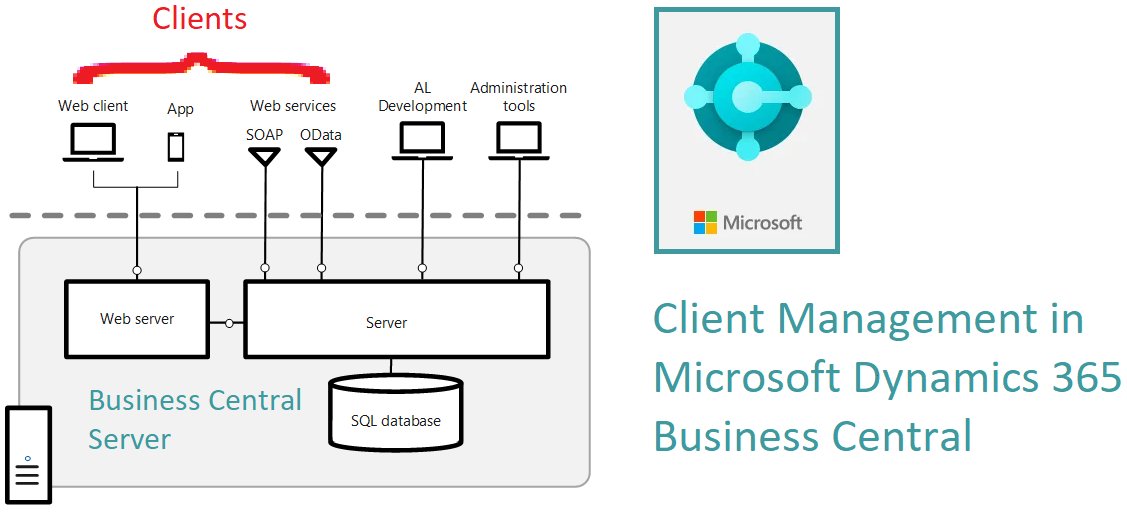
Well, this blog is just going to discuss the ClientType DataType and different ways of getting ClientTypes and how to use it in your code.
Pre-requisites:
- Microsoft Dynamics Business Central Online
- AL Language Extension
- VS Code
References:
- https://docs.microsoft.com/en-us/dynamics365/business-central/dev-itpro/developer/methods-auto/session/session-currentclienttype-method
- https://docs.microsoft.com/en-us/dynamics365/business-central/dev-itpro/developer/methods-auto/session/session-defaultclienttype-method
- https://docs.microsoft.com/en-us/dynamics365/business-central/dev-itpro/developer/methods-auto/clienttype/clienttype-option
Demonstration:
ClientType:
In order to understand how to use ClientTypes, we need to understand what ClientTypes represents.
ClientType is an Option based DataType introduced in Business Central. That is in order to get the value or use the value we need to simply use just like ClientType::<Option Value>
ClientType has the following OptionMembers:
| Member | Description |
|---|---|
| Background | A background client. |
| ChildSession | A child session client. |
| Desktop | A desktop client. |
| Management | A management client. |
| NAS | A NAS client. |
| OData | A NAS client. |
| Phone | Microsoft Dynamics Business Central Phone client. |
| SOAP | A SOAP client. |
| Tablet | Microsoft Dynamics Business Central Tablet client. |
| Web | Microsoft Dynamics Business Central Web client. |
| Windows | Microsoft Dynamics Business Central Windows client. |
| Current | Microsoft Dynamics Business Central Windows client. |
| Default | The default client. |
| ODataV4 | A ODataV4 client. |
| Api | An API client. |
Applying ClientType:
In this code, I will explain how to select a specific Client Type in AL Code.
There are two ways of selecting the Client Type.
1. Using Client Type Management Codeunit: The syntax will be
CU_ClientManagement.GetCurrentClientType
1. Using Client Type Management Codeunit: The syntax will be
CU_ClientManagement.GetCurrentClientType
2. Using CurrentClientType function: Just like using 'CurrentCompany' standard function, you can use the CurrentClientType function
trigger OnOpenPage();
var
CU_ClientManagement: Codeunit "Client Type Management";
ClientType_1 : ClientType;
begin
Clear(CU_ClientManagement);
If CU_ClientManagement.GetCurrentClientType() = ClientType_1::Api then begin
Message('API Client Type');
end;
If CurrentClientType = ClientType_1::Background then begin
Message('Background Client Type'); end;
end;
}
Conclusion:
In this blog, we covered what is ClientType DataType and how to use it to find what is the ClientType of the logged-in session.
I have personally discovered this datatype and found out the different ClientTypes that were added recently.
I hope this helps you get a clear understanding, implications, and how to apply it. :)
I have personally discovered this datatype and found out the different ClientTypes that were added recently.
I hope this helps you get a clear understanding, implications, and how to apply it. :)
*This post is locked for comments